Animation with CSS property “transition”

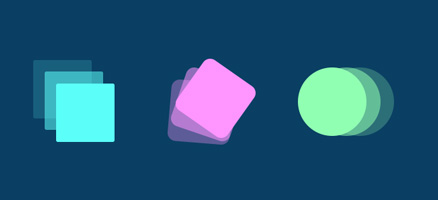
CSS Transitions is the simplest way to animate with CSS. A transition is used to soften the abrupt change in the value of a selected CSS property over a period of time by gradually changing the value of the CSS property. This mechanism is covered by four properties: transition-property (required), transition-duration (required), transition-timing-function (optional), and transition-delay (optional).

Categories CSS

An introduction to animation with CSS

How to perform animation with CSS CSS-driven animation arose out of a need for front-end developers to be able to define this interaction without using JavaScript or possibly outdated Flash. Two main properties enable animation from CSS: transition animation The “transitions” property is the simplest way to animate with CSS. A transition is used to … Read more

Categories CSS

Styling and positioning text in a container with CSS

The “overflow” property The overflow property is used to define the behavior of content that is larger than the container itself. This property is not only reserved for text styling but for all types of content, although it is often used for text. The following cases are possible: “visible” – content is visible even across … Read more

Categories CSS

Positioning content with CSS (the basics)

Introduction

Positioning content with CSS can be done in several ways, which property will be used depends on the specifics of the layout, and on the requirements for syntax support in browsers. The basic technique for positioning content is the position property. If the value of the property is: relative, absolute or fixed, additional properties are also available: top, right, bottom, left.
As one of the solutions for content positioning, the float property can be used, but the trend is to use this property as little as possible (that is, to use it only for “wrapping the text around the block”).
The technique that is recommended and supported by most recent browsers, involves using the CSS property “display:flex”. The “display:grid” property is considered to have great potential, but it will have to wait until all browsers adopt it in practice.

Read more

Categories CSS

Box model

Term and definition

box model

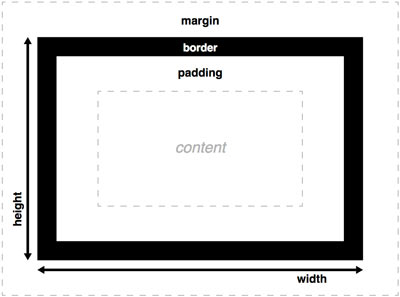
All HTML elements are boxes, including the span tag. A box as a concept in the front-end is different from the concept of a box in life.
Box dimensions according to W3C are obtained by addition
dimension of the following elements:

  • box content (it has its own height and width)
  • padding
  • border

The margin does not enter the size of the box, it separates the boxes. If the width of the box is not explicitly defined, then the box occupies 100% of the parent element.

To play with the box model and get the final size you can visit the page.

Read more

Categories CSS

CSS selectors

Selector types

CSS selectors are part of CSS syntax, which specify HTML elements to which CSS rules will be applied.

Universal selector

Universal selector is marked with a * (star), and its property is to select all elements. This selector is usually used when resetting styles.

Example

Defined with HTML element type

These are the simplest selectors and are defined by the name of the HTML element they target.

Example

or

Defined with element class

These selectors “target” HTML elements that contain a certain class.

Example

A selector that targets a class is marked with . (with a dot) in front of the class name.

Defined with element ID

These selectors “target” HTML elements that contain a specific ID. They are marked with a # sign in front of the ID name.

Example

A selector that targets an element with a specific ID is marked with a # sign in front of the ID.

Read more

Categories CSS

Installation of web development tools

Introduction

alati

This article serves as a reminder to a web developer to install all the necessary tools to work on a new or reinstalled computer. The installation of the tools that I personally use as well as some of their basic settings are described in detail. Web development covers a large number of different technologies and programming languages, therefore the list of required applications is also large.

Read more

CSS Selectors

Selector Types

CSS selectors are part of CSS syntax that determine which HTML elements CSS rules will be applied to.

Universal selector

The universal selector is denoted by * (asterisk), and its characteristic is that it selects all elements. This selector is commonly used when resetting styles.

Example

Defined by HTML element type

These are the simplest selectors and are defined by the name of the HTML element they target.

Example

or

Defined by element class

These selectors “target” HTML elements that contain a specific class.

Example

A selector that targets a class is denoted with . (dot) before the class name.

Defined by element ID

These selectors “target” HTML elements that contain a specific ID. They are denoted with the # sign before the ID name.

Example

A selector that targets an element with a specific ID is denoted with the # sign before the ID.

Read more