


Introduction
A mobile application is a program designed to run on a mobile device such as a mobile phone, tablet or wearable (smart watch…). Those applications have access to sensors and specific functionalities of the device (camera, gyroscope, vibration, etc.). Developing applications for mobile devices requires considering the characteristics of these devices and their limitations (they run on batteries and have weaker processors and less RAM than desktop computers). Developers also have to consider a wide range of: screen dimensions, hardware specifications and configurations of different devices. Most mobile devices have one of the following two operating systems: Android and IOS.
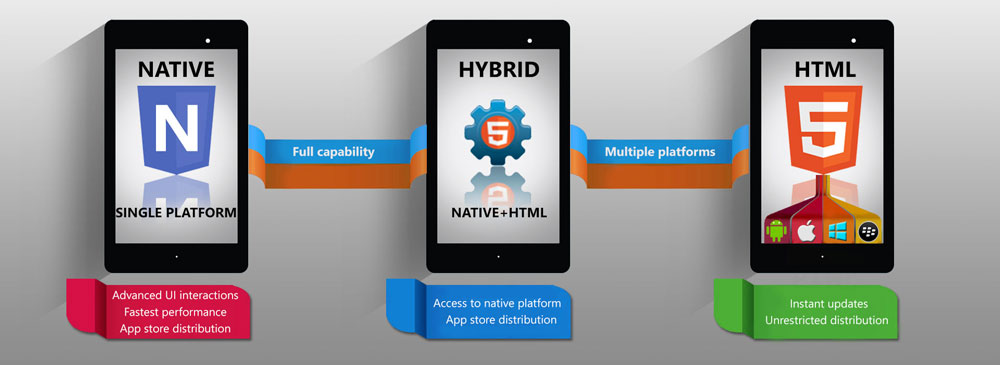
Different approaches to building mobile applications
Mobile apps are sometimes categorized depending on which approach was used to create the app, so we can divide mobile app development into the following groups:
- Original (native) mobile applications:
- iOS app development
- Android app development
- Quasi-native mobile apps:
- React Native
- NativeScript
- Xamarin
- Hybrid mobile applications
- Ionic + Android.js
- Quasar + Vue.js
- Framework7 + React.js
- Responsive web applications
Native mobile applications
A native application is a software program that has been developed for use on a specific platform or device. Because a native application is built only for use on a specific device and its operating system, it has the ability to make the most of device-specific hardware and software so that it can provide the best performance.
Native apps must be written in the appropriate programming language for each operating system, so iOS apps use Objective-C or Swift, while native Android apps are written in Java or Kotlin.
In order to develop “native mobile apps” on multiple different platforms, you need to have software engineers on your team for each operating system. In addition to the high (read “expensive”) dependence on a specific frame, it should be emphasized that the aggravating circumstance is that we cannot use and share the program code between different versions of the same application. The conclusion is that native applications have superior performance but also a high price.
Quasi native mobile apps

For the creation of quasi-native mobile applications, frameworks (ReactNative and NativeScript) are used, which are based on web concepts in the development of mobile applications. ReactNative and NativeScript use JavaScript, while Xamarin uses C# when developing these applications. The code written in this way is subsequently compiled into a native programming language (depending on the platform), and the result is something that works like a real native application.

This way of creating mobile apps allows us to create apps for iOS and Android at the same time (with the same code). Using this approach, we make great savings in time and production costs with minimum loss of performance. Currently, ReactNative, NativeScript and Xamarin say they have 100% native functionality support through their APIs. Xamarin is able to build for iOS, Android, Windows, MacOS and Linux, while ReactNative and NativeScript are limited to iOS and Android only.
It is known that apps created for the same purpose look a little different on iOS and Android platforms, because each platform follows its own guidelines. This fact is the biggest problem of quasi-native applications since the code is written once and used for both platforms. There is a case when the elements graphically match the guidelines of the specific platform, but their position on the screen does not match ie. screen position is different on different platforms.
Hybrid applications
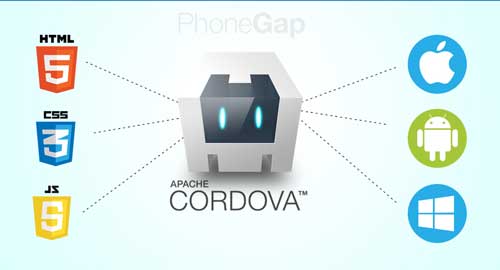
These are web applications that use classic web technologies (HTML, JavaScript, and CSS) and “Cordova” as a wrapper that gives them the ability to communicate with system components and compile them into applications available through the so-called webView (bare browser).
Similarly as with quasi-native applications, here we write the program code only once, and the other versions (for each of the desired platforms) are generated from that code. Such applications are called “hybrid”, because they are not purely native mobile applications (all rendering is done through the so-called “WebView” instead of the user interface platform), but they are also not purely Web-based (because they have access to the device’s native APIs and are prepared for distribution on the appropriate platform).
The problem with hybrid applications is that they do not have access to all system functions and have lower performance than native applications. This problem is expressed in older phones (especially on the Android platform before version 4.0) where the user interface renders slowly and chops occur when executing animations. Although currently the situation is better, mainly due to the significant processing power of current devices, and partly due to the tools used for the development and progress in the optimization of mobile operating systems. We should not ignore that by building hybrid applications we automatically inherit all the problems that come with programming on the web (different functionality support for different browsers…). Read more about this in the article “Introduction to Hybrid Mobile Applications”
Responsive web applications

Web applications can also be treated as mobile because theythey run on a mobile device but have the worst performance and lack many functionalities that applications created in one of the previously mentioned ways have. Web applications provide the so-called “application-like” experience where they are not installed locally but are available by running the application within the browser on the mobile device.
Progressive Web App
“Progressive Web App” can be considered a more advanced version of web applications, because they use service workers that work in the background of the application and act as intermediaries between the Internet and the application, so they are able to intercept network requests in the background. Progressive Web Apps (PWA) can run when the device is offline (using service workers), and have certain hardware access to the device (eg, device notifications) traditionally only available to native mobile apps. PWAs are always “up-to-date” thanks to the “service worker update process”. PWAs allow users to “save” the apps they find most useful on their home screen by creating a shortcut without using one of the app stores (GooglePlay, App Store).