



Algorithm for method selection when working with arrays
With the help of the following snippet written by Sarah Drasner, we arrive at the appropriate method using a simple algorithm:
See the Pen Array Explorer by Web programming (@chos) on CodePen.
Is the input a string?
The data type checking problem is based on the fact that when using the toString() method, the array is cast to the following string: “[object Array]”.
|
1 2 3 4 5 6 7 8 9 |
function isArray (input) { if (toString.call(input) === "[object Array]"){ return true; } else { return false; } }; console.log(isArray('some String')); // False console.log(isArray([1, 2, 4, 0])); // True |
Refining array elements
The following snippet shows a function that eliminates “unwanted” string members: null, “”, false, undefined, and NaN.
|
1 2 3 4 5 6 7 8 9 10 11 12 13 14 15 16 |
function preciscavanje(niz) { var index = -1, arrLength = niz ? niz.length : 0, resIndex = -1, result = []; while (++index < arrLength) { var value = niz[index]; if (value || value === 0) { result[++resIndex] = value; } } return result; } console.log(preciscavanje([NaN, 0, 15, false, -22, '',undefined, 47, null])); // Returns: [0, 15, -22, 47] |
Differences in two strings
The solution shown in the following snippet finds all members of an array that are not in both arrays.
|
1 2 3 4 5 6 7 8 9 10 11 12 13 14 15 16 17 18 19 |
function razlikaNizova (array1, array2) { var temp = []; array1 = array1.toString().split(',').map(Number); array2 = array2.toString().split(',').map(Number); for (var i in array1) { if(array2.indexOf(array1[i]) === -1) { // temp.push(array1[i]); } } for(i in array2) { if(array1.indexOf(array2[i]) === -1) { temp.push(array2[i]); } } return temp.sort((a,b) => a-b); } console.log(razlikaNizova([1, 2, 3], [100, 2, 1, 10])); // Returns: [3, 10, 100] |
Delete duplicate values in an array
a) Array of primitives
Casting an array into a temporary object (array values into object keys), then iterating through the object keys with the in operator:
|
1 2 3 4 5 6 7 8 9 10 11 12 13 14 15 16 17 |
function ukloniDuplikate(arr) { // Temporary object: var temp = {}; for ( var i = 0; i < arr.length; i++){ temp[arr[i]] = true; } // Checking if it exists in the temporary object: var r = []; for ( var k in temp){ r.push(k); } return r; } var niz = [ "Mika", 1, "Rale", "Pera", "Zika", 1, "Pera" ]; var bezDuplikata = ukloniDuplikate(niz); console.log(bezDuplikata); // Returns: [1, "Mika", "Rale", "Pera", "Zika"] |
This approach doesn’t preserve order and doesn’t distinguish number from “number” (1 == “1”)
|
1 2 3 |
var niz = [ "Mika", 1, "Rale", "Pera", "Zika", "1", "Pera" ]; var bezDuplikata = ukloniDuplikate(niz); console.log(jedinstvenaImena); // Returns: ["1", "Mika", "Rale", "Pera", "Zika"] |
The filter() method is used here, which takes a callback function as an argument. The callback function tests each member of the array (according to some condition), and if the condition is met, it inserts (returns) the element into the new array. Three parameters currentValue, index, string of Duplicates are automatically passed to the callback function.
In our condition, the function indexOf() is used, which searches the array and finds the index member of the array based on its value. If the array index obtained using the method nizDuplicata.indexOf(currentValue) matches the current index, it means that there was no such value. If there are two identical values in the sequence, when searching with the methodindexOf() the first value will “pass” the condition, while the second will not because it will return the index of the first value, which will not match the current index.
|
1 2 3 4 5 6 7 8 9 |
function ukloniDuplikate(nizDuplikata) { var ociscenNiz = nizDuplikata.filter(function (currentValue, index, nizDuplikata) { return nizDuplikata.indexOf(currentValue) === index; // USLOV }); return ociscenNiz; } var niz = [ "Mika", 1, "Rale", "Pera", 1, "Zika", "1", "Pera" ]; var bezDuplikata = ukloniDuplikate(niz); console.log(bezDuplikata); // Returns: ["Mika", 1, "Rale", "Pera", "Zika", "1"] |
Set is a new type of data collection that appeared with ES6. The main feature of this collection is that it contains only unique values in the collection.
|
1 2 3 4 5 6 7 8 9 10 11 |
function ukloniDuplikate(niz) { let setObjekat = new Set(niz); let sredjenNiz=[]; for(let element of setObjekat){ sredjenNiz.push(element); } return sredjenNiz; } var niz = [ "Mika", 1, "Rale", "Pera", 1, "Zika", "1", "Pera" ]; var bezDuplikata = ukloniDuplikate(niz); console.log(bezDuplikata); // Returns: ["Mika", 1, "Rale", "Pera", "Zika", "1"] |
Procedure:
First, a set object is created that has unique values, then with for..of iteration through the set object, a sequence is created. This process could be “shortened” by using the ES6 method from() which creates an array:
|
1 2 3 4 5 6 7 8 |
function ukloniDuplikate(niz) { let setObjekat = new Set(niz); let sredjenNiz = Array.from(setObjekat); return sredjenNiz; } var niz = [ "Mika", 1, "Rale", "Pera", 1, "Zika", "1", "Pera" ]; var bezDuplikata = ukloniDuplikate(niz); console.log(bezDuplikata); // Returns: ["Mika", 1, "Rale", "Pera", "Zika", "1"] |
|
1 2 3 4 5 6 7 8 9 10 11 12 13 |
function ukloniDuplikate(nizDuplikata){ var ociscenNiz = []; $.each(nizDuplikata, function(i, currentValue){ if($.inArray(currentValue, ociscenNiz) === -1) { ociscenNiz.push(currentValue); } }); return ociscenNiz; } var niz = [ "Mika", 1, "Rale", "Pera", 1, "Zika", "1", "Pera" ]; var bezDuplikata = ukloniDuplikate(niz); console.log(bezDuplikata); // Returns: ["Mika", 1, "Rale", "Pera", "Zika", "1"] |
b) Array of objects
Unlike primitives which are stored by value, objects are stored by reference, so the previous approaches will not give good results.
|
1 2 3 |
1 === 1 // true 'a' === 'a' // true { a: 1 } === { a: 1 } // false |
To find duplicate arrays, we will use the method filter() which creates a new array from array elements that passed some test and returned TRUE. When populating a helper object with key/value pairs, each key is converted to a string, so we cannot distinguish the number 1 from the string “1”. But using the expression JSON.stringify(el) allows us to distinguish them anyway. This expression returns different values depending on the type, as shown in the following example:
|
1 2 |
pomocniObjekat[JSON.stringify(1)] // '1' pomocniObjekat[JSON.stringify('1')] // ''1' |
|
1 2 3 4 5 6 7 8 9 10 11 12 |
function ukloniDuplikate(nizDuplikata) { var pomocniObjekat = {}; return nizDuplikata.filter(function (el) { var key = JSON.stringify(el); var match = Boolean(pomocniObjekat[key]); return (match ? false : pomocniObjekat[key] = true); }); } var nizObjekata = [ { a: 1 }, { a: 1 }, [ 1, 2 ], [ 1, 2 ], 1, 1, "1", "1" ] var bezDuplikata = ukloniDuplikate(nizObjekata); console.log(bezDuplikata); // [ {a: 1}, [1, 2], 1, "1"] |
Joining two strings
Merging two strings (with duplicates)
Concatenating two strings into a new string with the concat() method generates a new string. However, this method is not good for large arrays because it consumes resources by creating a new array.
|
1 2 3 4 |
var array1 = [1, 2, 3]; var array2 = [4, 5, 6]; var array3 = array1.concat(array2); console.log(array3); // Returns: [1,2,3,4,5,6] |
The push() method does not generate a new string, so it is more economical in terms of resources compared to the concat() method, so this method is recommended in the case of working with large strings. However, this method has a limitation, the array being added (in this case array2) cannot have more members than the maximum number of parameters that the function can receive (Chrome33: 65535, Firefox27:262143, IE11: 131071, Opera12: 1048576).
|
1 2 3 4 |
var array1 = [1, 2, 3]; var array2 = [4, 5, 6]; array1.push.apply(array1, array2); console.log(array1); // Returns: [1,2,3,4,5,6] |
or
|
1 2 3 4 |
var array1 = [1, 2, 3]; var array2 = [4, 5, 6]; Array.prototype.push.apply(array1, array2); console.log(array1); // Returns: [1,2,3,4,5,6] |
Note: See here why the apply() method is used in the previous expressions.
Concatenating two strings is easy using the spread operator:
|
1 2 3 4 |
var array1 = [1, 2, 3]; var array2 = [4, 5, 6]; var array3 = [...array1, ...array2]; console.log(array3); // Returns: [1,2,3,4,5,6] |
Merging two strings (no duplicates)
|
1 2 3 4 5 6 7 8 9 10 11 12 13 14 15 16 17 18 19 |
function spajanjeNizova(array1, array2) { var krajnjiNiz = []; var arr = array1.concat(array2); var len = arr.length; var assoc = {}; while(len--) { var item = arr[len]; if(!assoc[item]) { krajnjiNiz.unshift(item); assoc[item] = true; } } return krajnjiNiz; } var array1 = [1, 2, 3]; var array2 = [2, 30, 1]; console.log(spajanjeNizova(array1, array2)); // Returns: [3, 2, 30, 1] |
Clone string
If we want to create a new string that will occupy a new place in memory and contain a copy of the current string, we will use the following snippet:
|
1 2 3 4 5 6 7 |
function kloniranje (niz) { var noviNiz = niz.slice(0); return noviNiz; }; var original = [5,4,3]; var novi = kloniranje(niz); |
Getting the last members of an array
The last members of the array are obtained using the slice() method but with a negative argument -1:
|
1 2 3 4 |
var array = [1, 2, 3, 4, 5, 6]; console.log(array.slice(-1)); // [6] console.log(array.slice(-2)); // [5,6] console.log(array.slice(-3)); // [4,5,6] |
Finding an array member by value
In the following snippet, the method indexOf() is used, which returns the index of the requested element found in the array or returns the value -1 if the array does not contain it. If two attributes are used in the indexOf() method, then the second attribute defines from which index to start the search.
|
1 2 3 4 5 6 7 8 9 |
function pretraziNiz(element, niz) { var nadjeniClanovi = []; var indexNadjenog = niz.indexOf(element); while (indexNadjenog != -1) { nadjeniClanovi.push(indexNadjenog); indexNadjenog = niz.indexOf(element, indexNadjenog + 1); // Note: the second attribute defines from which index to start the search } console.log("These are the occurrence indices of the element:", nadjeniClanovi); } |
Example
|
1 2 |
someArray = ['a', 'b', 'a', 'c', 'a', 'd']; pretraziNiz("a", someArray); // Returns: [0, 2, 4] |
Remove a specified string member
Remove a specific member of an array selected by member value:
|
1 2 3 4 5 6 7 8 9 10 |
function izbaciVrednost(niz, value) { for(var i=0; i < niz.length; i++) { if(niz[i] == value) { niz.splice(i, 1); break; } } } var someArray = ["ponedeljak", "utorak", "sreda", "cetvrtak", "petak"]; izbaciVrednost(someArray, "utorak"); // Returns: ["ponedeljak", "sreda", "cetvrtak", "petak"] |
Emptying array
|
1 2 |
var list = [1, 2, 3, 4]; list.length = 0; |
With this method, it should be noted that this way deletes the contents of the memory to which the reference of that variable points, so if there is another variable that has the same reference to that part of the memory, it will also be changed.
|
1 2 3 4 |
var niz = [1, 2, 3, 4]; var drugiNiz = niz; niz.length = 0; console.log(drugiNiz); // Returns: [] |
We use this method if we want to delete the members of the array but not to delete the reference. The expression “string=[]” assigns a new empty string to the variable and does not affect other references. It should be noted that this method consumes memory because the memory location where the old array was stored is still occupied by the old array data.
|
1 2 3 4 |
var niz = [1, 2, 3, 4]; var drugiNiz = niz; niz = []; console.log(drugiNiz); // Returns: [1, 2, 3, 4] |
Sorting
Sorting an array of strings
|
1 2 |
var fruit = ['cherries', 'apples', 'bananas']; fruit.sort(); // ['apples', 'bananas', 'cherries'] |
Sorting list
-
- jQuery sort()
See the Pen JS sort list by Web programming (@chos) on CodePen.
See the Pen Sorting a jQuery list by Web Programming (@chos) on CodePen.
Sorting an array of numbers
The sort() method is initially intended to sort an array of strings, therefore when sorting an array of numbers it gives wrong results.
|
1 2 |
// Sorting numbers like strings gives the wrong result: [10,1, 5].sort() // [1, 10, 5] |
Solution
For use with numbers, you need to add a comparison function.
|
1 2 3 4 5 |
// Sortiranje brojeva sa ES5 someArray = someArray.sort(function (a, b) { return a - b; }); // Sortiranje brojeva sa ES2015 someArray = someArray.sort((a, b) => a - b); |
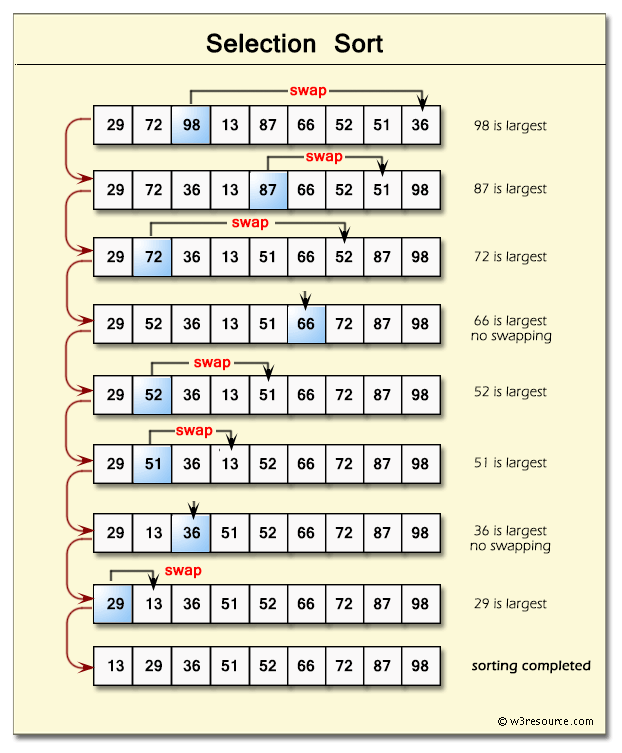
|
1 2 3 4 5 6 7 8 9 10 11 12 13 14 15 16 17 18 19 20 21 22 23 24 25 26 27 |
function Selection_Sort(arr, compare_Function) { function compare(a, b) { return a - b; } var min = 0; var index = 0; var temp = 0; compare_Function = compare_Function || compare; for (var i = 0; i < arr.length; i += 1) { index = i; min = arr[i]; for (var j = i + 1; j < arr.length; j += 1) { if (compare_Function(min, arr[j]) > 0) { min = arr[j]; index = j; } } temp = arr[i]; arr[i] = min; arr[index] = temp; } return arr; } console.log(Selection_Sort([3, 0, 2, 5, -1, 4, 1], function(a, b) { return a - b; })); console.log(Selection_Sort([3, 0, 2, 5, -1, 4, 1], function(a, b) { return b - a; })); |
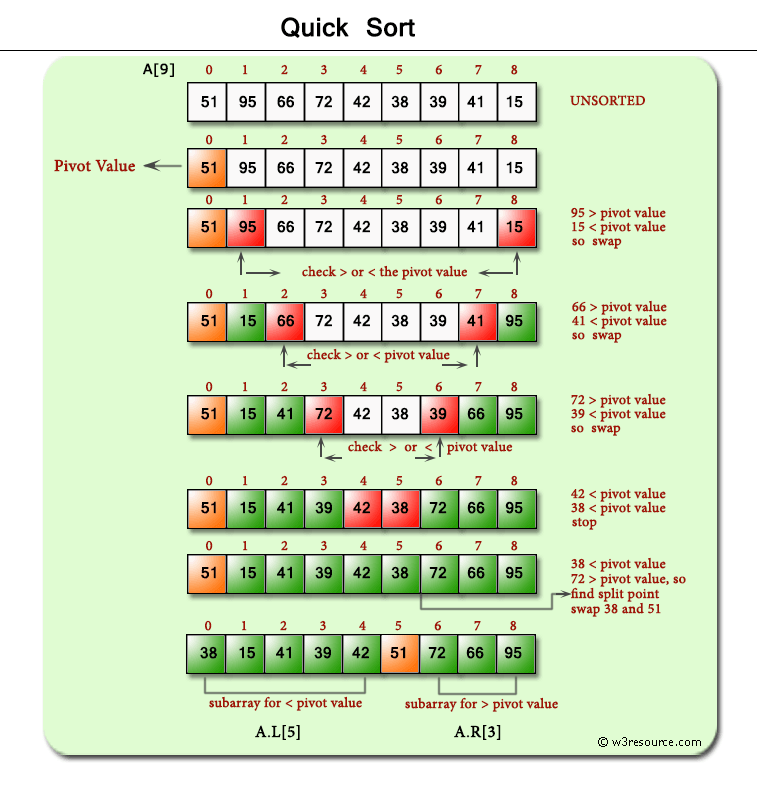
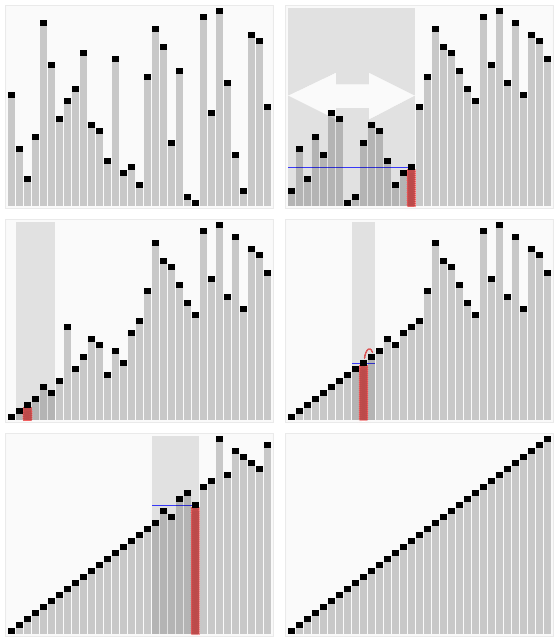
|
1 2 3 4 5 6 7 8 9 10 11 12 13 14 15 16 17 18 19 20 21 22 23 24 25 26 27 28 |
function quick_Sort(origArray) { if (origArray.length <= 1) { return origArray; } else { var left = []; var right = []; var newArray = []; var pivot = origArray.pop(); var length = origArray.length; for (var i = 0; i < length; i++) { if (origArray[i] <= pivot) { left.push(origArray[i]); } else { right.push(origArray[i]); } } return newArray.concat(quick_Sort(left), pivot, quick_Sort(right)); } } var myArray = [3, 0, 2, 5, -1, 4, 1 ]; console.log("Original array: " + myArray); var sortedArray = quick_Sort(myArray); console.log("Sorted array: " + sortedArray); |
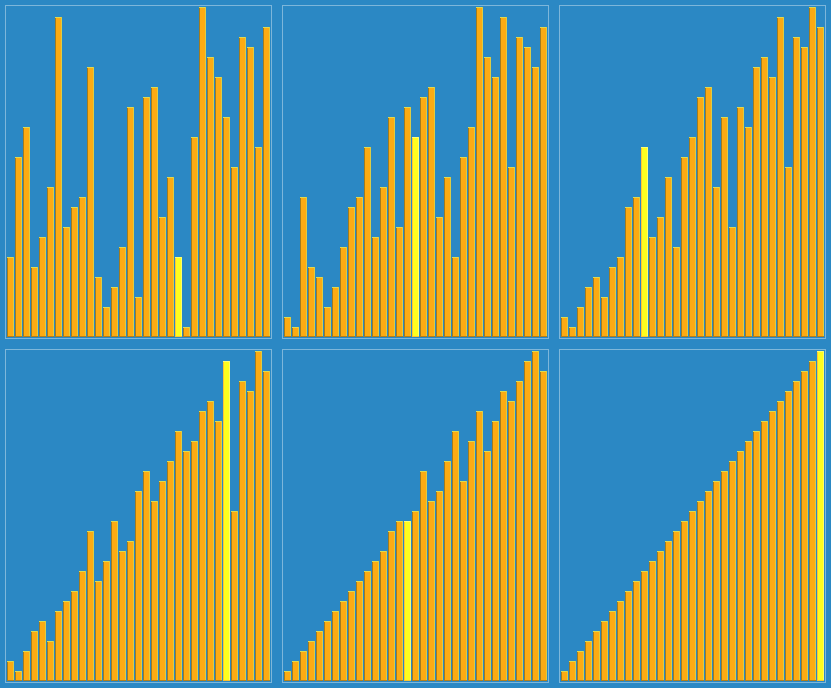
|
1 2 3 4 5 6 7 8 9 10 11 12 13 14 15 16 17 18 19 20 21 22 23 24 25 |
function shellSort(arr) { var increment = arr.length / 2; while (increment > 0) { for (i = increment; i < arr.length; i++) { var j = i; var temp = arr[i]; while (j >= increment && arr[j-increment] > temp) { arr[j] = arr[j-increment]; j = j - increment; } arr[j] = temp; } if (increment == 2) { increment = 1; } else { increment = parseInt(increment*5 / 11); } } return arr; } console.log(shellSort([3, 0, 2, 5, -1, 4, 1])); |
|
1 2 3 4 5 6 7 8 9 10 11 12 13 14 15 16 17 18 19 20 21 22 23 24 25 26 27 28 |
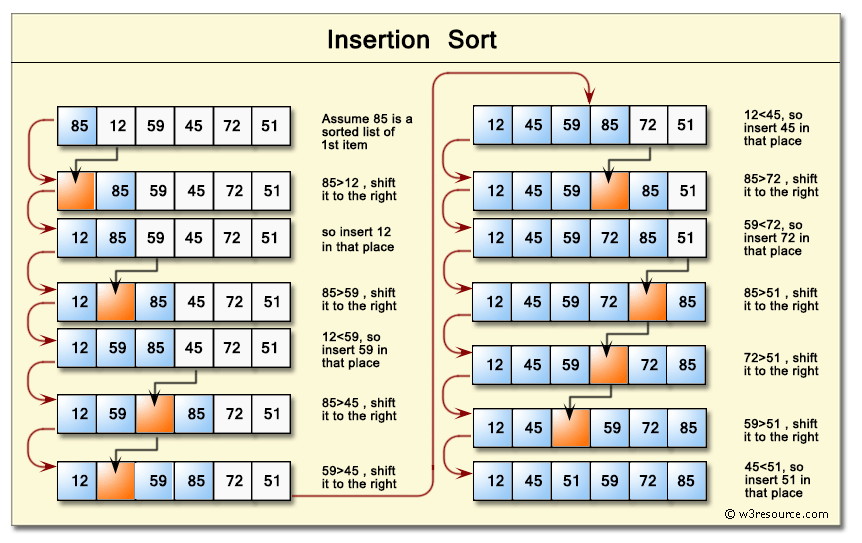
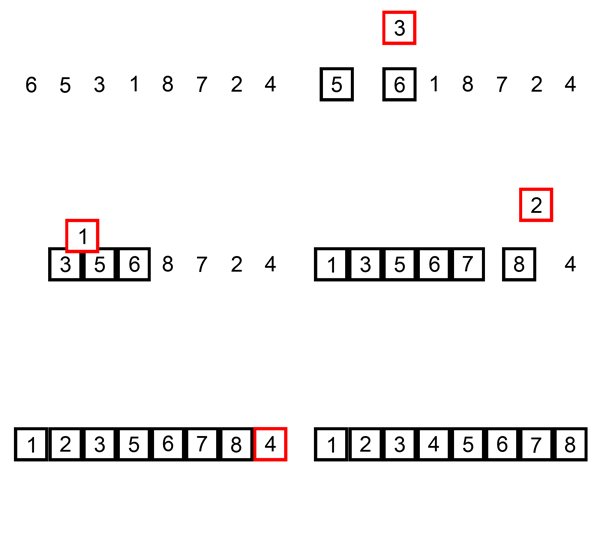
function insertion_Sort(arr){ for (var i = 1; i < arr.length; i++) { if (arr[i] < arr[0]) { //move current element to the first position arr.unshift(arr.splice(i,1)[0]); } else if (arr[i] > arr[i-1]) { //leave current element where it is continue; } else { //find where element should go for (var j = 1; j < i; j++) { if (arr[i] > arr[j-1] && arr[i] < arr[j]) { //move element arr.splice(j,0,arr.splice(i,1)[0]); } } } } return arr; } console.log(insertion_Sort([3, 0, 2, 5, -1, 4, 1])); |
|
1 2 3 4 5 6 7 8 9 10 11 12 13 14 15 16 17 18 19 20 21 22 |
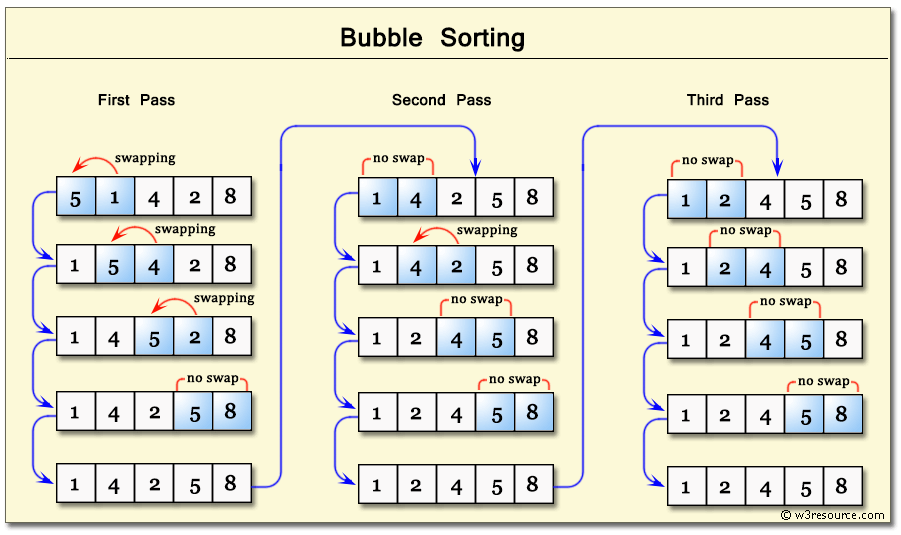
function swap(arr, first_Index, second_Index){ var temp = arr[first_Index]; arr[first_Index] = arr[second_Index]; arr[second_Index] = temp; } function bubble_Sort(arr){ var len = arr.length, i, j, stop; for (i=0; i < len; i++){ for (j=0, stop=len-i; j < stop; j++){ if (arr[j] > arr[j+1]){ swap(arr, j, j+1); } } } return arr; } console.log(bubble_Sort([3, 0, 2, 5, -1, 4, 1])); |
Max and min string
The smallest member of the array
ES5 mode
|
1 2 3 4 5 6 |
function minNiza(niz) { if (toString.call(niz) !== "[object Array]") { return false; } return Math.min.apply(null, niz); } |
ES6 – spread operator
|
1 2 3 4 5 6 |
function minNiza (niz){ if (toString.call(niz) !== "[object Array]") { return false; } return Math.min(...niz); } |
ES6 – Spread operator + arrow function
or even more clearly written with the arrow function:
|
1 2 3 |
const minNiza = niz => Math.min(...niz); // An example minNiza([20, 10, 5, 10]) // Returns: 5 |
The largest member of the array
|
1 |
const maxNiza = niz => Math.max(...niz); |
Sum of array
|
1 2 |
const sumaNiza = niz => niz.reduce((a,b) => a + b, 0) sumaNiza([20, 10, 5, 10]) -> 45 |
Average string member
|
1 2 |
const prosekNiza = niz => niz.reduce((a,b) => a + b, 0) / niz.length prosekNiza([20, 10, 5, 10]) -> 11.25 |
Mixing the order of array elements
The sort() method takes as a parameter a callback function that “comparison function” (or negative number or zero or positive number), the sort() method knows which number is larger and which is smaller. Therefore, if we screw up the sort() method and return random results, it will also return randomly mixed array numbers.
|
1 2 3 4 5 |
var list = [1, 2, 3, 4, 5, 6]; list.sort(function() { return Math.random() - 0.5 }); console.log (list); // Returnssvaki put drugi raspored |
This method uses the Fisher–Yates algorithm:
|
1 2 3 4 5 6 7 8 9 10 11 12 13 |
function shuffle(arr) { var i, j, temp; for (i = arr.length - 1; i > 0; i--) { j = Math.floor(Math.random() * (i + 1)); temp = arr[i]; arr[i] = arr[j]; arr[j] = temp; } return arr; }; var a = [1, 2, 3, 4, 5, 6, 7, 8]; var a = shuffle(a); // Returns: niz sa promesanim elementima |
Extracting a random string member
|
1 2 3 4 5 6 |
function randomClan(niz){ return niz[Math.floor(Math.random()*niz.length)]; } var niz = [254, 45, 212, 365, 2543]; console.log(randomClan(items)); // Returns a different member each time |
Switching string to list of elements
Some built-in features in theJavaScript for example Math.max() do not accept a string as an argument but a list. Therefore, there is a need to transform a string into a list, and we can do it in the following ways:
The apply() function can accept a string as an argument, so although that is not its main purpose, it is often used to “convert” a string to a list of arguments. The first argument to the apply() function must be the object pointed to by the this keyword (this is the primary purpose of the apply function), and the second is a string passed to the callback function as an argument list.
Example
In the following example, the Math object function accepts only a list of arguments (not an array), so apply() is used before it:
|
1 2 3 4 5 |
var numbers = [5, 6, 2, 3, 7]; console.log(Math.max(numbers)); // Returns: NaN because the Math object was passed an array and not a list Math.max.apply(Math, numbers) == Math.max(5, 6, 2, 3, 7); // TRUE |
Example
The push() method needs to be passed a list of elements in the form of arguments, as in the following example:.
|
1 2 |
var numbers = [1, 2, 3]; numbers.push(4, 5, 6); // Returns: [1, 2, 3, 4, 5, 6] |
However, if we want to pass the whole array, we need to pass it as a list, and for that we will use the apply() method which expects a list as the second argument, so it will implicitly transfer the array to the list:
|
1 2 3 4 |
var array1 = [1, 2, 3]; var array2 = [4, 5, 6]; Array.prototype.push.apply(array1, array2); console.log(array1); // Returns: [1, 2, 3, 4, 5, 6] |
This method requires the use of the ES6 spread operator:
|
1 2 |
var numbers = [5, 6, 2, 3, 7]; var max = Math.max(...numbers); // Returns the largest number |