



Introduction
Vue 3 note (2026): In Vue 3 the destroy hooks are named beforeUnmount / unmounted. The old beforeDestroy / destroyed names still work as aliases.

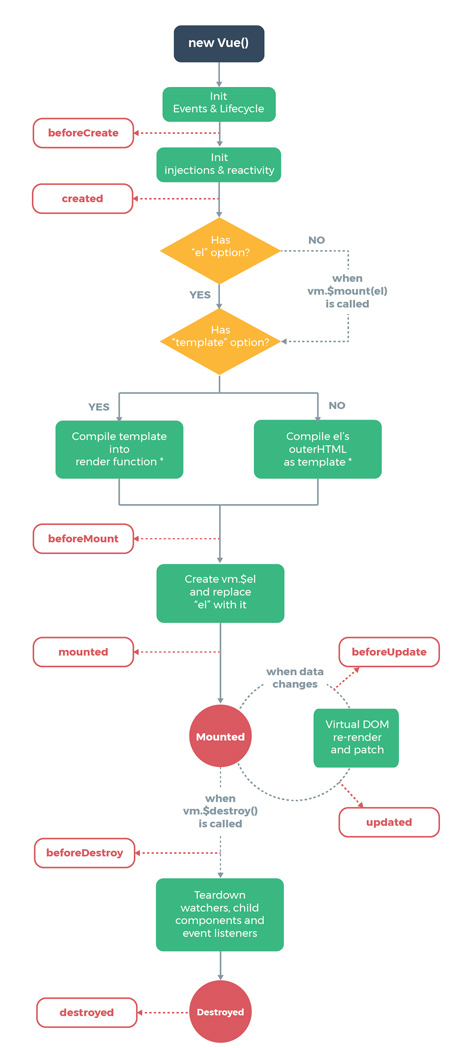
In order to target a specific moment in the “life” of a Vue instance/component, so-called hooks (eng. hooks). Hooks allow you to trigger the desired action precisely at the appropriate moment in the component’s lifecycle. Hooks within the Vue.js framework are represented through specific predefined methods that enable this.
All lifecycle-related methods are placed in the root vue instance as a direct property.
-
Initial hooks
These hooks allow you to add actions before the instance is added to the DOM (not rendered). Unlike all other hooks, these hooks are also executed during “server-side rendering”. Use this hook if you need to do something during “client” rendering as well as during “server-side” rendering.
- beforeCreate
Actions that are defined through this method are executed when the instance is initialized, the “data” property is not yet reactive and the events are not yet fired: - created
Actions defined through this method can access the “data” property and events are fired, however “template” and “Virtual DOM” are not rendered.
- beforeCreate
-
Mounting hooks
These hooks are tied to the moment the instance is rendered in the DOM. One is related to the pre-render moment and the other to the post-render moment”. It is most commonly used to retrieve data for your component. Use it if you want to access or modify the DOM before or after the instance is rendered. Also use it to integrate other libraries and frameworks.
- beforeMount
This hook is used very rarely, and the actions defined through this method are executed before the actual rendering of the instance. - mounted
This is one of the most commonly used hooks, with it we have full access to reactive components, template, and rendered DOM (via this.$el). Actions defined through this method are executed after the instance is rendered.
It should be emphasized the difference between the “v-if” directive, which “mounts” and “unmounts” the component, as opposed to the “v-show” directive, which only turns the visibility of the component on and off.
- beforeMount
-
Update hooks
-
These hooks are used to define the moment before and after some change that causes a re-render. It is used when it is necessary for debugging to know if something has been re-rendered. If we know when something was rendered, then don’t use it, because it is better to use “computed properties” or “watchers”.
- beforeUpdate
Actions defined through this method are executed after data changes on your component at the moment the update cycle begins, right before the DOM is updated and re-rendered. - updated
Actions defined through this method are executed after data changes on your component, right after the DOM is updated and re-rendered.
- beforeUpdate
-
keep-alive hooks
These hooks allow you to detect when a component wrapped in a <keep-alive> </ keep-alive> on or off. You can use them to fetch data for your component (fetch data), it has similar behavior as “created” and “beforeDestroy”, without the need to re-build the complete component.
-
Destruction hooks
These action hooks allow you to target the time for your actions when the component is destroyed and removed from the DOM. For example such as cleaning data or sending analytics.
- beforeUnmount (Vue 2 alias:
beforeDestroy)
Actions defined through this method are executed before the component is destroyed while it is still functional. It is used if you need to clean up events or reactive subscriptions. - unmounted (Vue 2 alias:
destroyed)
Actions defined through this method are executed after the instance is destroyed and removed from the DOM.
- beforeUnmount (Vue 2 alias:
- errorCaptured
Actions defined through this method are executed
Example
See when these codepen hooks fire:
See the Pen Lifecycle Vue Components by Web programming (@chos) on CodePen.