MVVM pattern
MVVM (Model-View-ViewModel) is a pattern that separates an application into multiple components so that each component has its own specific responsibilities. When using the MVVM pattern, the “code” of the application is separated into three parts: View, ViewModel and Model, this architecture is recommended by Google as one of the best ways to structure Android application code. The basic characteristics of this approach are:
- UI components are kept away from business logic
- Business logic is kept away from database related operations
- Less worries about “lifecycle” events (because using components that are aware of the lifecycle of other application components)
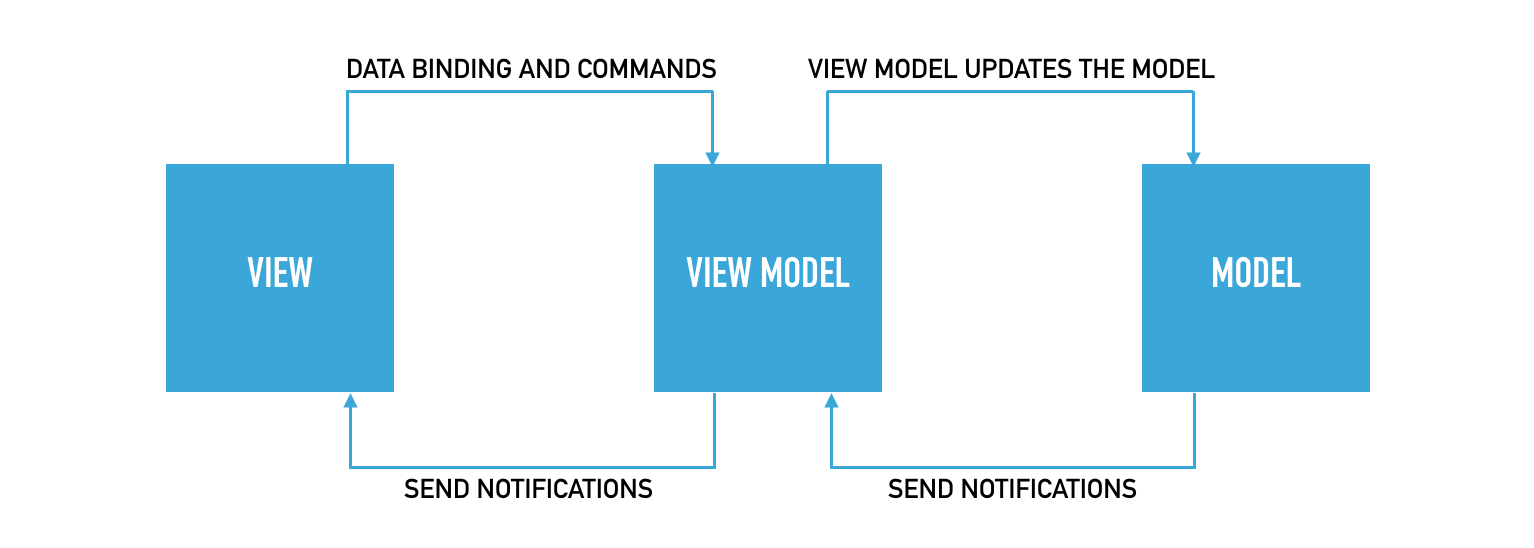
The recommended way for communication between two adjacent layers is the so-called “Observer pattern” (usually using “LiveData” or some other library).
LiveData
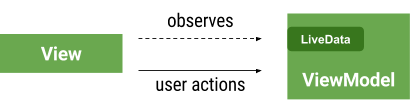
LiveData is the so-called observable data holder in charge of keeping, i.e. has a reference to the lower level of the data and to notify all interested observers if changes occur. The most important feature of LiveData is that it is aware of the life cycle of other application components (activities, fragments…). Because of this feature, LiveData only updates observers that are in the active state (if the life cycle is in the STARTED or RESUMED state). LiveData only informs active observers about updates, while inactive (destroyed) observers, although registered, are not informed about changes. When we use LiveData we don’t need to worry when the life cycle of the activity/fragment ends (destroy) because they are automatically logged out as soon as the component completes its life cycle. Read more about LiveData in the article: “LiveData & MVVM”
As you can see in the image below, one layer has a reference only to the layer below it, but not vice versa (ie, the layer has no notion of the component above it), so: “View” depends on “ViewModel”, and “ViewModel” depends on “Model”
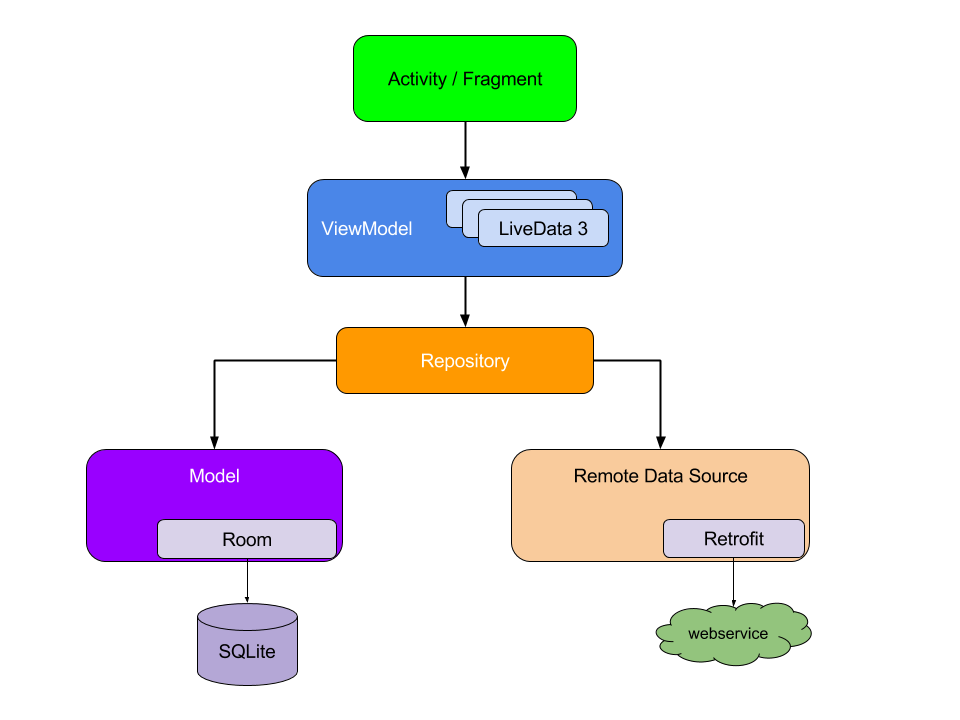
MVVM is similar to the MVP pattern, with the difference that in the “MVP” pattern the “Presenter” has a reference to the “View” and directly “tells” the View what data and changes to display, while the “ViewModel” does not hold a reference to the View and cannot directly influence the “View”.
“View”
“View” section (contains classes: Activities and Fragments) is responsible for displaying the interface and accepting user actions. Since this section has a reference to the level below (ViewModel) it can listen for changes in the ViewModel, and if there are changes call some method from the ViewModel and retrieve that new data. Because of this responsibility, it is necessary that within the View there is a piece of code with which the “View” registers to observe the events emitted by the “ViewModel” (streams of events). Read more about it in the article:
“Keep the logic in Activities and Fragments to a minimum”
After downloading new data, “View” has the obligation to update the view that the end user sees. Another important feature related to the “View” when using the MVVM architecture is that the activities or fragments no longer have to have the responsibility of saving the state because the responsibility has been taken over by the “ViewModel”
Note:
Conditional statements and loops should not be in activities or fragments, that part should be in ViewModels or other application layers.
“ViewModel”
“ViewModel” also has two roles:
- Because it has a reference to the level below (the Model class), the ViewModel can listen for “news” about changes emitted by the Model.
- When data changes occur, it (after data processing) further broadcasts news about it (ViewModel is not interested in who will use the information about the changes, it is only important for it to inform about it).
NOTE: “ViewModel” does not hold a reference to View and therefore cannot directly affect “View”
“Instead of pushing data to the UI, let the UI observe changes to it.”
“ViewModel” is a class that is designed to survive configuration changes (eg screen rotation) and store information that is necessary for the View (which means our activity/fragment no longer has to have that responsibility). When a “View” (ie a fragment/activity) is destroyed by changing the configuration or rotation of the device, its “ViewModel” will not be destroyed and a new instance of the View will be re-connected to the same “ViewModel”.
NOTE:
Although the ViewModel can survive a configuration change (eg screen rotation), it does not live indefinitely!
ViewModel cannot survive activity being killed by operating system or user (eg “back” button). If android destroys the application/activity it will destroy the ViewModel and then only onSavedInstance() or the database provide the mechanism to save the data. Which leads to the conclusion that the ViewModel class is not a replacement for “persistently saving data” or saving data using onSaveInstanceState()!
“Avoid references to Views in ViewModels.”
“ViewModel” is also often used as a communication layer between fragments within one activity. Each Fragment has access to the “ViewModel” through its Activity, which enables communication between Fragments without direct mutual contact. Both fragments can access the ViewModel via their respective activity. The first fragment can update some data by calling a method from the ViewModel, after which the ViewModel will broadcast those changes (using LiveData), and if the second fragment “observes” the LiveData, it will notice it, and thus get information from the first fragment.
More about this in the article: “Communication between fragments using ViewModel and LiveData”
NOTE:
It is recommended that “ViewModel” classes do not use android framework classes ie. that there are no android.* imports within the class.
“Don’t let ViewModels know about Android framework classes”
The previous statement that “ViewModel should not have a reference to View” is because this can cause problems if the View instance is destroyed (due to rotation…) while the ViewModel still has a reference to it (eg when “ViewModel” requests online data from the network). It is precisely because of this recommendation that the Observer pattern is used to enable View to access the data. The ViewModel emits data-related events (most often using the LiveData library), and the View logs in to observe those changes.
“Instead of pushing data to the UI, let the UI observe changes to it.”
When the ViewModel class is created we need to extend either the “ViewModel” or the “AndroidViewModel” class (use “AndroidViewModel” if you also need application context within the ViewModel).
|
1 2 3 4 5 6 7 8 |
public class MainActivityViewModel extends ViewModel{ private MutableLiveData<User> user; public LiveData<User> getUser() { return user; } } |
“Model”
The
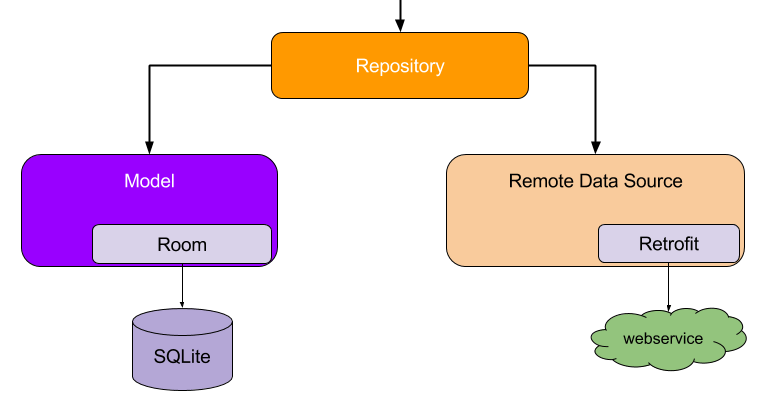
“Model” section contains classes responsible for direct access to data with the aim of abstracting and simplifying access to that data. Since data can often come from multiple sources (database, webservice…), for this reason it is useful to have only one entry point to data sources from the ViewModel, and that point is called “Repository” whose role is to abstract multiple data sources into one API. Repository is not a special architectural component, but an ordinary class that has access to all data sources. ViewModel practically only has direct access to the repository through that API and in a simple way, whenever it needs it, it can get data (without knowing from which source the data actually comes: web or database and how it got there).
“Data repository as the single-point entry to your data”