


What is node.js?
JavaScript is a programming language that cannot be used independently, but for its execution a special environment is needed, the so-called. “JavaScript runtime environment”. The most famous “JavaScript runtime environment” is the browser, but if we want to execute JavaScript outside the browser, node.js appears on the scene as another “JavaScript runtime environment”. Node.js is an open-source, cross-platform JavaScript runtime environment based on Chrome’s V8 JavaScript engine.
Since Node.js is the so-called “low-level” platform for easier use is smart to use one of the many frameworks such as: Express, Koa, Total.js, Sails….
Node.js is a JavaScript runtime environment and allows working with JavaScript outside the browser!
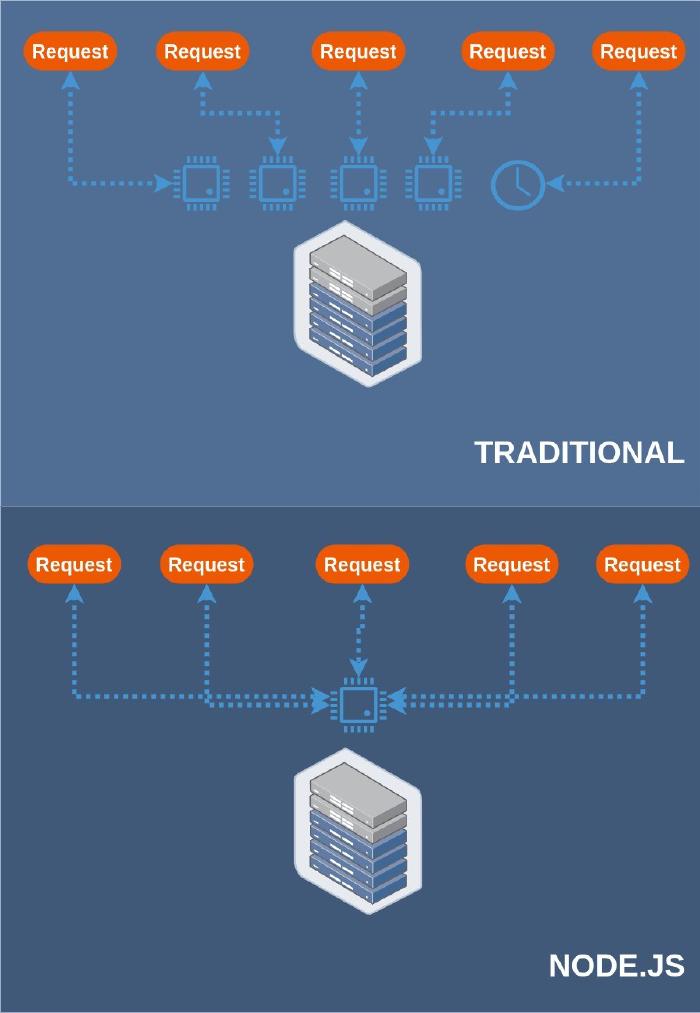
Node.js strives for a non-blocking and asynchronous way of programming and at the same time can do many things at once, unlike the PHP/Apache combination which works through requests and responses. The PHP/Apache server processes the file request by sending a task to the computer’s file system, waits there until the file system opens and reads the file, and then returns the requested content to the client as a result. Only after this is he ready to respond to the next request.
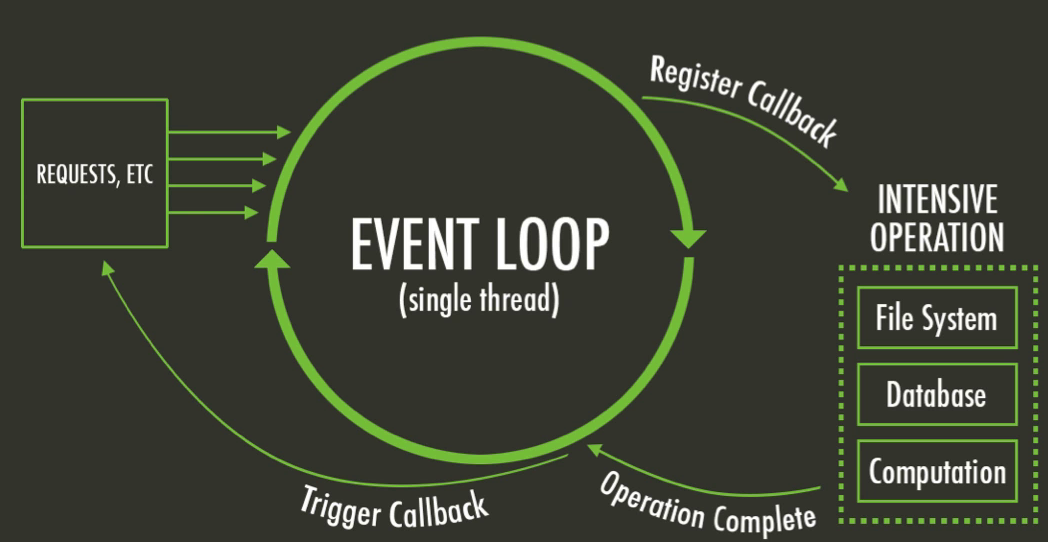
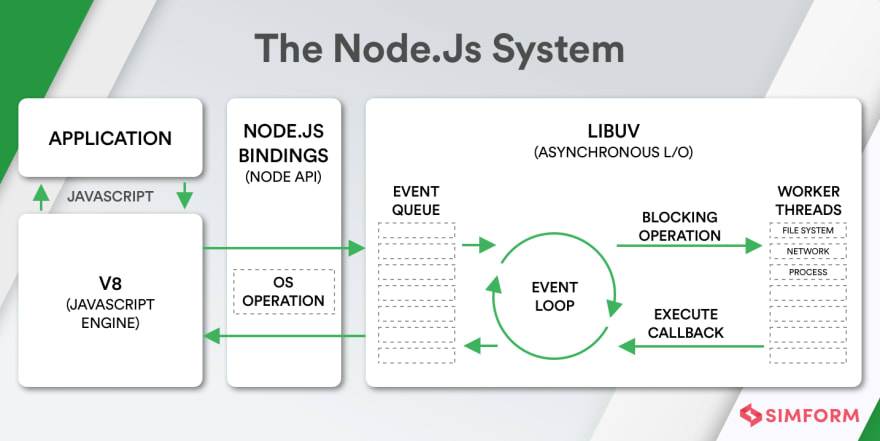
When Node.js processes a request for a file, it sends a task to the computer’s file system and is immediately ready to accept the next request. In the meantime, the file system opens and reads the file, after which the server returns the content to the client. This is precisely the biggest advantage of the Node.js server, because it eliminates waiting and simply continues with the next request. The event-driven UI makes it perfect for applications that run in real-time and require large amounts of data transfer. Node.js is based on the fact that most of the code just sits in the background and waits for some I/O (Input/Output) to happen, such as waiting for a file to be written to disk or for a MySql query to return data. When we request that a file be opened, we don’t wait for the result, but tell which function to pass the data to when the reading is finished or which event to call, while the execution of other code continues. You can see more about “JavaScript runtime environment” in the article “Symbiosis of JavaScript and its environment”.
Differences between Node.js and Browser
In addition to the fact that both platforms allow the execution of JavaScript, there are also differences between them:
- Node.js can create a server – Node.js has built-in libraries for HTTP and socket communication with which it can create a web server and thus be a replacement for other types of servers such as Apache, Nginx…
- Node.js uses CommonJS syntax, which enables modular programming – Although within ES6 there is a syntax for working with modules, the so-called import/export syntax, it was recently introduced in node.js andit as experimental option. To work with modules, Node.js uses CommonJS syntax (you can read more about this in the article Modular programming – external syntax).
- Node.js does not have DOM, window object, document object, cookies… – Node.js does not have browser APIs related to DOM, CSS, performancename, document, as well as all APIs related to the “window” object. Precisely because of the lack of a window object that represents a global object available to everyone, in Node.js there is also a new global object that is available in all modules and we don’t have to include it specifically in our application, but we can use it directly everywhere. This global object contains many useful environment properties such as: setImmediate(), setInterval(), clearTimeout(), console and process. We can view this object by simply listing it in the console with:
console.log(global)
- Global namespace object – In the Browser, the top-level scope is the global scope, which means that the “var” keyword inside the browser will define a new global variable. In Node.js this is different, because the top-level scope is not a global scope, so the “var” keyword inside a Node.js module will only be available for that module.
- Node.js has access to the files of the system it is in – Node.js has full access to the system like any other native application. This means that it can read and write directly to or from the file system, it can also have unrestricted network access, and it can execute software…
- Modern JS within Node.js – Because JavaScript development moves very fast, browsers often lag behind in implementing new JavaScript features so you have to use an older version of JavaScript in the Browser, but this is not the case for Node.js in which you can use all the modern ES6-7-8-9 JavaScript that your version of Node.js supports.
Note:
The following variables (__dirname, __filename, exports, require(), module) look like they are part of a global variable, but they are not, they exist as part of module.
Disadvantages of Node.js
Node.js executes code on a single thread, and this is actually one of the biggest advantages over other options that support multi-threading, because the single-threaded nature makes its programs extremely scalable.
What does it mean that an application is scalable?
A scalable application is one that, with the same code, can process a much larger number of requests than originally planned without spending additional resources, which is not the case with a multi-thread type of application, because increasing the volume of work leads to an increase in the consumption of system resources (RAM…). You can read more about the work of the Event loop in the article “Principle of work of asynchronous JavaScript”
The advantage just mentioned is also the biggest disadvantage of Node.js because due to the nature of node.js, it doesn’t have the ability to handle CPU related tasks non-blocking. We will explainthis problem through an example:
When Node.js receives a CPU-related task, it delivers all the CPU resources to that task and takes it to process it immediately, and only after completion responds to other requests in the loop, which leads to slow processing and delays in the “event loop”.
Is there a solution to this problem?
In newer Node.js versions (>10.5.0), a new module called “Worker threads” has appeared which allows multiple parallel JS execution threads, which helps to perform CPU intensive JS operations. However, there are still certain conditions because “Worker threads” can only run on machines with multiple cores (because Node.js allows the use of only one thread per core), and the fact that this feature is still experimental in currently active Node.js versions cannot be ignored.
Installing node.js
In order to install node.js on a local machine, it is necessary to have Python 2.7 installed, and only then can we download node.js (e.g. the corresponding windows installer version “.msi”) from the https://nodejs.org/download page.
The installation is standard and upon completion you get the following things:
- node.js
- node.js documentation
- node.js command prompt
- npm package manager
Checking the installed versions of node.js and its package manager npm can be done in the command prompt with the commands:
node -v
npm -v
In addition to the installation on the local machine used to develop the application, after the application is finished, it is necessary to transfer the application to some hosting that supports node.js. This procedure depends on the hosting configuration itself and the optional software installed on it (C-panel, Plesk…). If you have Plesk installed on your hosting machine here you can read how to ensure the operation of node.js on such a server.