


Introduction
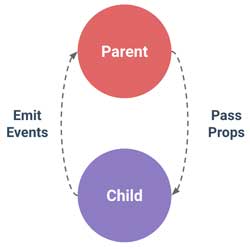
Within Vue.js, each component has its own isolated domain, direct communication between two components is not allowed by default, so appropriate mechanisms are used for data exchange.
Communication between parent and child components can take place in both directions, but using different mechanisms. In the direction from the parent to the child component, the data is forwarded through the child tag attribute, and in the direction from the child component to the parent component, it is forwarded with the custom event.
It should be emphasized that depending on the type of transmitted data, it depends on whether the communication is one-way or two-way. In the case of primitive type data, this communication is one-way, because even if the child component makes a change to the passed data, it will not affect the parent component. However, if data of reference type (strings or object) is passed, then the change of such data in the child component will also be noticed by the parent component because both “watch” the same place in memory.
|
1 2 3 4 5 |
<parent-komponenta> <div> <child-komponenta></child-komponenta> </div> </parent-komponenta> |
If a method from the parent component is passed as data, and if that method changes some data from the parent component, then by calling the passed method from the child component, we also change that data in the parent component.
Sending data type: parent -> child
a) Forwarding data from the parent component
In the mechanism for passing data from the parent component to the child component, the data is passed through the attribute of the HTML element (the custom tag element represents an instance of the child component).
String
If we want to pass a static string that will not change:
|
1 |
<child my-message="hello!"></child> |
However, when we pass primitive data that changes dynamically, to make it reactive we have to use the directive v-bind:
|
1 |
<child v-bind:my-message="parentMsg"></child> |
With this approach, every time the parent component is updated all the “prop” properties will also be updated.
Number
Unlike string props that pass numbers must be bound for both static and dynamic props:
|
1 2 3 4 5 |
<!-- Staticki props --> <blog-post v-bind:likes="42"></blog-post> <!-- Dinamicki props --> <blog-post v-bind:likes="post.likes"></blog-post> |
Boolean value
The props property that passes the boolean value must also be bound to both the static and dynamic values.
|
1 2 3 4 5 |
<!-- Staticki props --> <base-input v-bind:favorited="false"> <!-- Dinamicki props --> <base-input v-bind:favorited="post.currentUserFavorited"> |
NOTE:
In the case of passing the “props” attribute without a defined value, Vue.js considers it to be a boolean TRUE:
|
1 2 |
<!-- prop bez vrednosti je isto kao da smo prosledili `true` --> <blog-post favorited></blog-post> |
Object/Array
As with all other types, except String, the “props” property must be bind for both static and dynamic values.
Array
|
1 2 3 4 5 |
<!-- Staticki props --> <blog-post v-bind:comment-ids="[234, 266, 273]"></blog-post> <!-- Dinamicki props --> <blog-post v-bind:comment-ids="post.commentIds"></blog-post> |
Object
|
1 2 3 4 5 |
<!-- Staticki props --> <blog-post v-bind:comments="{ id: 1, title: 'My Journey with Vue' }"></blog-post> <!-- Dinamicki props --> <blog-post v-bind:post="post"></blog-post> |
b) Accepting data in the child component through the “props” property
In order for the child component to be able to use the passed data, it needs to specifically mark it by declaring it through the property “props”. Inside the child component, the property “props” declares what type of data it expects to be passed to it, the following syntaxes can be used:
Array syntax
|
1 2 3 |
Vue.component('props-demo-simple', { props: ['size', 'my-message'] }) |
Objectivesyntax
Unlike “Array syntax” “object syntax” also allows validation of the data type expected to be passed:
|
1 2 3 4 5 6 7 8 9 10 11 12 13 14 15 16 17 18 19 20 21 22 23 24 25 26 27 28 29 30 31 32 33 34 35 36 |
Vue.component('props-demo-advanced', { props: { // Basic data type checking (when `null' is defined then there is no condition) propA: Number, // Multiple possible data types propB: [String, Number] // The requirement that the passed property must have a value propC: { type: String, required: true }, // Podrazumevana value propD: { type: Number, default: 100 }, // An Object or Array must be returned through the Factory function propE: { type: Object, default: function () { return { message: 'hello' } } }, // custom validator function propF: { validator: function (value) { return value > 10 } } } }) |
NOTE:
HTML attribute names are case-insensitive, i.e. browsers are not case sensitive. However, Vue.js allows “props” attribute names to be written as “camelCase” because it processes them and generates “kebab-case” equivalents from them (which can be used within HTML).
Example
In this example, the props property “postTitle” is defined in JavaScript using the “camelCase” rule
|
1 2 3 4 |
Vue.component('blog-post', { props: ['postTitle'], template: '<h3>{{ postTitle }}</h3>' }) |
However, within HTML, the “post-title” “kebab-case” equivalent is used:
|
1 |
<blog-post post-title="hello!"></blog-post> |
BONUS Tip:
In case we need the values of passed properties as initial values, it is recommended to define a local variable:
|
1 2 3 4 |
props: ['initialCounter'], data: function () { return { counter: this.initialCounter } } |
Example
In this example, the parent component passes the “data” value of the “counter” via the “data” attribute, while the child component accepts the passed data through the “props” property of the same name. In this example, only the forwarding of data from the parent component is processed, therefore, when changing the counter from the child component, it will not affect the value in the parent component. Actually, changing the value of the counter inside the child component is temporary, because after a new update of the counter from the parent component, the data in the child will be synchronized with the parent component and thus “override” all its changes made from the child component.
In order for some data to always be synchronized between the parent and child components, it is necessary to forward the changes from the child component to the parent component, which is explained in the next section.
Sending data type: child -> parent
Forwarding data from the child component to the parent component is done by emitting a custom event with which we also forward the desired data. Therefore, it is necessary to listen for that specific event within the parent component, and when the component notices it, it should pick up the forwarded data.
a) Emitting events from the child component
The event is emitted from the child component with the command:
|
1 |
this.$emit('nameCustomEvent', [nekiPodatak]) |
It should be noted that the child component is still completely separate from what is happening outside of it, it only reports on its own activity (in case the parent component is interested).
b) Listening to custom events in the parent component
Listening to an event broadcast like this is exactly the same as listening to any other event. For listening, the standard directive “v-on:” v-on:nazivCustomDogadjaja="nekiEventHandler" is used, which is attached to the child tag within the parent component. The passed data is accessed via the specific variable $event:
Example: parent component
|
1 2 3 4 5 6 7 8 9 10 11 12 13 |
<child-komponenta v-on:nazivCustomDogadjaja="someEventHandler"></child-komponenta> <script> new Vue () { data: methods:{ nekiEventHandler: function () { console.log($event); // Returns the value of the variable "someData" } } } </script> |
Example
In this example, in addition to forwarding data from the parent component, after the change in the child component, an event was emitted to inform the parent component and new data was sent to it. The parent component then updates that data and prints the change.