


Introduction
Room is a library recommended by Google as one of the components of the so-called. “Android Architecture Components” approach. Room is a wrapper around the SQLite database and is an abstraction layer that facilitates working with the database. The Room library takes over most of the responsibilities so that now we can create tables and manage data more easily.
Room has a so-called compile-time checks ie. checking the code during compilation and if there is an error, it will be shown during the compilation itself. In this way, Room saves us from irritating small errors that occur when working with the SQL database (lack of semicolons or spaces…) that cause RunTimeException.
In order to work with this library, it is necessary to define dependencies:
|
1 2 3 4 |
def room_version = "2.2.5" implementation "androidx.room:room-runtime:$room_version" annotationProcessor "androidx.room:room-compiler:$room_version" |
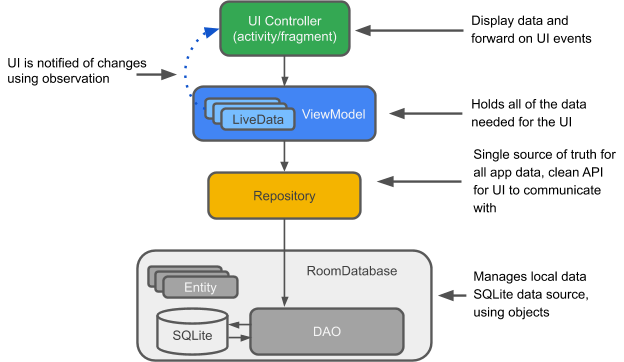
The Room library consists of three main components:
Entity (table)
Entity is a class that represents a database table and is marked with @Entity. In the continuation of this annotation (within the brackets) we can define a table name that can be different from the class name itself. If we don’t define the table name this way, Room will generate a table with the same name as the class name.
|
1 2 3 4 |
@Entity(tableName = "buy_item_table") public class BuyItem { } |
Every entity must have a constructor! A constructor is most often defined so that its parameters match the fields (based on type and name). However, the constructor doesn’t have to receive all the fields as parameters, the field we don’t want to put in the constructor must be marked with the @Ignore annotation, otherwise Android Studio will show an error. Also, within the constructor we don’t have to put a field that is autogenerated (ie autoGenerate = true), but for that field there must be a public setter (we won’t use it, but it is necessary for the Room library).
@PrimaryKey
When working with the Room library, one column must have a defined so-called PrimaryKey. Marking the column that will represent “Primary key” is done by adding the @PrimaryKey annotation to that field. When we define that a field is PrimaryKey then we can use its method autoGenerate() or simply add (autoGenerate = true) in brackets.
Example
In this example, the first field mId is automatically generated, so we will not include it in the constructor, but it is still necessary to provide its setter because it is needed by the Room library (for other fields, setters are not necessary).
|
1 2 3 4 5 6 7 8 9 10 11 12 13 14 15 16 17 18 19 20 21 22 23 24 25 |
@Entity(tableName = "buy_item_table") public class BuyItem { @PrimaryKey(autoGenerate = true) private int mId; private String mName; private String mAmount; private String mTimestamp; public BuyItem(String mName, String mAmount, String mTimestamp) { this.mName = mName; this.mAmount = mAmount; this.mTimestamp = mTimestamp; } // Setter only for the id field because it is not given as a parameter in the constructor public void setId(int id){ mId = id; } // Geteri: public int getId(){ return mId; } public String getName() { return mName; } public String getAmount() { return mAmount; } public String getTimestamp() { return mTimestamp; } } |
NOTE:
The constructor can possibly be withoutno arguments but then there must be defined setters for all fields.
@ColumnInfo
Room by default generates a table with the same column name as the class field, however, if we want the column name to have a different name from the name of the field it represents, then we must use the @ColumnInfo annotation and define a different column name in brackets.
|
1 2 3 4 5 6 7 8 9 10 11 12 13 14 15 |
@Entity(tableName = "buy_item_table") public class BuyItem { @ColumnInfo(name = "id") @PrimaryKey(autoGenerate = true) private int mId; @ColumnInfo(name = "name") private String mName; @ColumnInfo(name = "amaunt") private String mAmount; @ColumnInfo(name = "time") private String mTimestamp; } |
@Embedded
With this notation, it is possible to nest one table inside another (one-one reaction).
|
1 2 3 4 5 6 7 8 9 10 11 12 13 14 15 16 17 18 |
public class Address { public String street; public String state; public String city; @ColumnInfo(name = "post_code") public int postCode; } @Entity public class User { @PrimaryKey public int id; public String firstName; @Embedded public Address address; } |
Now we can make queries in this table and the User object has all the columns: id, firstName, street, state, city, and post_code.
NOTE:
We can add a prefix to all column names of an embedded table if we define it in brackets with prefix:
|
1 2 |
@Embedded public (prefix = "loc_") Address address; |
@ForeignKey
With this annotation, we connect two entities (tables) by connecting their columns (the column from the child entity with the column value from the parent entity). This is practically an additional annotation within the @Entity annotation of the child entity:
|
1 |
@Entity(foreignKeys = @ForeignKey(...)) |
Example
First we define the parent entity (table) Course.
|
1 2 3 4 5 6 7 8 9 10 11 12 |
@Entity(tableName = "course") public class Course { @PrimaryKey(autoGenerate = true) private long id_course; private String courseName; public Course(String courseName) { this.courseName = courseName; } } |
The previous table can be connected to several students, so to define the child table Student we will use the annotation @ForeignKey:
|
1 2 3 4 5 6 7 8 9 10 11 12 13 14 15 16 17 |
@Entity(@ForeignKey (entity = Course.class, parentColumns = "id_course", childColumns = "id_fkcourse", onDelete = CASCADE )) public class Student { @PrimaryKey(autoGenerate = true) private long id_student; private long id_fkcourse; private String studentName; public Student(String studentName) { this.studentName = studentName; } } |
In this example, we connected the id column values of the User table with the userId values of the Repo table. The meaning of the assigned values for onDelete/onUpdate are as follows:
- int CASCADE – The “CASCADE” action propagates the delete or update operation of the parent key to each dependent child key.
- int NO_ACTION – Default behavior when a parent key is modified or deleted from the database, and no other special action is taken.
- int RESTRICT – The RESTRICT action means that the application is prohibited from deleting (for onDelete ()) or changing (for onUpdate ()) a parent key when there are one or more child keys mapped to it.
- int SET_DEFAULT – “SET DEFAULT” actions are similar to SET_NULL, except that each of the key’s child columns is set to contain the column’s default value instead of NULL.
NOTE:
It is known that creating such a connection does not necessarily lead to a relationship between those tables, but only helps to clearly define what will happen to the “child entity” when a member of the “parent entity” is deleted (onDelete) or updated (onUpdate).
@Relations
With this annotation it is possible to connect two tables without using @Foreign.
Example
The previous example showed the connection of two tables with the help of the annotation @ForeignKey, we can solve the same request without the Foreign key using another notation called @Relation. For that, it is necessary to create a new class with which we can create an instance that contains both a parent entity instance and a list of child entity instances:
|
1 2 3 4 5 6 7 8 9 10 11 12 13 14 |
public class CourseWithStudents { @Embedded public Course course; @Relation(parentColumn = "id_course", entityColumn = "id_student") public List<Student> students; public CourseWithStudents(Course course, List<Student> students) { this.course = course; this.students = students; } } |
Later, the DAO is created as follows:
|
1 2 3 4 5 6 7 8 9 10 |
@Dao public interface CourseDao { @Transaction @Insert long insertCourse(Course course); @Insert void insertStudents(List<Student> students); } |
More on this in the next section.
DataAccess Object – DAO
DAO (data access object) as its name suggests: data access object. A DAO must be either an interface or an abstract class, ie. its methods have no body because Room will generate all non-walkable code depending on the annotation (@Insert, @Delete, @Query…). In this way, the amount of code that must be created by the programmer is reduced.
Another great advantage of this object is the ability to validate SQL statements during compilation (eng. “at compile-time”) and thus indicate errors in a timely manner, which was not possible when working with the SQLiteOpenHelper class.
@Dao
This annotation lets Room know that the given interface or abstract class is actually a DAO. In general, for each entity its own DAO is created, so for our entity from the example “BuyItem” the DAO would look like this:
|
1 2 3 4 |
@Dao public interface BuyItemDao { } |
@Insert
This annotation marks the method responsible for entering data into the database.
|
1 2 |
@Insert void insertItemToDB(BuyItem buyItem); |
This is quite enough to replace the entire insertItemToDB() method that we used in the example from SQLiteOpenHelper classes:
@Delete
This annotation marks the method responsible for deleting data from the database.
|
1 2 |
@Delete void removeItemFromDB(long id); |
This is quite enough to replace the entire removeItemFromDB() method we used in the example from SQLiteOpenHelper classes:
@Query
This annotation marks the method responsible for obtaining data from the database depending on the defined condition (query):
|
1 2 |
@Query("SELECT * FROM buy_item_table ORDER BY name DESC") List<BuyItem> getAllItemsFromDB(); |
When writing this query, you can notice that Android studio indicates errors and offers solutions and changes. And these two lines are quite enough to replace the entire getAllItemsFromDB() method that we used in the example from the SQLiteOpenHelper class.
Passing parameter to query
It is often necessary to pass some parameter with which to filter the query, so it looks like in the following example:
Example
|
1 2 |
@Query("SELECT * FROM user WHERE age > :minAge") public User[] loadAllUsersOlderThan(int minAge); |
We can even pass multiple parameters as in the following example:
Example
|
1 2 |
@Query("SELECT * FROM user WHERE age BETWEEN :minAge AND :maxAge") public User[] loadAllUsersBetweenAges(int minAge, int maxAge); |
We can also pass as parameters some collection (can return a LiveData object):
|
1 2 |
@Query("SELECT first_name, last_name FROM user WHERE region IN (:regions)") public LiveData<List<User>> loadUsersFromRegionsSync(List<String> regions); |
NOTE:
When you pass data through the layers of the application architecture (from the Room database, through the Repository class, then through the ViewModel class all the way to the user interface, i.e. the View class (activity or fragment), that data must be LiveData in all layers, or in other words, all data that Room sends from DAO through some query to the Repository, and then from the Repository to the ViewModel, must be LiveData. The explanation for this lies in the fact that we don’t need to set anywhere in the application that Room does it for us, so we don’t need the MutableLiveData object anywhere (which, unlike the LiveData object, has a publicsetter) methods).
Example
This is what a typical Dao interface looks like:
|
1 2 3 4 5 6 7 8 9 10 11 |
@Dao public interface BuyItemDao { @Insert void insertItemToDB(BuyItem buyItem); @Delete void removeItemFromDB(BuyItem buyItem); @Query("SELECT * FROM buy_item_table ORDER BY name DESC") LiveData<List<BuyItem>> getAllItemsFromDB(); } |
DataBase
The class representing the Room database must be abstract and extend the RoomDatabase class:
|
1 2 3 |
public abstract class BuyItemDB extends RoomDatabase { } |
In addition to this, we need to mark this class so that Room knows which class it is, and this is achieved through the @Database annotation. In the continuation of this annotation (in parentheses), we define which entities (tables) this database contains, as well as the current version of the database:
|
1 2 3 4 |
@Database(entities = {BuyItem.class}, version = 1) public abstract class BuyItemDB extends RoomDatabase { } |
Creating a database
When creating databases, it is “smart” to use the singleton pattern. The database is created using the Room method called databaseBuilder(). This method accepts parameters: context, “class that defines the base” and base name. In order to create and initialize the database, we need to call the build() method:
|
1 2 |
instance = Room.databaseBuilder(context.getApplicationContext(), BuyItemDB.class, DB_NAME) .build(); |
If we want to prevent database migration problems then it is good to call the method fallbackToDestructiveMigration().
|
1 2 3 4 5 6 7 8 9 |
public static BuyItemDB instance; public static synchronized BuyItemDB getInstance(Context context){ if (instance == null) { instance = Room.databaseBuilder(context.getApplicationContext(), BuyItemDB.class, "buy_items_database") .fallbackToDestructiveMigration() .build(); } return instance; } |
NOTE:
If for debugging purposes you want to access the database (using DeviceFileExplore) and view it using DB Browser for SQLite or a similar application, you need to call the method setJournalMode(JournalMode.TRUNCATE), otherwise the database you are browsing will be empty.
|
1 2 3 4 |
instance = Room.databaseBuilder(context.getApplicationContext(), BuyItemDB.class, DB_NAME) .fallbackToDestructiveMigration() .setJournalMode(JournalMode.TRUNCATE) .build(); |
In addition to this, it is necessary to create an abstract method that will return the corresponding Dao object:
|
1 |
public abstract BuyItemDao getBuyItemDao() |
Example
This is what a whole class looks like:
|
1 2 3 4 5 6 7 8 9 10 11 12 13 14 15 16 |
public abstract class BuyItemDB extends RoomDatabase { private static final String DB_NAME = "buy_items_database"; public static BuyItemDB instance; public static synchronized BuyItemDB getInstance(Context context){ if (instance == null) { instance = Room.databaseBuilder(context.getApplicationContext(), BuyItemDB.class, DB_NAME) .fallbackToDestructiveMigration() .build(); } return instance; } public abstract BuyItemDao getBuyItemDao(); } |
Repository
Although this class does not belong directly to the Room library but is hierarchically above it, it will still be covered in this article because the Room library does not allow operations on the base from the main threed! For this reason, all methods related to CRUD operations must be executed on the background thread, and the only exception is the method that returns the LiveData object, because Room takes care of it and automatically calls it from the background thread.
One way to execute a method on a background thread is for it to extend the AsyncTask class, however, since Android 11 (API 30) the AsyncTask class has been deprecated, so it is necessary to use another approach (see here how our Repository class would look like if we used AsyncTask methods). Since we need to avoid using an AsyncTask, another way to execute is to use an Executor object.
Executor service is created in the Database class by defining the necessary number of threads:
|
1 2 3 4 5 6 |
@Database(entities = {BuyItem.class},exportSchema = false, version = 1) public abstract class BuyItemDB extends RoomDatabase { private static final String DB_NAME = "buy_items_database"; private static final int NUMBER_OF_THREADS = 3; public static final ExecutorService databaseWriteExecutor = Executors.newFixedThreadPool(NUMBER_OF_THREADS); |
Now within our repository class we can use the ExecutorService and execute the DAO method asynchronously from the background thread.
Example
|
1 2 3 4 5 6 7 8 9 10 11 12 13 14 15 16 17 18 19 20 21 22 23 24 25 26 27 28 29 30 31 32 33 34 35 36 37 38 39 40 41 42 43 |
public class BuyItemsRepository { private BuyItemDao buyItemDao; private LiveData<List<BuyItem>> listFromDB; public BuyItemsRepository(Application app){ BuyItemDB database = BuyItemDB.getInstance(app); buyItemDao = database.getBuyItemDao(); listFromDB = buyItemDao.getAllItemsFromDB(); } /* Static instance - Singleton pattern */ private static BuyItemsRepository mInstance = null; public static BuyItemsRepository getInstance(Application application){ if(mInstance == null){ mInstance = new BuyItemsRepository(application); } return mInstance; } /* With this method, we don't have to worry about execution from the background thread jer o tome brine Room */ public LiveData<List<BuyItem>> getAllItemsFromRepo() { return listFromDB; } /* Call DB method from repo on background thread */ public void insertItem (BuyItem buyItem) { BuyItemDB.databaseWriteExecutor.execute(new Runnable() { @Override public void run() { buyItemDao.insertItemToDB(buyItem); } }); } /* Call DB method from repo on background thread */ public void removeItem(BuyItem buyItem) { BuyItemDB.databaseWriteExecutor.execute(()-> { buyItemDao.removeItemFromDB(buyItem); }); } } |
The entire example project can be found on Github under the name “sqliteWithRoomLib”.
Example
|
1 2 3 4 5 6 7 8 9 10 11 12 13 14 15 16 17 18 19 20 21 22 23 24 25 26 27 28 29 30 31 32 33 34 35 36 37 38 39 40 41 42 43 44 45 46 47 48 49 50 51 52 53 54 55 56 57 58 59 60 61 62 |
public class BuyItemsRepository { private BuyItemDao buyItemDao; private LiveData<List<BuyItem>> listFromDB; public BuyItemsRepository(Application app){ BuyItemDB database = BuyItemDB.getInstance(app); buyItemDao = database.getBuyItemDao(); listFromDB = buyItemDao.getAllItemsFromDB(); } /* Static instance - Singleton pattern */ private static BuyItemsRepository mInstance = null; public static BuyItemsRepository getInstance(Application application){ if(mInstance == null){ mInstance = new BuyItemsRepository(application); } return mInstance; } /* With this method, we don't have to worry about execution from the background thread because Room takes care of it*/ public LiveData<List<BuyItem>> getAllItemsFromRepo() { return listFromDB; } /* Call DB method from repo on background thread */ public void insertItem (BuyItem buyItem) { new InsertBuyItemAsyncTask(buyItemDao).execute(buyItem); } private static class InsertBuyItemAsyncTask extends AsyncTask<BuyItem, Void, Void> { private final BuyItemDao buyItemDao; private InsertBuyItemAsyncTask(BuyItemDao buyItemDao) { this.buyItemDao = buyItemDao; } @Override protected Void doInBackground(BuyItem... buyItem) { buyItemDao.insertItemToDB(buyItem[0]); return null; } } /* Call DB method from repo on background thread */ public void removeItem(BuyItem buyItem) { new RemoveBuyItemAsyncTask(buyItemDao).execute(buyItem); } private static class RemoveBuyItemAsyncTask extends AsyncTask<BuyItem, Void, Void> { private final BuyItemDao buyItemDao; private RemoveBuyItemAsyncTask(BuyItemDao buyItemDao) { this.buyItemDao = buyItemDao; } @Override protected Void doInBackground(BuyItem... buyItem) { buyItemDao.removeItemFromDB(buyItem[0]); return null; } } } |
|
1 2 3 |
public void removeItemFromDB(long id) { db.delete(DBContract.BuyListTable.TABLE_NAME, DBContract.BuyListTable._ID + "=" + id, null); } |
|
1 2 3 4 5 6 7 8 |
public void insertItemToDB(BuyItem buyItem) { ContentValues cv = new ContentValues(); cv.put(DBContract.BuyListTable.COLUMN_NAME, buyItem.getName()); cv.put(DBContract.BuyListTable.COLUMN_AMOUNT, buyItem.getAmount()); cv.put(DBContract.BuyListTable.COLUMN_TIME_STAMP, buyItem.getTimeStamp()); db.insert(DBContract.BuyListTable.TABLE_NAME, null, cv); } |
|
1 2 3 4 5 6 7 8 9 10 11 12 13 14 15 16 17 18 19 20 21 22 23 |
public List<BuyItem> getAllItemsFromDB() { List<BuyItem> buyItemsList = new ArrayList<>(); Cursor cursor = db.query( DBContract.BuyListTable.TABLE_NAME, null, null, null, null, null, DBContract.BuyListTable.COLUMN_TIMESTAMP + " DESC" ); /*Popunjavnje liste iz Cursora*/ while (cursor.moveToNext()){ BuyItem item = new BuyItem(); item.setName(cursor.getString(cursor.getColumnIndex(DBContract.BuyListTable.COLUMN_NAME))); item.setId(cursor.getInt(cursor.getColumnIndex(DBContract.BuyListTable._ID))); item.setAmount(cursor.getString(cursor.getColumnIndex(DBContract.BuyListTable.COLUMN_AMOUNT))); item.setmTimestamp(cursor.getString(cursor.getColumnIndex(DBContract.BuyListTable.COLUMN_TIMESTAMP)));setItemFromCurrentCursor(item, cursor); buyItemsList.add(item); } return buyItemsList; } |
fallbackToDestructiveMigration()
This method is in charge of database migration when we change the database version and has a similar role as the OnUpgrade() method from the SQLiteOpenHelper class.
|
1 2 3 4 5 6 7 |
@Override public void onUpgrade(SQLiteDatabase db, int oldVersion, int newVersion) { /* Destroys the table*/ db.execSQL("DROP TABLE IF EXISTS " + DBContract.BuyListTable.TABLE_NAME); /* Re-creating the table*/ onCreate(db); } |
This method allows the Room library to destructively recreate database tables if no migrations are found to migrate old database schemas to the latest schema version. Read more about migration with Room library here.
Primary key
Primary key is a column that represents a unique identifier of a row in a database table. Each table must have at least one Primary key that cannot be NULL. Primary key is defined when creating the table as follows:
|
1 2 3 4 |
CREATE TABLE table_name( naziv_kolone_koja_je_identifikator INTEGER NOT NULL PRIMARY KEY, ... ); |
Another syntax for defining a Primary key looks like this:
|
1 2 3 4 5 6 7 8 |
CREATE TABLE languages ( naziv_kolone_koja_je_identifikator INTEGER, name TEXT NOT NULL, . . . PRIMARY KEY (naziv_kolone_koja_je_identifikator) ); |