
An overview of the new JavaScript standards

News list In this text, all the novelties that came as part of the new JavaScript standards are listed, and are covered on the website webprogramiranje.org through various articles: Standard Newspaper Article ES2015 New way of declaring variables with let & const keywords “let & const” ES2015 Easily defining default function parameter values “Default values … Read more

Collecting data from a form with the FormData interface

Introduction

js this

Using the FormData interface makes working with forms quite easy, because it is able to simply pick up all the input values in the form and store them in an object as key/value pairs.
An additional advantage over the standard method is related to easier writing of server code. With the standard method we have to add a certain code on the server side that would process the incoming data in a specialized way, while with FormData it is not necessary, because the code sent is standardized and debugged! It should be emphasized that in the form all HTML input tags must have the ‘name’ attribute, because FormData has access to the input values through it.
Read more

“Async/Await” syntax for better “Promise”

Introduction

asyn/await

Using only one promise is clear and simple, but when the program is complicated by asynchronous logic, working with promises quickly becomes difficult. With the ES2017 standard, a new syntax “async/await” has arrived, which makes it easier to work with promises, and enables a simpler presentation of a series of asynchronous promises. Using the “async/await” syntax allows us to display multiple interdependent asynchronous actions more readably and thus avoid the so-called “promise hell”. It should be noted that “ordinary” callback functions cannot be used with async functions.

“Async/await” syntax does not exclude promises, but changes the way of “consumption” of promises. Async/Await syntax allows us to write asynchronous code according to the sequential order of execution so that it looks like synchronous code.

Chrome DevTools

Introduction

chrome devtools

This article provides an overview of specialized tools within the “Chrome” browser, called “DevTools”. Chrome DevTools are an irreplaceable set of tools intended for web developers to help them in their daily work. Through DevTools it is possible to view the HTML page and work with DOM elements, as well as access to all CSS properties of the elements.
In this toolkit, attention has been paid to the debugging part of JavaScript code. Using this tool, it is possible to define various ways of interrupting the execution of program code (the so-called breakpoint), which greatly facilitates the work of web developers when removing bugs on websites. At each interruption, an insight into the value of the variable as well as its areas of definition is enabled.
In addition to this, there are sections related to monitoring the performance of the web application, as well as an overview of the data exchange between the client and the server.

Read more

Data types in JavaScript

Division of data types

data types in javascript

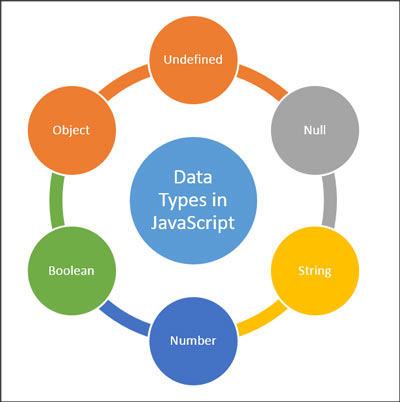
There are 7 data types within JavaScript. Data can be divided into two groups:
a) Data that store primitive value type:

  • 1) string
  • 2) number
  • 3) boolean
  • 4) undefined
  • 5) null
  • 6) symbol (ES2015)

b) Data that stores reference value type:

  • 7) object
    • array
    • Map (ES2015)
    • WeekMap (ES2015)
    • Set (ES2015)
    • WeekSet (ES2015)

Read more

npm & yarn basics

Introduction

npm vs yarn

Package manager is a tool responsible for automating processes related to working with packages. Software packages are located in archive files, and each package contains meta-data that describes the given software (such as the software name, version, and list of all dependencies).
The most common application of package manager is when installing packages and their dependencies. Package manager eliminates the need to manually install software. In addition, package manager can handle updating, configuring and finally removing all those components.

The biggest package manager is npm, which is primarily made for the node.js (server) environment, so in order for it to work in a browser, it is necessary to use module bundler (browserify or webpack). Yarn package manager is the “new kid in town”, Facebook’s baby, it can use all npm packages and has a very similar syntax but it is considered to execute commands faster than npm.

Read more

JS snippets various (tips & tricks)

Borrowing a method from another object

The methods call, apply and bind are used to define the meaning of the reserved word this, however this also allows us that by changing the meaning of “this” an object can “borrow” a method from another object, as in the following example:

It is often the case that one of the methods of Array that are built into its prototype object is borrowed.

In this way, we borrowed Array’s slice method to some object.

Read more

Overview of objects built into the environment (Browser & node)

Introduction

js this

JavaScript is a scripting language “placed” in a container that allows it to work (read more about JS environment in the article JS environment). That container (browser or node.js) contains objects that enable JavaScript to communicate with the outside world. These objects are known as “external API” or “Web API”. You can see a list of all Web APIs at https://developer.mozilla.org/en-US/docs/Web/API. In the following part, I tried to gather in one place the most frequently used objects and their methods and properties.

Read more

The symbiosis of JavaScript and its environment

Introduction

asnhorni JS environment

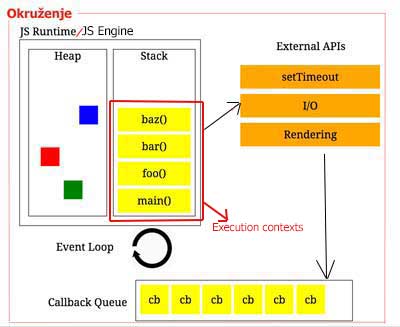
JavaScript is a scripting language, therefore it is necessary to “place” it in some container that would enable it to work, that container is called JS Runtime Environment (Serbian environment). There are two types of environments: browser (for working on the client) and node.js (for working on the server). Runtime Environment consists of :

  1. JS Engine/Runtime
    • Heap
    • Stack
  2. External API
  3. Queue
  4. Event loop

EXPLANATION:
JavaScript is a “single thread” programming language and cannot itself perform multiple simultaneous parallel actions. However, the execution of several parallel actions (so-called asynchronous execution) is possible with the mutual cooperation of JavaScript and its environment. Read more about this in the article “Principle of work of asynchronous JavaScript”.

Read more

Promises (Basics)

Introduction


pyramid of doom

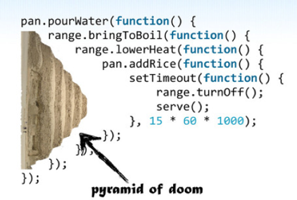
In JavaScript, there is a term for a piece of code with nested callback functions called “callback hell” or “pyramid of doom”. Debugging such program code and even just understanding it is very difficult. With the ES2015 standard came a new syntax called “promise” (Serb. promise), which with its API provides a better and clearer way to organize callback functions. This is especially noticeable when working with asynchronous operations because with promises the syntax is very similar to standard synchronous syntax.

Example – “callback hell”

The most well-known and most common application of callback functions is “handling” of actions after an event has occurred. It is the “handling” of interdependent events that is most often the cause of “callback hell”. This example shows the appearance of such code:

Read more