Type conversion in JavaScript

Introduction

javascript_konverzija

JavaScript is a loosely typed language, which means that it does not require you to clearly declare the data type when declaring a variable. In JavaScript, the type of a variable is implicitly declared by associating a specific value with the given variable.
Javascript is also a language of dynamic types because it is possible to change the type during the execution of the program. The result of the conversion is always some primitive value, ie. there is no conversion that results in some complex value (such as an object or function). Unlike JavaScript, TypeScript (a JavaScript superset language) is a “strongly typed” language that requires a type to be defined when declaring a variable and does not allow implicit type changes.

Read more

Front-End Tools (Overview)

Package manager

Introduction

frontend

Today’s web development is based on a set of different technologies that are used simultaneously on one project, such as: Typescript (language), Sass (CSS extension), JSCS (code style linter and formater), JSHint or TSLint (a tool for detecting errors and potential problems), BrowserSync (a tool for synchronizing changes in the code and in the browser – Live reload)… One project requires the installation of each of the mentioned programs but also of all programs (dependencies) on which they depend and which precede their installation.
Package manager eliminates the need to manually install software with all necessary supporting software (dependencies) and to update all those components. Package manager is a set of tools responsible for automating the process of installing, configuring and removing programs. Package managers work with packages ie. with software or data contained in archive files. Packages contain meta-data that describe the given software such as the name of the software, the version and a list of all dependencies (other software necessary for the given software to work). The most famous package managers are:

  • npm
  • bower
  • JSPM (JavaScript Package Manager)
  • Yarn

Read more

The meaning of the “this” operator in JavaScript

Introduction

js this

Developers use one of these two mechanisms:

  • lexical range of visibility
  • “this mechanism”

The mechanism using the “this” keyword provides an elegant way to implicitly “pass” a reference to a particular object, resulting in a cleaner design and easier code reuse. Developers who avoid using this mechanism mostly do so because they don’t understand the principles of how that mechanism works.

“This” is not a variable but a special programming language word (operator) and represents a link that points to some reference (object). It is activated, i.e. gains meaning only at the moment when the function that contains it is called (invoke).

It does not depend on where the function is declared, but solely on where and how the function is called!

Rules for determining the meaning of “this”

The whole process of determining the meaning is based on recognizing “who” and how it calls the function containing “this”. The sequence of actions is as follows:

  1. First it is checked whether the constructor function is called with operator new(). If it is called in this way, then the value “this” is explained under the point a) Calling the function with the operator “new” but if it is not called in this way, then it is done…
  2. … control whether the function is called with the help of call(), apply() (or bind) methods. If it is called in this way, then the value of “this” is explained under point b) Calling with call(), apply() or bind(), but if it is not called in this way, then it is done …
  3. …check if the function is called as a method of the object. If it is called in this way, then the value “this” is explained under the point c) Calling the method of the object, but if it is not called in this way, then it is…
  4. default linking, which is explained under d) Default linking

If by any chance several different rules are used, priority is applied according to the order from the previously described procedure.

Read more

Events in JavaScript

Introduction

Events are phenomena, which are most often the result of something the user does (mouse click, keyboard click, drag and drop…), although they can also be caused by the system, browser… Registering an event on an HTML element implies binding an event listener (eng. event listener) to the HTML element and defining the consequence of that event. The Event listener, after the event has been executed, calls the event handler (eng. event handler) to action. Event handler is a callback function that is activated as a result of some event.

Read more

Box model

Term and definition

box model

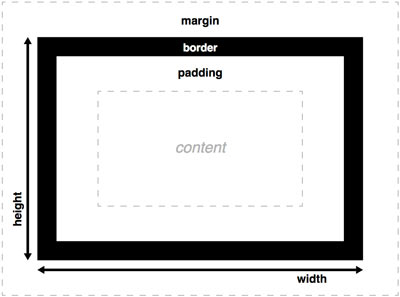
All HTML elements are boxes, including the span tag. A box as a concept in the front-end is different from the concept of a box in life.
Box dimensions according to W3C are obtained by addition
dimension of the following elements:

  • box content (it has its own height and width)
  • padding
  • border

The margin does not enter the size of the box, it separates the boxes. If the width of the box is not explicitly defined, then the box occupies 100% of the parent element.

To play with the box model and get the final size you can visit the page.

Read more

Categories CSS

Overview of built-in JavaScript objects

Introduction

js this

Within JavaScript itself, there are built-in objects with their own properties and methods, intended to make programming easier.

  • Array
  • Math
  • Given
  • Function

In addition to the listed objects, there are also objects whose names are the same as the names of simple primitives (only with a capital letter):

  • String
  • Number

These objects are “equipped” with the methods needed to work with the corresponding data type and are intended to make working with primitive types easier. When the need arises for an operation on such a primitive type, the compiler automatically “wraps” the primitive type in its “counterpart” object, after which all methods of the built-in object are available.

In this article, I wanted to clearly gather in one place all methods and properties of objects embedded in javascript.

Read more

Structured marking
(Structured Data)

What is structural markup?

image ×

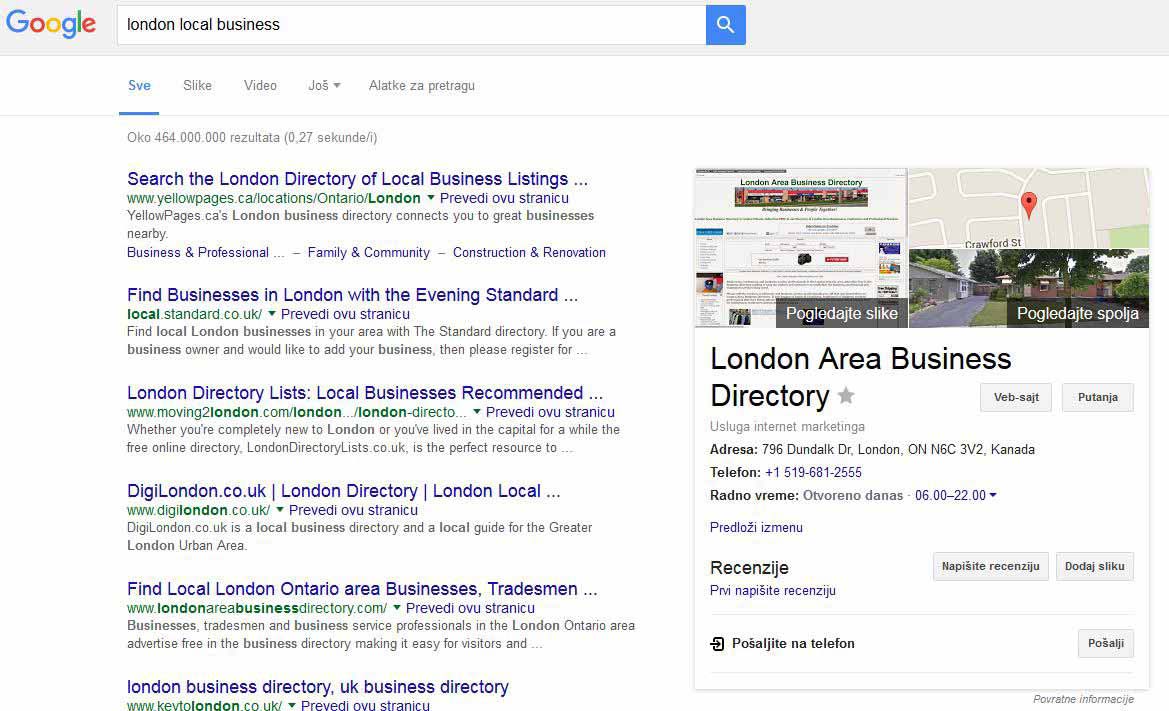
Structured data markup (eng.“Structured data markup”) is an additional way of marking web page content. It allows machines (read: search engines) to better understand the content of a web page, and therefore to better display search results related to that page (see image).

Structural content markup is implemented using the knowledge that different types of content have their own specific properties. Those specific features of the content are collected in one place in the form of dictionary (eng.vocabulary). Dictionaries are sets of property/value pairs that describe content in more detail. The major search engines Google, Microsoft and Yahoo have agreed to standardize the properties in a single dictionary called schema.org. Each specific type of content has its own set of pairs, so restaurant-related content is described by the following properties:

  • working hours
  • address
  • reservations
  • menu

while the content related to the term book is described by the following features:

  • number of pages
  • ISBN book number
  • who is the illustrator

Property names standardized within the schema.org dictionary can be inserted into web pages via three different syntaxes:

  • Microdata
  • RDFa
  • JSON-LD

The choice of syntax is left to the programmer and his personal choice.

Read more

Git commands

.gitignore

Before activating Git, it is necessary to prevent the saving and tracking of changes of unnecessary files. Most often, these are files used by the editor or files created by compiling, etc. We define files or entire directories that we don’t want to track in .gitignore. The .gitignore file is placed within the project folder.
This file is filled with the appropriate commands with the help of which Git knows which files it should not follow. The principle of marking files and folders that we don’t want to track in .gitignore is as follows:

  • Enter the file extensions with a space that we do not want to follow, such as

    .swo .swp

  • Enter the folders we don’t want to track:

    folder_name

    In case there is a file inside the folder that still needs to be tracked, write:

    !someFile.txt

  • Enter the folder and its subfolders that we do not want to track:

    folder_name/subfolder_name

    View branches

  • Let’s enter the folder and all its subfolders that we don’t want to track:

    folder_name/*

  • Let’s write all objects and archives that we want to ignore:

    *.[oa]

There are a large number of .gitignore examples on the Internet, depending on the project in question (WordPress, Android…), and you can find an excellent site for finding an adequate one at the following link: toptal/.gitignore.

Unfollow

It is very important to create a .gitignore file before initiating Git, because if Git has already started monitoring a certain file, it will not stop monitoring it even if we later insert that unwanted file into .gitignore. Below are described the necessary actions to stop uploading a file.

a) Termination of tracking without physical deletion

If some non-essential files for the project have been committed by mistake, the changes of which we do not want to save, but we also do not want to physically delete them from the working directory, we need to order git to stop tracking them (i.e. to remove them from the repository) with the command:

The command to stop tracking a directory is:

where -r tells Git to stop tracking all subdirectories and files within it.

After the command to stop tracking, the file is in the preparation space (index). In order to prevent the files on the next commit from entering the repository again, it is necessary to insert those files into the .gitignore file before the commit-ovj.

NOTE:
Please note that if the file name contains a space between words, it is necessary to put it in quotation marks, as in the following example:
git rm "neki naziv fajla sa razmacima.ekstenzija"

b) Termination of monitoring with physicalby deleting

If there is a need to remove the file from the repository and delete it from the working directory, use the command:

If it is a directory, we use the command:

where -r tells Git to stop tracking all subdirectories and files within it. After the command to delete files, it is also necessary to commit (without first sending to the index).

See more about this command on the official page

Local repository

When we want to activate Git ie. to start tracking changes in the project, we need to initiate the creation of a “working git repository” within the project folder, which is done as follows:

This command creates a new folder .git (so-called “repository”) within our project and it will contain the entire database of our project. From that moment Git monitors the project and takes snapshots of the state when we commit. If we want Git to no longer monitor our project, it is enough to delete this folder.
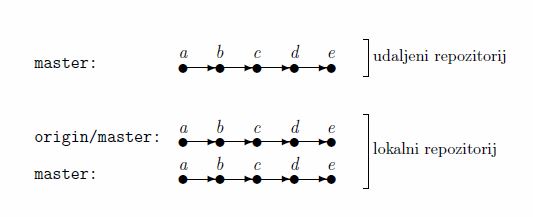
view branches after cloning

The local repository is in a specific relationship with the remote one because it is “aware” of the existence of the remote repository. Within the local repository there are always at least two branches (see picture):

  1. A branch named “origin/master” which is a local version (copy) of the remote repository. Our changes cannot be sent to this branch, but it serves to take changes (merges) from it, because it is practically an intermediary, i.e. an intermediate step for getting changes from a remote repository.
  2. The branch named “master” is our local branch directly linked for the project (where we make commits).

Read more

Domain and hosting

Domain lease Renting a domain is one of the first steps necessary for web presentation. Purchases are made through authorized sellers (registries). Domain registrars are companies that sell domains. They must have a certificate approved by ICANN, the Internet Corporation for Assigned Names and Numbers. List of authorized registries in Serbia can be viewed here, … Read more

CSS selectors

Selector types

CSS selectors are part of CSS syntax, which specify HTML elements to which CSS rules will be applied.

Universal selector

Universal selector is marked with a * (star), and its property is to select all elements. This selector is usually used when resetting styles.

Example

Defined with HTML element type

These are the simplest selectors and are defined by the name of the HTML element they target.

Example

or

Defined with element class

These selectors “target” HTML elements that contain a certain class.

Example

A selector that targets a class is marked with . (with a dot) in front of the class name.

Defined with element ID

These selectors “target” HTML elements that contain a specific ID. They are marked with a # sign in front of the ID name.

Example

A selector that targets an element with a specific ID is marked with a # sign in front of the ID.

Read more

Categories CSS