Directive v-on:

Syntax

Vue provides a very nice way to integrate an event listener on any DOM element. As with other methods, event callback methods have direct access to Vue data using the “this” keyword.

a) Standard syntax

In order to attach an event listener to any HTML element, we use the directive v-on: to which we append the name of the type of event we are listening to. In addition, it is necessary to “assign” the appropriate event handler method at the end of such syntax.

Abbreviated writing syntax

b) Object syntax for multiple “hooked” events

This syntax is used when we “hang” several different events on the same element

Read more

What are Vue.js directives

Vue.js directive syntax Directives are commands that we can attach to the DOM element, they are used for low-level access to the HTML element, and its behavior control. Thanks to directives and interpolation, any HTML under the jurisdiction of Vue.js is still something more than ordinary HTML. In order for Vue.js to know when it … Read more

The v-bind directive:

Syntax

As mentioned Vue.js can dynamically generate HTML using one of the directives. The “v-bind” directive is used for dynamic generation of HTML element attributes .

Using this directive we can reactively bind an attribute value to a “data” object:

Example

Abbreviated directive writing

This directive v-bind: has an abbreviated syntax represented by a colon :

Example

Read more

HTML interpolation within Vue.js

Introduction

vue.js

Vue.js is a MVVM framework, which has a system to connect the “model” (data) to the corresponding “view”. The “view” section, like in other frontend libraries, is actually HTML, but with additional functionalities that allow it to display the model dynamically, namely:

  • “interpolation”
  • “directives”

The part of the HTML code over which interpolation is performed is marked with double curly brackets, and such syntax is known as “Mustache syntax”. Anything inside double curly brackets will be processed by Vue.js and replaced with the appropriate result.

Text interpolation

If there is text between the brackets that represents a property from the “data” object, this syntax will display the current value from that property in the HTML frame. Since the “data” property is specific and acts as a proxy to the vue instance, it is not necessary to use the this.data.property syntax, just the name of the property is sufficient. The most important thing about text interpolation is that Vue.js will reprocess everything inside the brackets if the data changes, after which it will automatically update the HTML.

This method interprets “data” as plain text, not HTML. If it is necessary to evaluate HTML, then the directive “v-html” is used. It should be emphasized that text interpolation cannot be used to interpret HTML tag attributes, for that it is necessary to use the “v-bind” directive.

Read more

Lifecycle of a Vue.js instance/component

Introduction

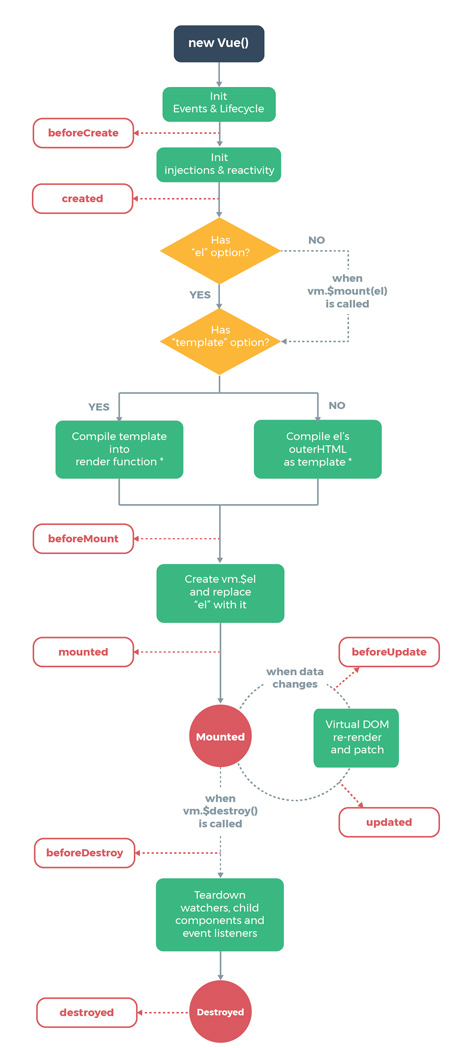
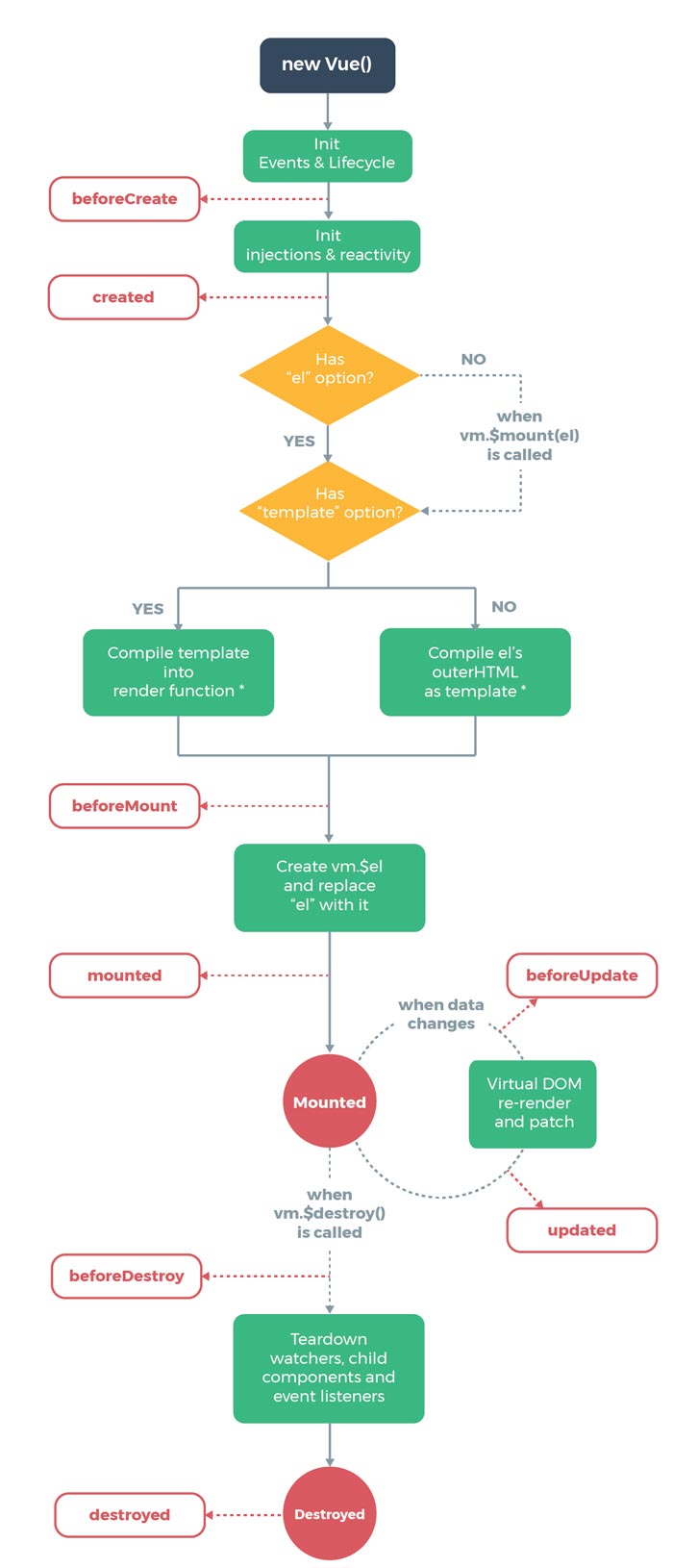
Vue 3 note (2026): In Vue 3 the destroy hooks are named beforeUnmount / unmounted. The old beforeDestroy / destroyed names still work as aliases.

vue

In order to target a specific moment in the “life” of a Vue instance/component, so-called hooks (eng. hooks). Hooks allow you to trigger the desired action precisely at the appropriate moment in the component’s lifecycle. Hooks within the Vue.js framework are represented through specific predefined methods that enable this.

Lifecycle related methods

All lifecycle-related methods are placed in the root vue instance as a direct property.

vue lifecycle

image ×

Read more

Vue instance properties: methods, computed and watch

methods

Properties within Methods are functions bound to a Vue instance. “Methods” are used when you want something to be executed after an event or when you want a function to be executed whenever the state of the instance/component changes after which the DOM is re-rendered. “Methods” are also executed every time the instance (component) is loaded.

When this data changes, the view will re-render. Method invocation will always run the function whenever a re-render happens.
Vue.js documentation

This behavior of methods is made possible by the fact that Vue.js does not take into account what is inside the method, so the method will be recalculated even if the change does not affect the method.

Example

methods

In this example we have two methods (“notification()” and “printValueB()”) whose functionality is simple and described by the name of the method itself. However, the functionality that is important in this example is printing a message to the console every time any button is clicked.
The first thing to pay attention to is the fact that immediately after loading the Vue instance messages from both methods are printed in the console, which confirms the fact that the methods are executed every time the Vue instance (component) is loaded.
Then you should monitor the console after each click on the action button, because after each click, two new messages are printed, regardless of which button was clicked. This indicates that both methods are executed every time the DOM is re-rendered after a given property change, and even a method that is not affected by the given property change.

See the Pen Method specificity in Vue.js by Web Programming (@chos) on CodePen.

Conclusion:

Therefore, due to everything mentioned, it should be emphasized that in the case of frequent user interface updates, there may be problems with the performance of the application, because resources are consumed when restarting all methods. For example, if we have an application that displays a timer that is updated every second, all the functions in the “methods” object will be called to execute after every second, and recalculated regardless of their purpose. In this case, it is recommended to use computed properties.

Read more

Accessing properties of a Vue.js instance

Access properties within the Vue instance itself

Within a Vue.js instance, the keyword “this” points to an instance of a vue.js object. Therefore, the “this” reserved word is used to access instance properties, appended to the name of the desired property:

It should be noted that certain vue instance properties are specific, because they have additional “background magic” going on. The data, methods, computed and watch properties act as a “proxy for the vue instance”, so all properties inside them are passed directly to the vue instance. Therefore, all child properties of these specified properties are represented as if they were direct properties of the Vue instance.

Example

Thanks to this “magic”, when targeting child properties within those specific properties, we access them as if they were “main” properties. So we don’t need to use “this.data.someProperty”, we can just use “this.someProperty”.

In this example, instead of using the this.data.message expression, we use this.message as a completely legitimate way.

Problem cases when using “this” (for: data, methods, computed and watch)

a) Arrow function

Child properties within these “special” properties (data, methods, computed and watch), precisely because of the “magic” in the background, should not use the arrow function because it uses the lexical “this” ie. uses “this” from the parent environment, so it would return “undefined” in that case. You can read more about the arrow function in the article “Arrow function”

b) Closure

If the clousure function is called by an external function, then the “default rule” is used when determining the value of the keyword “this” (read more about this in the article “Meaning of the “this” operator in JavaScript”). For the aforementioned reason the “this” keyword in the closure points to a global object.

Example

In this example this.message does not return the expected value but “undefined” because the global object does not have a “message” property

To solve this problem, we can use the well-known technique var self = this;, where we save the value this within the new variable of the closure function (closure always has access to this variable). Read more about this mechanism in the section “Mechanism self=this”

See the Pen Closure within Vue.js by Web programming (@chos) on CodePen.

Read more

Vue instance properties

What are Vue instance properties?

When defining a new Vue instance, the constructor function accepts an object as a parameter through which all Vue instance options are defined. Within that object, Vue.js already provides predefined properties each with its own characteristics, which enable the operation of the Vue application. The following list represents the basic properties of each Vue instance and are accessed outside the instance with the $ sign.

Next to them, three very important properties are mentioned: computed, methods and watch which act as proxies (read more about this in the article “Accessing Vue instance properties”).

“$el”

As of version 3.0 $el can be used to access the underlying DOM element, mostly with components that use fragments. However, it is recommended that starting with version 3.0, the reliance on $el should be avoided, but instead the template references $refs should be used as direct access to DOM elements.

Within the 2.0 version with the property “el” we define the HTML element that will be “managed” by the Vue application:

HTML

JavaScript

Read more

Installing Vue.js

Integration into an existing project

Among other things, Vue.js is popular among developers, because it has the ability to be easily integrated into an existing project, it is enough to insert a skip at the bottom of the body section, which is located on the CDN:


When we have the Vue.js library available within the project after this script tag, it is enough to open a new script tag within which the instance will be created.

In the case of version 3.0, the syntax has been slightly changed (see what caused these changes on the official site), so instantiating a Vue object looks like this:

In this version, after instantiation, it is still necessary to perform “mounting” ie. binding the instance to the HTML element.

So the whole code would look like this:

Example (3.0 ver):

See the Pen
Untitled
by Web Programming (@chos)
on CodePen.


Every Vue application must have an instance created based on the Vue() constructor function. The data necessary to create a new instance is passed to the constructor function through the so-called “options object”. To create a new instance, it is enough to call the constructor function with the keyword new.

If we need to access the properties of the Vue instance outside the instance itself, then it is necessary to assign the created instance to a variable:

Multiple Vue instantiations are allowedinstances, but each of the instances must “control” different parts of the HTML, because it is not allowed to bind one instance to multiple different HTML parts. However, there is often a need to embed multiple identical or similar repeating HTML elements (such as a product) into a web application, yet still be linked to Vue.js instances. Since it is not allowed to bind one instance to several different HTML parts, in that case you should create a Vue.js component and embed it multiple times.

Read more