Dynamic components

Syntax for dynamic components Dynamic components in Vue allow you to specify a single HTML placeholder for different components, after which the user/application can dynamically choose which component to display. The syntax of dynamic components is very similar to the syntax of the “slot” mechanism, except that in this case it is the so-called placeholder … Read more

Forwarding content with a slot element

Introduction One of the ways to forward the content from the parent component is to insert it between the custom tag that represents the instance of the component. This mechanism is used when we have similar components that differ only in content, because this way we avoid creating two separate components. The Child component accepts … Read more

Communication between neighboring components

Introduction

Communication between “neighboring” components can be achieved in several ways, and the choice of one of the offered mechanisms usually depends on the complexity of the application.

a) Communication via common parent ($emit -> $on & attribute -> props )

A feasible solution, but it is generally a bad idea, because it is difficult to monitor the flow of data and therefore difficult to debug.

b) Event bus ($emit & $on)

A fast and simple solution for applications with a simple architecture and fewer components.

c) Pinia / Vuex (centralized state)

For Vue 3 use Pinia (official store). Vuex remains relevant for older Vue 2 apps.
Read more

Communication between components type “parent <---> child”

Introduction

emit-props

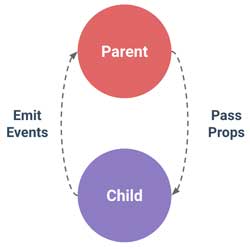
Within Vue.js, each component has its own isolated domain, direct communication between two components is not allowed by default, so appropriate mechanisms are used for data exchange.
Communication between parent and child components can take place in both directions, but using different mechanisms. In the direction from the parent to the child component, the data is forwarded through the child tag attribute, and in the direction from the child component to the parent component, it is forwarded with the custom event.

It should be emphasized that depending on the type of transmitted data, it depends on whether the communication is one-way or two-way. In the case of primitive type data, this communication is one-way, because even if the child component makes a change to the passed data, it will not affect the parent component. However, if data of reference type (strings or object) is passed, then the change of such data in the child component will also be noticed by the parent component because both “watch” the same place in memory.

Read more

What are Vue.js components?

Creating a component It is known that even with the simplest applications, it is not good to keep the entire code in one file, but it is better to break it into several units, because that way the application is simplified and allows better visibility and easier debugging. Components are a great way to break … Read more

Directives v-text & v-html & v-pre

v-text

This directive accepts as an argument a variable representing the text with which the entire content of the tag should be updated. It has the same functionality as string interpolation.

See the Pen v-text by Web programming (@chos) on CodePen.


vue.js

Read more

v-show & v-once & v-cloak directives

v-show The “v-show” directive is used to conditionally display an element. Although “v-show” always generates the HTML element it is on (the element is visible in the inspector), it will only display it on the user interface if the state of the v-show="true" directive is true, otherwise the element will not be displayed because it … Read more

Directive v-if

Introduction These directives are embedded as attributes in the desired HTML elements and can replace the familiar javascript syntax:

Syntax and examples v-if It is used for conditional rendering of the element ie. can add and remove an element from the DOM.

NOTE: If the “v-for” directive is used together with “v-if” on … Read more

Directive v-for

Introduction

vue.js

Using the Vue.js directive “v-for” we dynamically generate the so-called HTML. listing (mapping) data. <div v-for="item in items">
Although it may seem logical at first glance to place the directive on the parent element (“ul” or “ol”), this is not the case here, with Vue.js the “v-for” directive is embedded on the HTML element that should be “listed”, i.e. The HTML element on which the “v-for” directive is “attached” will be used as a template for rendering the corresponding content.

The “v-for” directive uses a so-called “in-place patch” strategy that allows efficient use of resources. However, this approach can in some cases create a problem in displaying the listed elements, after sorting them or changing their order (for example, if we use a method that mixes the order). There is a solution to this problem by adding a unique “key” attribute to each element, which is “bind” to that element. Essentially adding this extra attribute is a cue for Vue.js to track the identity of each element and thus redefine the element’s position correctly. For the key, you should choose some unique data
v-bind:key="nekiJedinstveniParametar"
It is recommended to provide this attribute whenever possible. Read more about this issue on the official page or on the “codingexplained.com” page in the article “Understanding-v-for-update-strategy”

Example

Read more

Directive v-model

Introduction

vue.js directives

The user action on the view is forwarded to the application with the “v-on:” directive, after processing the data to update the user interface, we forward the data from the application by interpolation or the v-bind directive. Each of the listed individual procedures represents data forwarding in one direction (“one-way binding”). However, data entry fields are specific, because they need forwarding of data in both directions (eng. “two-way binding”), therefore both directives are needed on the same element.
In the following example, the data from the form is passed to the data object with the “v-on:input” directive, while the data changed from the application itself updates the value in the HTML input with the “v-bind:value” directive.

Within Vue.js there is a directive that covers this process called “v-model”, with the use of which the code looks much simpler, so instead of:

we use a clearer and simpler syntax:

Read more