


Introduction
WordPress translations can be divided into:
- Translation of the entered content so called. frontend (translated by the user using plugins: Polylang or WPML…)
- Translating the backend:
- WordPress core (already translated during installation)
- Themes or plugins (prepared and translated by the developer)
Domain (text domain)
The domain for translation (text Domain) is a unique freely chosen term that points to a folder inside the theme or plugin that contains the files necessary for translation .po and .mo. WordPress by default looks for files to translate in two places:
- wp-content/languages
- wp-includes/languages
for all other locations it is necessary to emphasize that.
It is recommended that in every theme or plugin file where there is text ready for translation, the following should appear in the comment at the beginning:
|
1 2 3 |
/* * textdomain: domain name */ |
Domain in theme
When developing a theme, wordpress checks if the translation files exist and where they are located with the function load_theme_textdomain(). This function is used inside functions.php and needs a path to the domain.
|
1 |
load_theme_textdomain( $domain, $path ) |
This function returns TRUE if the text domain is loaded and FALSE if it is not.
Example
|
1 2 3 4 |
function my_theme_setup(){ load_theme_textdomain('my_theme', get_template_directory() . '/languages'); } add_action('after_setup_theme', 'my_theme_setup'); |
Domain in plugin
When developing the plugin, the function load_plugin_textdomain() is used.
|
1 |
load_plugin_textdomain( $domain, $abs_rel_path, $plugin_rel_path ) |
Where are:
- $domain – (string) (required) unique domain name that must match the plugin’s slug. If a slug of more than one word is used “dashes” – and not underscore _
- $abs_rel_path – (string) (optional) Relative path to the folder where the .mo file is. IT IS NOT USED ANYMORE, so it is left FALSE, which is the default value.
- $plugin_rel_path – This parameter is used instead of the previous one. Provides a relative path to WP_PLUGIN_DIR.
Example
|
1 2 3 4 |
function myplugin_load_textdomain() { load_plugin_textdomain( 'my-plugin', false, plugin_basename( dirname( __FILE__ ) ) . '/languages' ); } add_action( 'plugins_loaded', 'myplugin_load_textdomain' ); |
Preparing a theme or plugin for translation
Internationalization (so-called i18n) and localization (so-called l10n) in WordPress is the process of preparing parts of the text for translation. This involves wrapping (eng.wrap) the text with special gettext functions. These functions check if there is a translation of the “wrapped” text in the textdomain and if there is, return it.
When creating a theme or plugin text wrapped by the gettext function MUST be written in ENGLISH !!!
Gettex functions
__()
This is a basic function that takes text and returns a variable with the translated text if it exists in the domain.
|
1 |
$translated_text = __( $text, $domain ) |
Example
If inside the code we have a part like this:
|
1 |
the_content( ‘Read more’ ); |
In order to enable the translation of the text “Read more” when the language is changed, it is necessary to complete the text with a function as in the following example:
|
1 |
the_content( __(‘Read more’,’mytheme’) ); |
_e()
This function works the same as the previous one in that it immediately prints the translated text.
|
1 |
_e( $text, $domain ) |
Example
If inside the code we have a part like this:
|
1 |
echo ‘Hello user’; |
In order to enable the translation of the text “Read more” when the language is changed, it is necessary to complete the text with a function as in the following example:
|
1 |
_e(‘Hello user’,’mytheme’); |
_n()
This function allows, in addition to the singular, to return the translated word in the plural
|
1 |
_n( $single, $plural, $number, $domain ) |
- $single – translation of the text that will be used if the number is 1
- $plural – translation of the text that will be used if the number is greater than 1
- $number – the number used to determine the plural
- $domain – domain
Example
|
1 2 3 4 5 6 |
rating = '3'; $text = sprintf( _n( '%s star', '%s stars', $rating, 'your_textdomain' ), $rating ); echo $text; // for number 3 returns: 3 stars |
_x()
This function allows different translations of the same word depending on the context in which it is mentioned.
|
1 |
_x( $text, $context, $domain ) |
- $text – Text to translate
- $context – Context information
- $domain – domain
Functions for translation and encoding
There are also functions that, in addition to working like the previous functions, additionally encode strings and enable safe use. They are used when it comes to input via forms:
- esc_attr__()
- esc_attr_e()
- esc_attr_x()
- esc_html__()
- esc_html_e()
- esc_html_x()
Examples of good practice
It is recommended to use whole sentences because the arrangement of words in a sentence is not the same in different languages. If it were to be translated word by word, then the sentence in another language might not make sense.
Example
Use variables inside sentences to translate.
|
1 2 3 4 5 |
printf( /* translators: %s: Name of a city */ __( 'Your city is %s.', 'my-plugin' ), $city ); |
Example
It is always better to use “format string” instead of concatenation
|
1 2 3 4 5 6 |
printf( /* translators: 1: Name of a city 2: ZIP code */ __( 'Your city is %1$s, and your zip code is %2$s.', 'my-plugin' ), $city, $zipcode ); |
Example of incorrect code
|
1 2 |
// This is incorrect do not use. _e( "Your city is $city.", 'my-plugin' ); |
The previous example gives the phrase to translate: “Your city is $city.” and does not use variables.
Example
Use “placeholders”
|
1 2 3 4 |
printf( __( 'Search results for: %s', 'my-plugin' ), get_search_query() ); |
Translating a theme or plugin
All data related to translation are stored in files with extensions:
-
.POT files
POT (Portable Object Template) file contains all words that are wrapped with some gettex function such as __() or__e() .
-
.PO files
A PO (Portable Object) file in addition to the words that are “wrapped” with gettex functions also contains their translations in a human-readable form.
-
.MO files
An MO (Machine Object) file is a converted .PO file into a computer-readable format.
Since we have created a folder within the theme or plugin named “languages” and “load-ovals” text domain, we can now collect all the text parts that are wrapped with some gettext function in one place and add a translation to them. All of this is stored in a .po file. The “PoEdit” application is used to create .po files and compile them into .mo files.
The procedure is as follows:
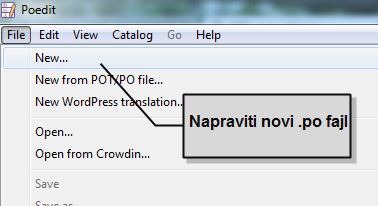
- After starting the application, click on File/New
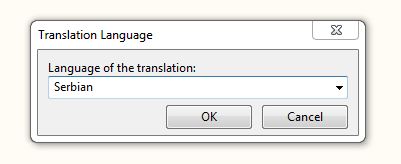
- Choose the language into which we translate
- Save the file on the Save icon. The folder we place it in is “languages” and when naming it, we adhere to the following rules:
- for topics in the form “domen_locale.po” (for Serbia it was sr_RS.po),
other abbreviations for each language can be found on the page make.wordpress.org/polyglots/teams/ - for plugins in the form “text_domen-domen_locale.po”,
(so for a plugin with a text-domain: “plugin-domen” and for the Serbian localization it would be plugin-domen-sr_RS.po)
- for topics in the form “domen_locale.po” (for Serbia it was sr_RS.po),
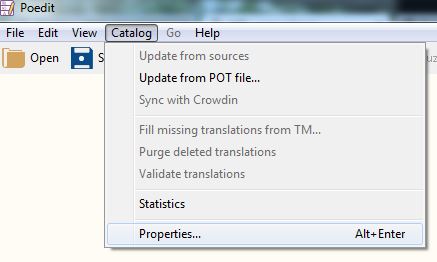
- Let’s open the application settings window “Catalog/Properties”
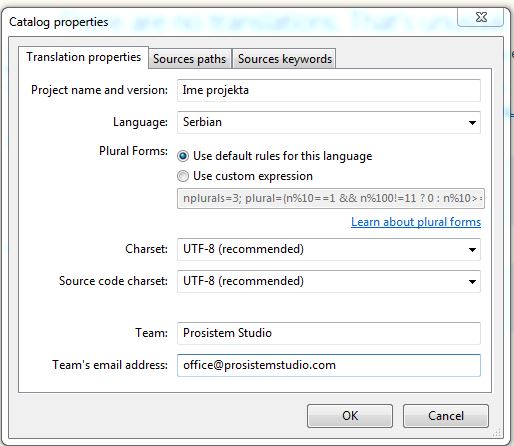
- In the Translation properties tab I fill in the basic data
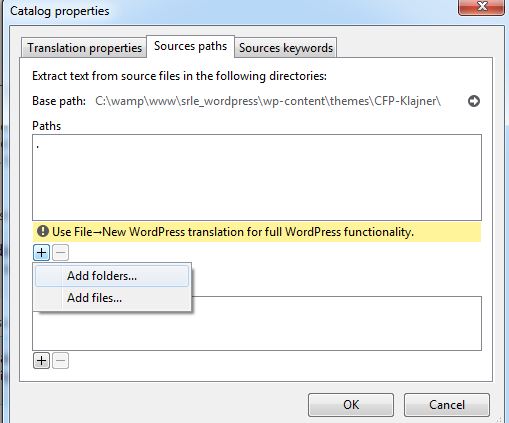
- In the tab “Source path”, select the folders that contain files with text wrapped by one of the gettext functions
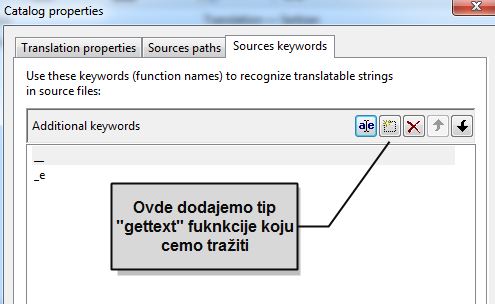
- In the “Source keywords” tab, select which gettext functions we are looking for:
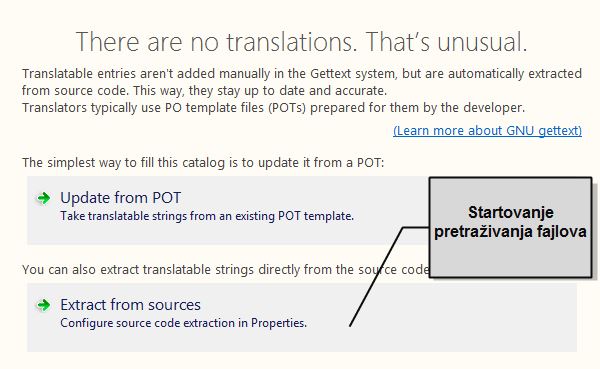
- When we close the properties, we select the option “Extract from sources” which gives the command to search all gettext functions in the selected files.
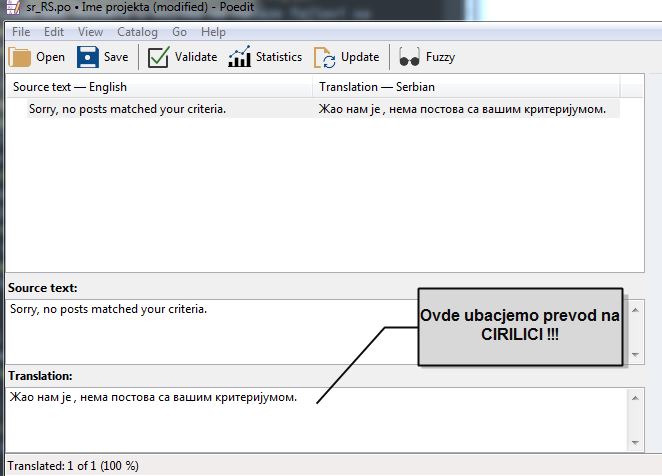
- When “PoEdit” finishes searching for gettext functions, it opens a window with a list of all texts wrapped by gettext functions and allows us to enter a translation. The translation should be in Cyrillic because it is easily switched to Latin later by simply turning on the plugin for switching to Latin.
- After the translation, it is necessary to save all changes by pressing the “Update” button
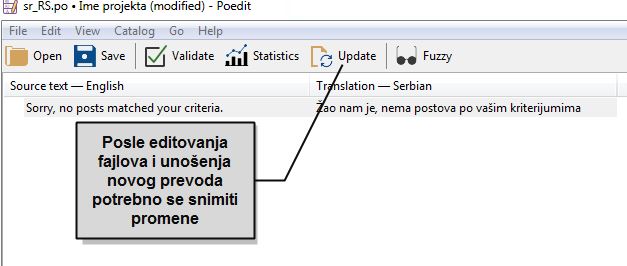
after which PoEdit will create the file .po and .mo
Here, files or folders can also be excluded from the search for gettext functions.
If we open the .po file with Sublime text, we can clearly see in which files and in which line of the file the specific text is found.

Change backend language
For translation to be possible, it is necessary that there are files with translations, namely:
- for standard admin page options(wordpress core)
(files in textdaomain wp-content/languages)
These files are prepared and are downloaded automatically when you select the language - for the part of the admin page related to the topic
(files in the texdomain of our theme theme/languages
Backend language is easily changed on the admin page under Settings/General
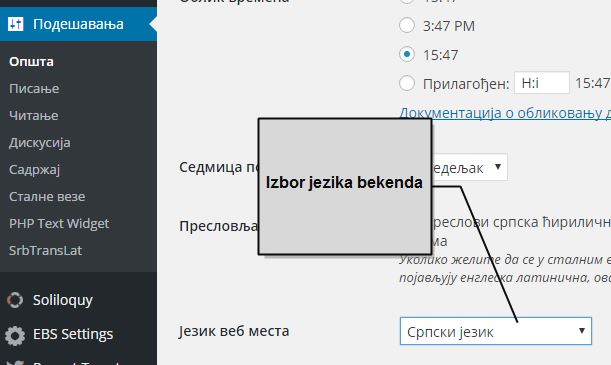
Backend in a different language than Frontend
If it is necessary for the backend of the admin page to be in one language and the frontend in another, then we use a plugin such as Backend Localization
Serbian WordPress
Serbian WordPress is standard English wordpress, only it has downloaded files for Serbian translation inside standard text domain wp-content/languages
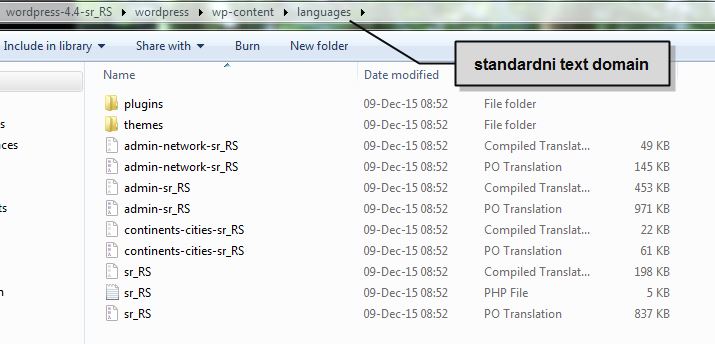
In this folder (text-domain) are:
- files related to wordpress backend translation
- folder themes where there are translations of the default themes that come with wordpress
- folder plugins in which there is a file for translation of the plugin that comes with WordPress, i.e. Aximet
English WordPress always comes with only English names and downloads new languages only after language selection.
If you do change something in these files, all changes will be “trampled” during the next update, therefore it is wise to update English wordpress and not Serbian in order to save data.
Serbian backend in Latin
The procedure for switching the Cyrillic backend to Latin is as follows:
- Click on “Control Panel”.
- In the menu on the left, find “Add-ons” and click on it.
- A list of all installed plugins will be displayed on the newly opened page. Find the appendix “Serbian translation in Latin”.
- Activate the plugin.
- After this WordPress will be in Serbian language and Latin script. If you want to re-enable the Serbian language in Cyrillic, you only need to turn off this plugin.
- Your language and font settings will remain after every WordPress update.