


Algorithm for method selection when working with arrays
With the help of the following snippet written by Sarah Drasner, we arrive at the appropriate method using a simple algorithm:
See the Pen Array Explorer by Web programming (@chos) on CodePen.

With the help of the following snippet written by Sarah Drasner, we arrive at the appropriate method using a simple algorithm:
See the Pen Array Explorer by Web programming (@chos) on CodePen.

Ajax stands for “Asynchronous JavaScript + XML” (although JSON is mostly used today), and represents a group of technologies intended for dynamic creation of Web pages. By using AJAX, we improve the quality of interactivity with the user, with the desire to make it as similar as possible to desktop applications (according to the speed of interaction). The idea behind Ajax is that the page on which the Web application takes place is loaded only once, and that all further communication with the server is performed asynchronously without blocking the interface and without reloading the entire page. Asynchronous behavior means that after the user interacts with the interface, the request to the server is accepted by JavaScript and the XMLHttpRequest object, which in the background sends requests to the server and displays the results when they are available, while the user can continue working in the meantime.
Ajax is not without flaws, since Ajax pages are dynamically generated the biggest problem for sites is search engine optimization. Search engines often cannot interpret the site well, which leads to problems in indexing the sites. A similar problem exists with page traffic analysis tools, because a user can spend a whole day on one Ajax page, and classic traffic analysis tools will interpret this as one page view.
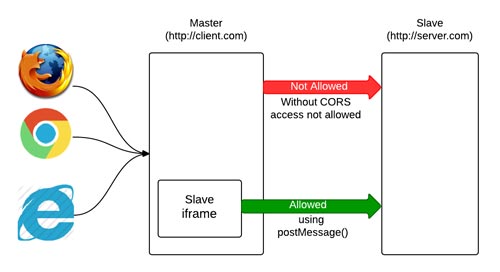
Cross Domain Data Request is a specific request for data, because the data is not on the domain (protocol or port) from which the request originates.
The default behavior of servers is to not allow access to data from other servers, and the main reason for this prohibition is the ability to perform advanced requests (POST, PUT and DELETE etc.) which can lead to various security issues. Therefore, AJAX requests are prohibited by default, and this restriction is known as “the same origin policy“ (Serb. polisa common origin).
However, some types of resources are not subject to this ban, because browsers allow access to them by default. Resources that are not located on the domain from which the request originates are allowed to be called only through “src” or “href” attributes of the following HTML elements: <script>, <img>, <video>, <iframe>.
There are also solutions for requests where the ban “the same origin policy” applies, but this implies the use of specific mechanisms. This article is about those mechanisms.

Introduction In synchronous execution of operations, the current operation must be completed before the next operation can begin. While in asynchronous execution, operations do not wait for each other to be executed, but are executed simultaneously. In general, in most cases, synchronous processes are not a problem because computers are very fast, so all operations … Read more

In this article, I tried to collect JavaScript code snippets (eng. code snippets), which can be useful in everyday work with DOM. Almost all snippets are written in two versions, using only plain JavaScript or with the help of the jQuery library.

The following examples show an “event listener” that waits for the moment when the DOM is loaded so that JavaScript can manipulate it. The same would be obtained if the JavaScript code were placed at the end of the body, i.e. before the closing “body” tag itself.
|
1 2 3 |
document.addEventListener("DOMContentLoaded", function() { // some code }, false); |
|
1 2 3 |
$(document).ready(function() { // some code }); |
|
1 2 3 |
jQuery(document).ready(function ($) { // some code }); |
The load event is “triggered” only when the entire page with all CSS styles, images…
is loaded
|
1 2 3 |
window.addEventListener("load", function(event) { console.log("All resources finished loading!"); }); |
|
1 2 3 |
$(window).on('load', function(){ console.log("All resources finished loading!"); }); |


JavaScript is a specific programming language, and compared to other languages, it sometimes solves problems in a different way than expected, but that doesn’t mean that way is wrong. Behind every “weird” decision regarding language syntax is a good reason why the JavaScript development team chose it. In order to understand the specifics of the language, it is necessary to thoroughly study the syntax and principles of the language. There are a small number of illogicalities that I still can’t “digest” so easily, but nobody is perfect and neither is JavaScript. It is considered that programmers who come into contact with JavaScript as a second language have a little more trouble to adapt, because they expect the same principles as in their favorite programming language but do not find them here either. In this article, I’ve collected potential (un)forced errors that a mere JavaScript mortal can make. The article will be updated regularly as I make mistakes 🙂
Introduction Whenever an event occurs (eng. event), javascript places all relevant data related to the event in an “event object”, e.g. where was the mouse pointer, which button was clicked, which element was clicked… This object is always passed to the callback function, and therefore the callback function has access to all the data stored … Read more
| Event | Description | HOME |
|---|---|---|
| onkeydown | The event occurs when the user is pressing a key | 2 |
| onkeypress | The event occurs when the user presses a key | 2 |
| onkeyup | The event occurs when the user releases a key | 2 |

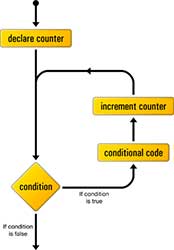
There is often a need to execute some lines of code multiple times within a program. This mode of execution is achieved by means of appropriate management structures. Loops and iterations are the basic building block of any program. Standard loops occur in more or less the same form in almost all programming languages. The most used is “for loop”. Special attention should be paid to while loops because there is a possibility that the loop may become infinite due to a bad choice of conditions.
The while statement is executed as long as the condition is TRUE, and if it is not then the loop is exited. This type of loop is most often used when the exact number of elevations of the loop is not known. In case the condition is not met at the very beginning, the loop is not executed once. Before entering the loop, variables are initialized that will be used either in the condition or in the body of the loop. The body of the loop contains the code that forms the condition for remaining in the loop.
|
1 2 3 |
while ([condition]) { expression for execution if condition is TRUE } |
This type is called a “pre-test loop” because the condition is executed before the expression block.
|
1 2 3 4 5 6 7 |
var n = 0; var x = 0; while (n < 3) { n++; x += n; } alert ("Ukupan zbir niza je " + x) |

It is a known fact that when a function ends, all its local variables are picked up by the garbage collector and they cease to exist in memory. However, this is not the case for a function that contains a closure function.
Closures are functions that have access to variables that are in the domain of another function. This is most often achieved by embedding the function inside another function (thus defining the “scope chain”), after which the closure gains the ability to remember the reference to variables from the parent domain.
It should be noted that mutable external functions are not deleted upon execution of the function itself, but are kept in memory to be available to the closure function. After the execution of the closure function, the external function is also closed (hence the name “closure“). Until the closures are executed, JavaScript will also store the necessary variables from the domain of other functions, therefore they take up more memory than regular functions. Excessive use of closure can lead to increased memory consumption. The latest JavaScript engines manage to partially free the trapped memory, but it is still recommended to be careful when using closure.
As part of the debugger built into the browser, you can see the closure expression and which value of the variable is “remembered” (see picture).
The function b() is nested inside the function a() and along the “scope chain” looks for a variable from the function a(), therefore it is a classic example of a closure function.
|
1 2 3 4 5 6 7 8 |
function a (){ var x = "This is closure"; function b (){ console.log (x); } b(); } a(); Returns: Ovo je closure |
If the inner function does not use a variable from the outer functions in which it is located (along the “scope chain”), then it is not a closure. See the following example:
|
1 2 3 4 5 6 7 8 |
function a (){ var x = 5; function b (){ console.log ("This is a nested function, but not a closure!"); } b(); } a(); // Returns: This is a nested function, but not a closure! |
It is known that after using the return command, the execution of the function and the existence of its variables in the temporary memory are interrupted. However, “Closure” remembers the variables from the outer function even if it returned a value with return.
|
1 2 3 4 5 6 7 8 9 |
function a () { var x = "This is a closure, even after the outer function has completed and returned a result"; function b () { console.log(x); } return b; } var c = a(); // We assign the return function to the variable "c" c(); // Returns: This is a closure, even after the outer function has completed and returned a result |
When it is said that the “closure function” has access to a variable, it means that it has access to a certain place in the memory pointed to by that variable, ie. to its reference at the time of calling “closure function“. If at that place in the memory, i.e. reference changes value, closure will always take the latest current value. The following example shows how the internal function “remembers” the reference and uses the current value in memory.
|
1 2 3 4 5 6 7 8 9 10 11 |
function povecajBrojac () { var brojac = 0; return function () { return brojac++; }; } var izbroj = povecajBrojac(); izbroj(); // Returns: 0 izbroj(); // Returns: 1 izbroj(); // Returns: 2 |
If, after defining clousure, we assign some other reference (place in memory that stores some value) to the variable that needs closure, clousure will use the reference that was in circulation at the time of defining clousure. In the following example, the function sayHello() at the moment of definition “remembers” a reference to the global variable “myName” (“Dragoljub”). So even though “myName” changes the reference which now contains the value “Marko”, the closure still uses the value “Dargoljub”.
|
1 2 3 4 5 6 7 8 9 10 |
var myName = 'Dragoljub'; var pozdrav = function(name){ return function(){ console.log('Hello ' + name + '!'); } } var pozdravSaImenom = pozdrav(myName); myName = 'Marko'; pozdravSaImenom();// Returns: Hello Dragoljub! |
However, this does not mean that the closure remembers the first defined value of a variable, but remembers the defined value of the variable at the time of definitionclosure. So in the following example the function returns “Marko”
|
1 2 3 4 5 6 7 8 9 10 11 |
var myName = 'Dragoljub'; var pozdrav = function(name){ return function(){ console.log('Hello ' + name + '!'); } } myName = 'Marko'; var pozdravSaImenom = pozdrav(myName); myName = 'Pera'; pozdravSaImenom();// Returns: Hello Marko! |
NOTE:
When the “new” keyword is used to create an object inside an outer function, IT DOES NOT CREATE A CLOSURE and the new function does not have a reference to the outer function’s local variable as a closure.