



Socket
“Socket” represents an end point for sending or receiving data in a network. In other words, it is the interface between the application and network communication on the operating system. Through sockets, applications can communicate with each other over the network.
Sockets are the basis for many network applications and services, including web browsers, e-mail clients, chat applications, and many others. They enable communication between computers in a local network or over the Internet.
Type of Communication:
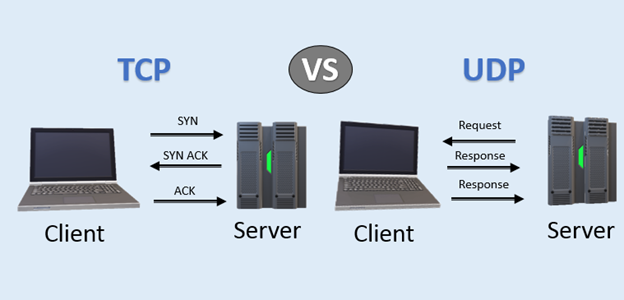
- Stream sockets: Use TCP (Transmission Control Protocol) for communication. These sockets are reliable, connection-oriented, and guarantee that data sent will reach its destination in the order in which it was sent.
- Datagram sockets: Use UDP (User Datagram Protocol) for communication. They are offline oriented and do not guarantee delivery or order of packages.
Socket address
Each socket on the Internet is characterized by an IP address and a port number. For example, when you access a website, your computer establishes a connection with the web server’s IP address on a specific port (most commonly port 80 for HTTP or 443 for HTTPS).
Application
A “socket” is used as a means of communication between two systems over a network. Here are some situations and scenarios where sockets are typically used:
Communication in Real Time
When applications require real-time interaction between client and server, sockets are often the first choice. Examples include chat applications, online games, and real-time document sharing applications.
VoIP and Streaming
Voice over IP (VoIP) applications such as Skype use sockets to transmit voice and video data. Similarly, streaming media services such as YouTube and Netflix use sockets to transfer data.
Monitoring and Supervision
Sockets allow system administrators to monitor and monitor system resources and performance in real time.
Financial Terminals and Trading
In the financial industry, speed and reliability are key. Sockets are used in trading platforms to ensure fast and efficient communication between traders and exchanges.
Network Applications
Most network applications, such as web servers, e-mail servers, and clients, use sockets to communicate.
Distributed Systems
In scenarios where data must be shared or synchronized between multiple systems, sockets provide the basis for communication.
IoT (Internet of Things)
Devices connected to the Internet use sockets to send and receive data. For example, smart thermostats can use sockets to send temperature data to a central server.
P2P Communication
Protocols such as BitTorrent use sockets to enable peer-to-peer communication between users.
These are just some of the many cases where sockets are used. Given their versatility and fundamental role in network communication, sockets are an integral part of many different systems and applications.
Examples of using TCP protocol and socket
1) Using the base node of the “net” library
A simple example of how you can use a TCP socket to communicate between a client (written in JavaScript) and a server (usingNode.js).
|
1 2 3 4 5 6 7 8 9 10 11 12 13 14 15 16 17 18 19 20 |
// server.js const net = require('net'); const server = net.createServer((socket) => { console.log('Klijent povezan'); socket.on('data', (data) => { console.log(`Primljeno od klijenta: ${data}`); }); socket.on('end', () => { console.log('Klijent diskonektovan'); }); socket.write('Greetings from the server!'); }); server.listen(8080, () => { console.log('Server pokrenut na portu 8080'); }); |
The server is started using: node server.js
For the client side, we will also use the “net” module from Node.js (since pure JavaScript executed in a web browser does not directly support the use of TCP sockets).
|
1 2 3 4 5 6 7 8 9 10 11 12 13 14 15 16 |
// client.js const net = require('net'); const client = net.createConnection({ port: 8080 }, () => { console.log('Povezano sa serverom'); client.write('Hello server! This is the client.'); }); client.on('data', (data) => { console.log(`Primljeno od servera: ${data}`); client.end(); // close the client connection after receiving the data }); client.on('end', () => { console.log('Klijent je diskonektovan sa servera'); }); |
2) Using the “socket.io” library
For the client side in the Node.js environment, there are many libraries that enable communication via the TCP protocol and provide various additional functionalities. One of the popular libraries is socket.io. While the net module is the basic TCP module that comes with Node.js, socket.io provides an event-driven API that enables real-time communication between the server and the client. Although socket.io is most commonly used for websockets, it can also be used for TCP communication.
First you need to install socket.io and socket.io-client:
|
1 |
npm install socket.io socket.io-client |
Server part:
|
1 2 3 4 5 6 7 8 9 10 11 12 13 14 15 16 17 18 |
// server.js const io = require('socket.io')(); io.on('connection', (socket) => { console.log('Klijent povezan'); socket.on('message', (data) => { console.log(`Primljeno od klijenta: ${data}`); }); socket.on('disconnect', () => { console.log('Klijent je diskonektovan sa servera'); }); socket.emit('message', 'Greetings from the server!'); }); io.listen(8080); |
and the client part:
|
1 2 3 4 5 6 7 8 9 10 11 12 13 |
// client.js const io = require('socket.io-client'); const socket = io.connect('http://localhost:8080'); socket.on('connect', () => { console.log('Povezano sa serverom'); socket.emit('message', 'Hello server! This is the client.'); }); socket.on('message', (data) => { console.log(`Primljeno od servera: ${data}`); socket.disconnect(); }); |
This is just a basic example. socket.io provides many additional functionalities, including working with rooms, broadcasting, middleware, and much more. If you want to work with pure TCP sockets (no WebSockets) in a Node.js environment, the net module is the most basic and direct approach. However, for more complicated applications and when you need to work with web clients, socket.io is an excellent choice.
TCP is one of the main protocols in the Internet Protocol (IP) suite and defines how data is sent and received over Internet networks. It is connection-oriented, meaning that it first establishes a reliable connection between two computers before transferring data and then maintains that connection until all data has been transferred.
Here are some key features and functions of TCP:
- Reliability: TCP guarantees data delivery from source to destination. If some part of the data doesn’t reach its destination, TCP will recognize the problem and send that data again.
- Connection Oriented: Before data is transferred between two computers, TCP establishes a connection between them. This connection is maintained until all data has been transferred and confirmed.
- Flow control: TCP controls the amount of data sent so that the receiver is not overloaded, ie. prevents overflow of network resources.
- Maintaining order: If data packets (segments) are sent over the network and arrive at their destination in the wrong order, TCP will reassemble them into the correct order before passing them on to the application.
- Error detection and correction: When data is sent, TCP adds a checksum to each data segment. At the destination, a checksum is used to verify the integrity of each received segment.
TCP is the basis for many applications that use the Internet, including web browsers and e-mail programs. When you open a web page, for example, your web browser uses TCP to download the HTML and other content of the page from the web server.
Essentially, TCP is key to guaranteeing reliable, consistent, and secure communication between computers on the Internet.
You can read more about network protocols in the article “Network protocols”