



What is
Vue 3 note (2026): Vue 3 is the current major version (Vue 2 is EOL). New projects should use Vue 3 + Vite (npm create vue@latest). Options API remains fully supported; Composition API is recommended for complex/new code.
Vue.js?
npm create vue@latest). Options API remains fully supported; Composition API is recommended for complex/new code.Vue.js is pronounced /vjuː/, similar to the English word view, and in the official documentation they say it is a progressive JavaScript framework for creating user interfaces.
“Progressive framework for building user interfaces”.
Vue.js documentation

Vue.js is considered to be one of the simplest JavaScript frameworks, which is very fast, has a small size and very detailed documentation. Vue.js is very flexible and adaptable to different types of projects. In the basic version, it is practically a library, and as such is applicable for small and medium projects, however, by adding appropriate official components, Vue.js becomes a full framework, and as such has the potential for creating enterprise applications.
Although currently Vue.js is not yet as popular as React (supported by Facebook) or Angular 2 (supported by Google), its popularity is growing day by day, and the Laravel community considers it one of their favorite front-end frameworks.
NOTE:
At the time of writing the current version was 2.0, but later a new version 3.0 was released, for which most of the texts are still valid, but it still brings with it numerous changes (see list of changes on the official website). For the biggest changes, I went back and updated the content of the articles, adding explanations related to the 3.0 version, but not all, so it’s up to the reader to study all the differences.
Vue.js architecture
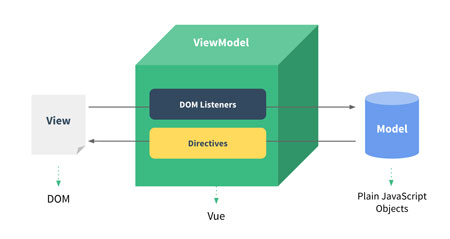
Vue.js framework designed based on the MVVM template (Model View ViewModel), which allows dividing the application into different sections for better comprehensibility and transparency. In this division:
“Model”
This section is related to data, i.e. database, data entry or even for hardcoded values.
“View”
This section usually represents the frontend part of the application that is used to “print” data from the model. The “view” section, like in other frontend libraries, is actually HTML, but with additional functionalities that allow it to dynamically display the model.
“ViewModel”
This section is a bridge between the two previously mentioned sections and has a system to connect the “model” (data) with the corresponding “view”. Within it, we manipulate the data from the Model before displaying it in the View section. Dynamic rendering within HTML is provided by Vue.js with:
- by “interpolation”
“Interpolation” means processing the expression defined in double curly braces {{ }}, and printing the result in that place. Read more about interpolation in the article “Interpolation within Vue.js” - “directives”.
In addition to interpolation, one of the following directives can be used to render HTML tag content: “v-text”, “v-html”, “v-pre”…
But the most common use of directives is for dynamic rendering of HTML tag attributes, when we use the “v-bind” directive, because we cannot render attributes with interpolation. Directives are an important mechanism within Vue.js, therefore a lot of attention is paid to them within the site, you can read more about directives in the introductory article “Introduction to Vue.js Directives”