


LiveData class
LiveData
|
1 |
public abstract class LiveData extends Object |
LiveData is an abstract class called observable data holder in charge of keeping information about the data and notifying all interested observers if changes occur.
LiveData is actually just an Abstract Class. So it can’t be used as itself.
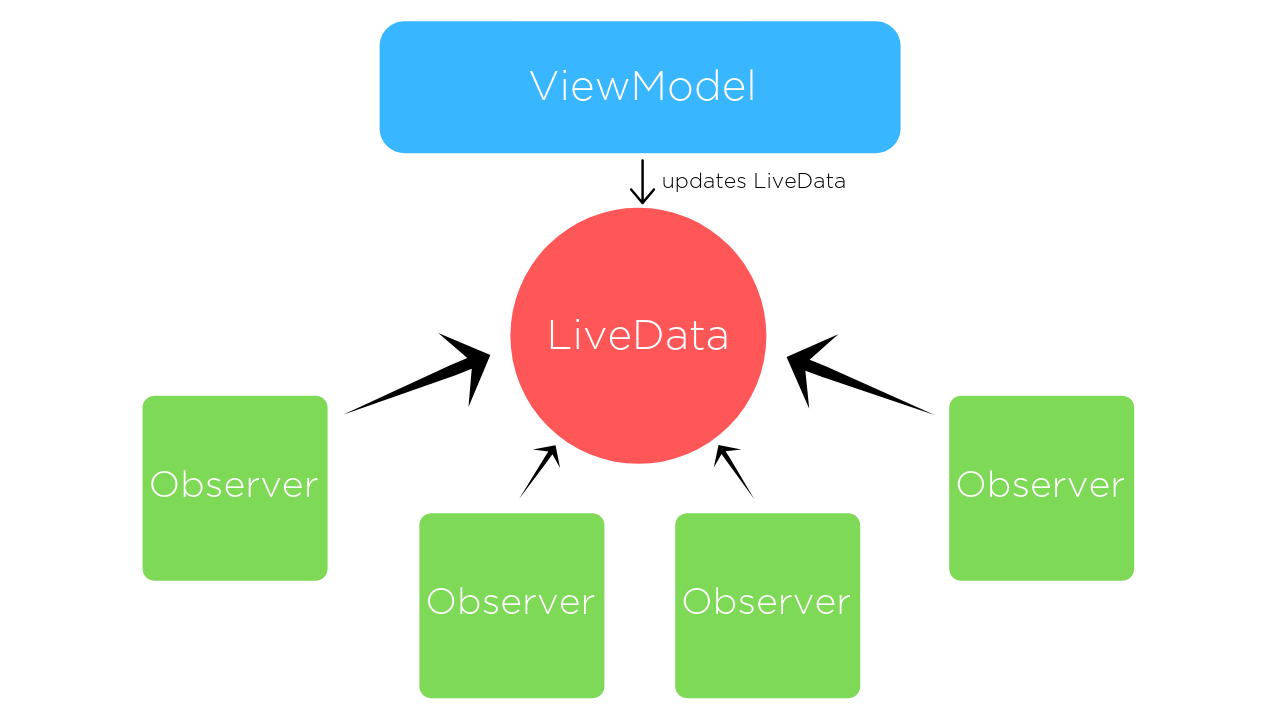
The most important feature of LiveData is that it is aware of the life cycle of other components of the application (activities, fragments…). Precisely because of this feature, LiveData forwards data only to observers who are in active state (if the life cycle is in STARTED or RESUMED state), while inactive (destroyed) observers, although registered, are not notified of the values stored by LiveData. When we use LiveData we don’t need to worry when the life cycle of the activity/fragment ends (destroy) because they are automatically logged out as soon as the component completes its life cycle.
MutableLiveData
|
1 2 3 |
java.lang.Object ↳android.arch.lifecycle.LiveData<T> ↳android.arch.lifecycle.MutableLiveData<T> |
With the LiveData class, the setter methods are private and cannot be used if it is necessary to change the data somewhere, ie. set them. For this reason, there is its subclass MutableLiveData where the setter method public is setValue() (the postValue() method is used for the background thread).
MediatorLiveData class
|
1 2 3 4 |
java.lang.Object ↳android.arch.lifecycle.LiveData<T> ↳android.arch.lifecycle.MutableLiveData<T> ↳android.arch.lifecycle.MediatorLiveData<T> |
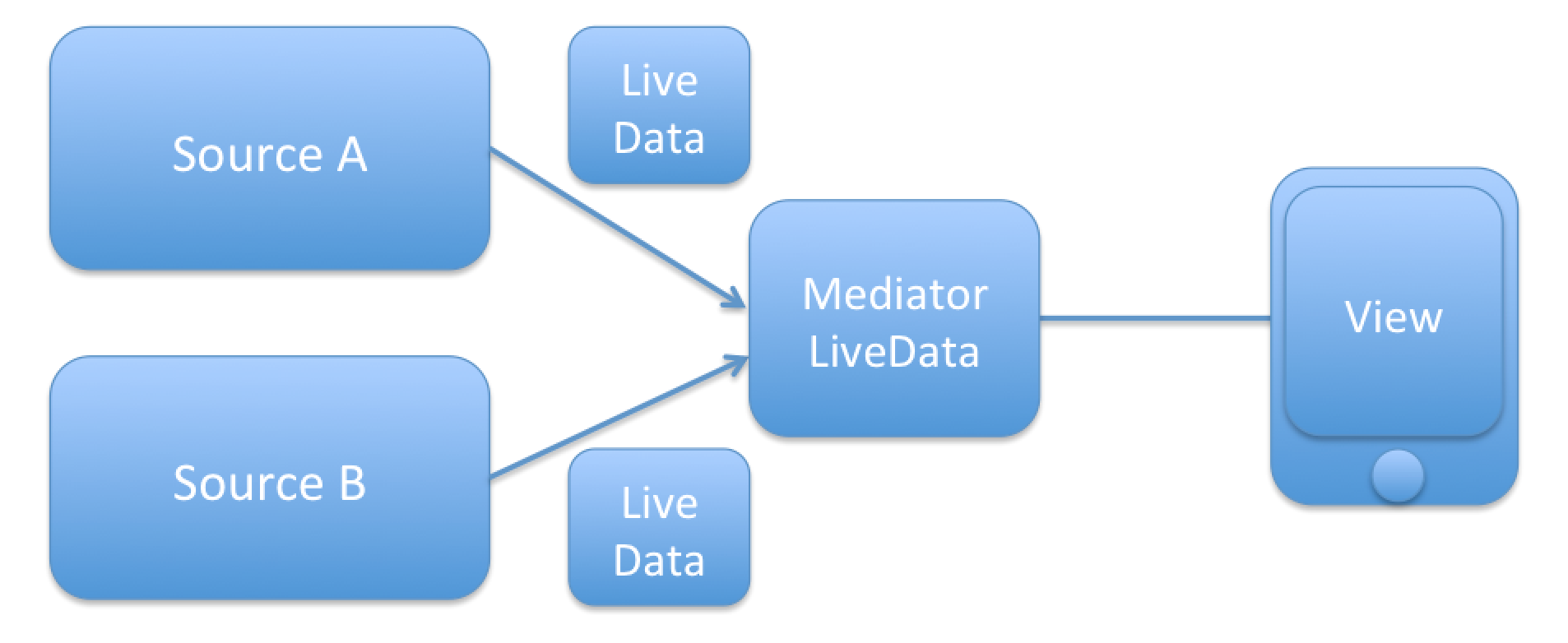
LiveData subclass which may observe other LiveData objects and react on OnChanged events from them.
This is an even more specific method and has the added ability to track results from different LiveData and merge them into a single MediatorLiveData.
If I assume that we have two LiveData objects that emit some value but from two different sources (eg the value of a good from two different stock exchanges) then we want to listen to changes from both sources.
- addSource(LiveData source, Observer onChanged)
The method allows to choose which LiveData object is listened to, and what the callback method onChanged will do when a change occurs.
MediatorLiveData has two parameters, the first is the LiveData that you want MediatorLiveData to observe, and the second is a callback that will fire when the data in the LiveData changes (passed in the first parameter)
123456789101112131415161718192021LiveData<Integer> berzaBeogradLiveData = ....;LiveData<Integer> berzaLondonLiveData = ....;final MediatorLiveData<String> resultMediatorLiveData = new MediatorLiveData<>();resultMediatorLiveData.addSource(berzaBeogradLiveData, new Observer<Integer>() {@Overridepublic void onChanged(@Nullable Integer value) {// Do something with an integer// npr. resultMediatorLiveData.setValue(value);}});resultMediatorLiveData.addSource(berzaLondonLiveData, new Observer<Integer>() {@Overridepublic void onChanged(@Nullable Integer value) {// Do something with an integer}}); - removeSource(LiveData toRemove)
Method allows to stop listening for LiveData changes. As in the following example, when after 10 data changes, the changes are no longer tracked:
1234567891011liveDataMerger.addSource(liveData1, new Observer() {private int count = 1;@Override public void onChanged(@Nullable Integer s) {count++;liveDataMerger.setValue(s);if (count > 10) {liveDataMerger.removeSource(liveData1);}}});
Observe in View
Some of the code inside the View is the same as LiveData, so a MediatorLiveData view might look like this:
|
1 2 3 4 5 6 |
mediatorLiveData.observe(this, new Observer<Integer>() { @Override public void onChanged(@Nullable Integer integer) { //Use the value } }); |
View – ViewModel
This example shows the procedure necessary for communication between View (activity) and its ViewModel:
-
Implementation of the library in the project
1implementation 'androidx.lifecycle:lifecycle-extensions:2.2.0'
1implementation "android.arch.lifecycle:extensions:1.1.0"
Also, in gradle, put google() in the repository section:
123456allprojects {repositories {jcenter()google()}} -
MutableLiveData in ViewModel class
-
Creating the ViewModel class
extending ViewModel (when we don’t need Context) or AndroidViewModel classes (when we need Context):
We use this class if we don’t need Context:
123public class MainActivityViewModel extends ViewModel{}AndroidViewModel is used if context is required. To obtain context within the class, use the method getApplication () or pass Application through the class constructor.
12345public class MainActivityViewModel extends AndroidViewModel{public ManiActivityViewModel(@NonNull Application application) {super(application);}} -
Creating a MutableLiveData object
123public class MainActivityViewModel extends ViewModel{private MutableLiveData<Boolean> mHasSearchResults = new MutableLiveData<>();} -
Creating a getter for a MutableLiveData object
Although the “mHasSearchResults” object itself has mutable values and is represented as MutableLiveData, we with the getter always return the same object, and for that reason the LiveData object is used here and not MutableLiveData:
12345678public class MainActivityViewModel extends ViewModel{...public LiveData<Boolean> getSearchResultsState(){return mHasSearchResults;}} -
Broadcast changes
The next thing to do within the ViewModel class is to broadcast changes to all registered observers. This is done using the MutableLiveData methods: setValue() (from the main thread) or postValue() (from the background thread):
1mHasSearchResults.setValue(true);Calling the methodsetValue(T) and the previous example results in calling the onChanged() methods of the observer (usually a View) with the values sent through the parameter of the setValue() method (in this case “true”).
NOTE:
setValue() cannot be called from a background thread, in that case it is necessary to use postValue()
-
-
Track changes to MutableLiveData in the View class
-
Reference to ViewModel in View:
1234567891011private MainActivityViewModel mMainActivityViewModel;@Overrideprotected void onCreate(Bundle savedInstanceState) {super.onCreate(savedInstanceState);super.onCreate(savedInstanceState);setContentView(R.layout.activity_main);//Referenciranje na ViewModel iz View-a:mMainActivityViewModel = ViewModelProviders.of(this).get(MainActivityViewModel.class);} -
Creating a reference to a LiveData object
Now that we have a reference to the ViewModel, we can also access its methods, which we will use to call the getter method with which we will also get a reference to the LiveData object:
1LiveData<boolean> liveDataObjekat = mMainActivityViewModel.getSearchResultsState(); -
Observe (listening for changes)
Once we have a reference to the LiveData object we can call its observe() method. This method accepts two parameters:
- “LifecycleOwner” – we define which View LiveData should pay attention to when it comes to LifeCycle
- “Observer” – through this parameter creating a new anonymous observer (Observer) we practically define what the observer will do after the change:
12345678910111213liveDataObjekat.observe(this, new Observer<Boolean>() {@Overridepublic void onChanged(@Nullable Boolean hasSearchResults) {// use the boolean value "hasSearchResults" passed in and affect the Viewif (hasSearchResults){clResultsContainer.setVisibility(View.VISIBLE);} else {clResultsContainer.setVisibility(View.GONE);}}});
-
Repository – ViewModel – View
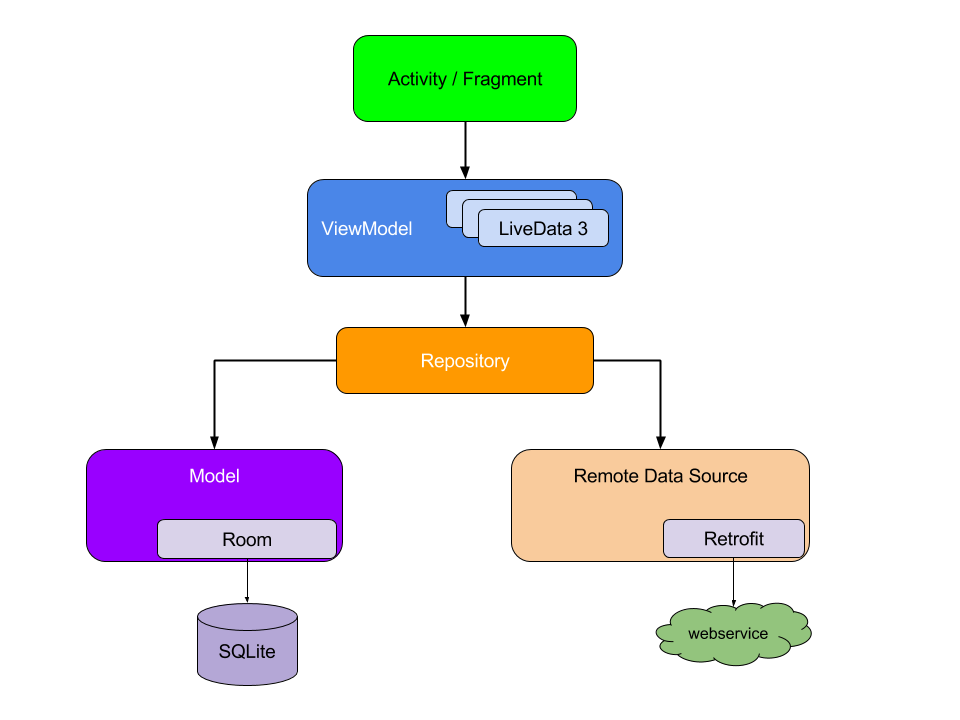
In the MVVM architecture, each level has direct access to only one level below it, while it is not interested in those above it. This kind of architecture allows us to change the layer above (eg View) without changing the level below, ie. source of information (eg ViewModel).
The entire communication between these architectural layers is actually a closed circle. The beginning of communication is usually the interaction of the user with the interface (View), which forwards the information “down” all the way to the database (through setValue()). A change in the database is the trigger for emitting changes in the Repository class. These changes are listened to by the ViewModel, and then used to broadcast its information to the View, which then uses it to update the content. This case is practically an extended case of communication between View and ViewModel from the previous section.
Repository
Repositor is a class that allows data access to other parts of the program, and it only has access to different sources of information (web or, as in this case, database). To get information from the database, the repository accesses the class responsible for direct access to the database (in this example, it is the “AppDBHelper” class)
|
1 2 |
private AppDBHelper mHandler; List<BuyItem> listFromDB = mHandler.getAllItemsFromDB(); |
We cannot call this handler’s method from other parts of the code because the rest of the program has access only to the repository-jy, then it is necessary to create a method that abstracts the handler:
|
1 2 3 4 5 |
/* get list directly from DB */ public List<BuyItem> getAllItems () { List<BuyItem> listFromDB = mHandler.getAllItemsFromDB(); return listFromDB; } |
As we have seen so far in the work with LiveData, in order to broadcast the change of a variablethree things are required:
- Creation of MutableLiveData objects (everything starts here and a new object is created)
12/* New LiveData */MutableLiveData <List<BuyItem>> allDataItems = new MutableLiveData<>(); - Getter of that MutableLiveData object
- Setting the new value of the variable with the setValue() method (in this example, that new value is the list we got directly from the Db.
We will define the second and third items together in one method:12345/* Getter and setValue (value "listFromDB") to emitting changes all in one */public MutableLiveData<List<BuyItem>> getAllItemsFromRepo() {allDataItems.setValue(listFromDB);return allDataItems;}
ViewModel
In the ViewModel class, the first item is also the creation of MutableLiveData objects. However, there is a slight difference here compared to the previous example (communication only between View and ViewModel), because a new MutableLiveData object is not created, but that ViewModel object is obtained from the Repository via a getter:
|
1 |
private MutableLiveData<List<BuyItem>> allDataItems = repository.getAllItemsFromRepo(); |
The second item is to create a getter for that LiveData object (which will be used by the View):
|
1 2 3 4 |
/* LiveData Getter from ViewModel*/ public LiveData<List<BuyItem>> getAllItemsFromViewModel() { return allDataItems; } |
And the third item is broadcasting the changes (setValue() or postValue()). Usually these changes happen when one of the Repository methods is called to insert, update or remove data from the database.
|
1 2 3 4 5 6 7 8 9 10 11 12 13 |
/*Insert item to DB*/ public void insertItemDB(BuyItem buyItem) { repository.insertItem(buyItem); /*Set new value end emit that */ allDataItems.postValue(repository.getAllItems()); } /* Remove item from DB*/ public void removeItemFromDB(long id) { repository.removeItem(id); /*Set new value end emit that*/ allDataItems.postValue(repository.getAllItems()); } |
View
The View is responsible for starting the whole chain of events by accepting the interaction of the end user (who can make some change that will affect the contents of the database). Then that user request is forwarded further “down” (View -> VieModel -> Repository -> DB). Acceptance
|
1 2 3 4 5 6 |
buttonAdd.setOnClickListener(new View.OnClickListener() { @Override public void onClick(View v) { addItem(); } }); |
Within this method, the method that will eventually affect the database change is called:
|
1 |
mMainViewModel.insertItemDB(newBuyItem); |
Or
|
1 |
mMainViewModel.removeItemFromDB((long) viewHolder.itemView.getTag()); |
When there are changes in the database View needs that new information. For this reason, the View monitors and listens for changes to the LiveDate object (the beginnings of which extend to the tail) and reacts to them by updating the content:
|
1 2 3 4 5 6 7 8 |
/* Observe changes in list emitted from ViewModel*/ mMainViewModel.getAllItemsFromViewModel().observe(this, new Observer() { @Override public void onChanged(Object o) { /*React to changes in list*/ mMainViewModel.updateAdapter(); } }); |
You can see the entire project code in these examples on GitHub under the project “SQLdatabaseWithoutLibrary”.
Fragment – Fragment
Communication takes place through a shared ViewModel, so that all Views (fragments and activity) can access it, and “listen” for changes emitted by the ViewModel.
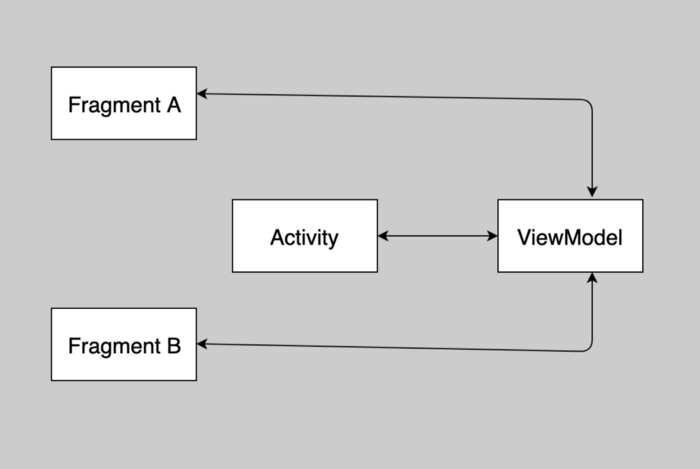
When fragmentA wants to send a message to FragmentB, it is enough to update the LiveData in the ViewModel, and the ViewModel will “broadcast” those changes to the air, so the listening FragmentB will be notified of the message and will be able to react accordingly. If the Activity is listening for changes in the same LiveData object, it will be notified at the same time, so it will be able to react adequately.
The advantages of this communication are as follows:
- The activity does not have to know anything and do anything about the conversation between the two fragments (using the listener pattern code related to the conversation is located within the Activity).
- Fragments do not need to know about each other, if one of the fragments goes down, the other continues to work as usual.
- Each fragment has its ownlife cycle and is not affected by the life cycle of another. If one fragment replaces another, the UI continues to work without problems.
Example
|
1 2 3 4 5 6 7 8 9 10 11 12 13 14 15 |
public class MainActivity extends AppCompatActivity { @Override protected void onCreate(Bundle savedInstanceState) { super.onCreate(savedInstanceState); setContentView(R.layout.activity_main); /*Adding fragments to container*/ getSupportFragmentManager().beginTransaction() .add(R.id.clContainerA, FragmentA.newInstance()) .add(R.id.clContainerB, FragmentB.newInstance()) .commit(); } } |
|
1 2 3 4 5 6 7 8 9 10 11 12 13 14 15 |
public class SharedViewModel extends ViewModel { /*Defining a mutable object that represents the text*/ private MutableLiveData<String> mText = new MutableLiveData<>(); /*getting a reference to a mutable object*/ public LiveData<String> getTextLiveDataObject() { return mText; } /*defining the value of the object*/ public void setUnos(String text) { this.mText.setValue(text); } } |
|
1 2 3 4 5 6 7 8 9 10 11 12 13 14 15 16 17 18 19 20 21 22 23 24 25 26 27 28 29 30 31 32 33 34 35 36 37 38 39 40 41 |
public class FragmentA extends Fragment { private SharedViewModel mViewModel; private EditText editText; private Button button; public static FragmentA newInstance() { return new FragmentA(); } @Override public View onCreateView(@NonNull LayoutInflater inflater, @Nullable ViewGroup container, @Nullable Bundle savedInstanceState) { View root = inflater.inflate(R.layout.fragment_a_layout, container, false); editText = root.findViewById(R.id.etUnos); button = root.findViewById(R.id.btnAkcija); button.setOnClickListener(new View.OnClickListener() { @Override public void onClick(View view) { mViewModel.setUnos(editText.getText().toString()); } }); return root; } @Override public void onActivityCreated(@Nullable Bundle savedInstanceState) { super.onActivityCreated(savedInstanceState); mViewModel = new ViewModelProvider(getActivity()).get(SharedViewModel.class); mViewModel.getTextLiveDataObject().observe(getViewLifecycleOwner(), new Observer<String>() { /*Defining a callback method that reacts to changes in the LiveData object mText*/ @Override public void onChanged(String s) { editText.setText(s); } }); } } |
|
1 2 3 4 5 6 7 8 9 10 11 12 13 14 15 16 17 18 19 20 21 22 23 24 25 26 27 28 29 30 31 32 33 34 35 36 37 38 39 40 41 42 |
public class FragmentB extends Fragment { private SharedViewModel mViewModel; private EditText editText; private Button button; public static FragmentB newInstance() { return new FragmentB(); } @Override public View onCreateView(@NonNull LayoutInflater inflater, @Nullable ViewGroup container, @Nullable Bundle savedInstanceState) { View root = inflater.inflate(R.layout.fragment_b_layout, container, false); editText = root.findViewById(R.id.etUnos); button = root.findViewById(R.id.btnAkcija); button.setOnClickListener(new View.OnClickListener() { @Override public void onClick(View view) { mViewModel.setUnos(editText.getText().toString()); } }); return root; } @Override public void onActivityCreated(@Nullable Bundle savedInstanceState) { super.onActivityCreated(savedInstanceState); mViewModel = new ViewModelProvider(getActivity()).get(SharedViewModel.class); mViewModel.getTextLiveDataObject().observe(getViewLifecycleOwner(), new Observer<String>() { /*Defining a callback method that reacts to changes in the LiveData object mText*/ @Override public void onChanged(String s) { editText.setText(s); } }); } } |
See the full sample project on GitHub under the “FragmetCommunication” repository.
LiveData class
|
1 |
public abstract class LiveData extends Object |
LiveData is an abstract class called observable data holder in charge of keeping information about the data and notifying all interested observers if changes occur.
LiveData is actually just an Abstract Class. So it can’t be used as itself.
The most important feature of LiveData is that it is aware of the life cycle of other components of the application (activities, fragments…). Precisely because of this feature, LiveData forwards data only to observers who are in active state (if the life cycle is in STARTED or RESUMED state), while inactive (destroyed) observers, although registered, are not notified of the values stored by LiveData. When we use LiveData we don’t need to worry when the life cycle of the activity/fragment ends (destroy) because they are automatically logged out as soon as the component completes its life cycle.
MutableLiveData class
|
1 2 3 |
java.lang.Object ↳android.arch.lifecycle.LiveData<T> ↳android.arch.lifecycle.MutableLiveData<T> |
Since LiveData is an abstract class it cannot be used independently, for that reason there is its subclass MutableLiveData which has public methods setValue() and postValue() to define the values that observers follow:
- setValue() is called when we update the value from MainThread
- postValue() is called when we update values from another thread.
So that any View that tracks changes to some value set via the setValue()/postValue() method can update the UI when a LiveData object changes.
MediatorLiveData class
|
1 2 3 4 |
java.lang.Object ↳android.arch.lifecycle.LiveData<T> ↳android.arch.lifecycle.MutableLiveData<T> ↳android.arch.lifecycle.MediatorLiveData<T> |
LiveData subclass which may observe other LiveData objects and react on OnChanged events from them.
This is an even more specific method and has the added ability to track results from different LiveData and merge them into a single MediatorLiveData.
If I assume that we have two LiveData objects that emit some value but from two different sources (eg the value of a good from two different stock exchanges) then we want to listen to changes from both sources.
- addSource(LiveData source, Observer onChanged)
The method allows to choose which LiveData object is listened to, and what the callback method onChanged will do when a change occurs.
MediatorLiveData has two parameters, the first is the LiveData that you want MediatorLiveData to observe, and the second is a callback that will fire when the data in the LiveData changes (passed in the first parameter)
123456789101112131415161718192021LiveData<Integer> berzaBeogradLiveData = ....;LiveData<Integer> berzaLondonLiveData = ....;final MediatorLiveData<String> resultMediatorLiveData = new MediatorLiveData<>();resultMediatorLiveData.addSource(berzaBeogradLiveData, new Observer<Integer>() {@Overridepublic void onChanged(@Nullable Integer value) {// Do something with an integer// npr. resultMediatorLiveData.setValue(value);}});resultMediatorLiveData.addSource(berzaLondonLiveData, new Observer<Integer>() {@Overridepublic void onChanged(@Nullable Integer value) {// Do something with an integer}}); - removeSource(LiveData toRemove)
Method allows to stop listening for LiveData changes. As in the following example, when after 10 data changes, the changes are no longer tracked:
1234567891011liveDataMerger.addSource(liveData1, new Observer() {private int count = 1;@Override public void onChanged(@Nullable Integer s) {count++;liveDataMerger.setValue(s);if (count > 10) {liveDataMerger.removeSource(liveData1);}}});
Observe in View
Some of the code inside the View is the same as LiveData, so a MediatorLiveData view might look like this:
|
1 2 3 4 5 6 |
mediatorLiveData.observe(this, new Observer<Integer>() { @Override public void onChanged(@Nullable Integer integer) { //Use the value } }); |
View – ViewModel
This example shows the procedure in which the ViewModel broadcasts changes in the state of a variable, while the state of that variable listens to the View (in this case, an activity) and then reacts to that change.
-
Implementation of the library in the project
1implementation 'androidx.lifecycle:lifecycle-extensions:2.2.0'
1implementation "android.arch.lifecycle:extensions:1.1.0"
Also, in gradle, put google() in the repository section:
123456allprojects {repositories {jcenter()google()}} -
MutableLiveData in ViewModel class
-
Creating the ViewModel class
extending ViewModel (when we don’t need Context) or AndroidViewModel classes (when we need Context):
-
- AndroidViewModel
We use this class if we don’t need Context:
123public class MainActivityViewModel extends ViewModel{}AndroidViewModel is used if context is required. To obtain context within the class, use the method getApplication () or pass Application through the class constructor.
12345public class MainActivityViewModel extends AndroidViewModel{public ManiActivityViewModel(@NonNull Application application) {super(application);}} -
-
Creating a MutableLiveData object
123public class MainActivityViewModel extends ViewModel{private MutableLiveData<Boolean> mHasSearchResults = new MutableLiveData<>();} -
Creating a getter for a MutableLiveData object
Although the “mHasSearchResults” object itself has mutable values and is represented as MutableLiveData, we with the getter always return the same object, and for that reason the LiveData object is used here and not MutableLiveData:
12345678public class MainActivityViewModel extends ViewModel{...public LiveData<Boolean> getSearchResultsState(){return mHasSearchResults;}} -
Changes in the value of a variable caused by the broadcast of news about it
In order to broadcast news from the viewModel about a change in the value of a variable, it is necessary to make that change. This is done using the MutableLiveData method:
- setValue() (from the main thread)
- postValue() (from background thread)
Example
1mHasSearchResults.setValue(true);NOTE:
setValue() cannot be called from a background thread, in that case it is necessary to use postValue()After the variable’s value has been changed, the ViewModel broadcasts a “news” to all registered observers that changes have occurred, which then results in the observer’s onChanged() method being executed with the new values passed (through the setValue() method parameter, in this example “true”).
NOTE:
The setValue() method of the LiveData object, which changes the value of the variable, can be called from any file where we have a reference to that LiveData object (in this example, that object is mHasSearchResults). It can be a View that accepts a user action and sets a new value based on it, or a file that registers a change in the database and then broadcasts those changes…
-
-
Track changes to MutableLiveData in the View class
-
Reference to ViewModel in View:
1234567891011private MainActivityViewModel mMainActivityViewModel;@Overrideprotected void onCreate(Bundle savedInstanceState) {super.onCreate(savedInstanceState);super.onCreate(savedInstanceState);setContentView(R.layout.activity_main);//Referenciranje na ViewModel iz View-a:mMainActivityViewModel = ViewModelProviders.of(this).get(MainActivityViewModel.class);} -
Creating a reference to a LiveData object
Now that we have a reference to the ViewModel, we can also access its methods, which we will use to call the getter method with which we will also get a reference to the LiveData object:
1LiveData liveDataObjekat = mMainActivityViewModel.getSearchResultsState(); -
Observe (listening for changes)
Once we have a reference to the LiveData object we can call its observe() method. This method accepts two parameters:
- “LifecycleOwner” – we define which View LiveData should pay attention to when it comes to LifeCycle
- “Observer” – through this parameter creating a new anonymous observer (Observer) we practically define what the observer will do after the change:
12345678910111213liveDataObjekat.observe(this, new Observer<Boolean>() {@Overridepublic void onChanged(@Nullable Boolean hasSearchResults) {// use the boolean value "hasSearchResults" passed in and affect the Viewif (hasSearchResults){clResultsContainer.setVisibility(View.VISIBLE);} else {clResultsContainer.setVisibility(View.GONE);}}});NOTE:
With the previous code within onChanged() we react only to the change of the value we monitor, however sometimes it is necessary to have the value saved by the live object even before the change itself (eg set the initial value before any change occurs…). In such a case, getting the current value stored by the LiveData object is done using its getValue() method (it returns the current value stored by that object):1234567if (liveDataObjekat.getValue() != null) {boolean state = liveDataObjekat.getValue();// .....Do something with that returned value}
-
Repository – ViewModel – View
In the MVVM architecture, each level has direct access to only one level below it, while it is not interested in those above it. This kind of architecture allows us to change the layer above (eg View) without changing the level below, ie. source of information (eg ViewModel).
The entire communication between these architectural layers is actually a closed circle. The beginning of communication is usually the interaction of the user with the interface (View), which forwards the information “down” all the way to the database (through setValue()). A change in the database is the trigger for emitting changes in the Repository class. These changes are listened to by the ViewModel, and then used to broadcast its information to the View, which then uses it to update the content. This case is practically an extended case of communication between View and ViewModel from the previous section.
Repository
Since Repositoru is the only one that has direct access to the source of information (in this case, it is the database), we create a method in it whose goal is to get that information through the classes in charge of access to the database (in this example, it is the “AppDBHelper” class)
|
1 2 3 4 5 6 7 |
private AppDBHelper mHandler; /* get list directly from DB */ public List<BuyItem> getAllItems () { List<BuyItem> listFromDB = mHandler.getAllItemsFromDB(); return listFromDB; } |
As we have seen so far in working with LiveData in a class that emits information three things are needed:
- Creation of MutableLiveData objects (everything starts here and a new object is created)
12/* New LiveData, setValue and Emit changes (which value acquired list "listFromDB") */MutableLiveData <List<BuyItem>> allDataItems = new MutableLiveData<>(); - Getter of that MutableLiveData object
- Emitting information with the setValue() method (this information is obtained from the Db by the previous method “getAllItems()”
We will define the second and third items together in one method:12345/* Getter and setValue (value "listFromDB") to emitting changes all in one */public MutableLiveData<List<BuyItem>> getAllItemsFromRepo() {allDataItems.setValue(getAllItems());return allDataItems;}
ViewModel
In the ViewModel class, the first item is also the creation of MutableLiveData objects. However, there is a slight difference here compared to the previous example (communication only between View and ViewModel), because a new MutableLiveData object is not created, but that ViewModel object is obtained from the Repository via a getter:
|
1 |
private MutableLiveData<List<BuyItem>> allDataItems = repository.getAllItemsFromRepo(); |
The second item is to create a getter for that LiveData object (which will be used by the View):
|
1 2 3 4 |
/* LiveData Getter from ViewModel*/ public LiveData<List<BuyItem>> getAllItemsFromViewModel() { return allDataItems; } |
And the third item is broadcasting the changes (setValue() or postValue()). Usually these changes happen when one of the Repository methods is called to insert, update or remove data from the database.
|
1 2 3 4 5 6 7 8 9 10 11 12 13 |
/*Insert item to DB*/ public void insertItemDB(BuyItem buyItem) { repository.insertItem(buyItem); /*Set new value end emit that */ allDataItems.postValue(repository.getAllItems()); } /* Remove item from DB*/ public void removeItemFromDB(long id) { repository.removeItem(id); /*Set new value end emit that*/ allDataItems.postValue(repository.getAllItems()); } |
View
The View is responsible for starting the whole chain of events by accepting the interaction of the end user (who can make some change that will affect the contents of the database). Then that user request is forwarded further “down” (View -> VieModel -> Repository -> DB). Acceptance
|
1 2 3 4 5 6 |
buttonAdd.setOnClickListener(new View.OnClickListener() { @Override public void onClick(View v) { addItem(); } }); |
Within this method, the method that will eventually affect the database change is called:
|
1 |
mMainViewModel.insertItemDB(newBuyItem); |
Or
|
1 |
mMainViewModel.removeItemFromDB((long) viewHolder.itemView.getTag()); |
When there are changes in the database View needs that new information. For this reason, the View monitors and listens for changes to the LiveDate object (the beginnings of which extend to the tail) and reacts to them by updating the content:
|
1 2 3 4 5 6 7 8 |
/* Observe changes in list emitted from ViewModel*/ mMainViewModel.getAllItemsFromViewModel().observe(this, new Observer() { @Override public void onChanged(Object o) { /*React to changes in list*/ mMainViewModel.updateAdapter(); } }); |
You can see the entire project code in these examples on GitHub under the project “SQLdatabaseWithoutLibrary”.
Fragment – Fragment
Communication takes place through a shared ViewModel, so that all Views (fragments and activity) can access it, and “listen” for changes emitted by the ViewModel.
When fragmentA wants to send a message to FragmentB, it is enough to update the LiveData in the ViewModel, and the ViewModel will “broadcast” those changes to the air, so the listening FragmentB will be notified of the message and will be able to react accordingly. If the Activity is listening for changes in the same LiveData object, it will be notified at the same time, so it will be able to react adequately.
The advantages of this communication are as follows:
- The activity does not have to know anything and do anything about the conversation between the two fragments (using the listener pattern code related to the conversation is located within the Activity).
- Fragments do not need to know about each other, if one of the fragments goes down, the other continues to work as usual.
- Each fragment has its own life cycle and is not affected by the life cycle of another. If one fragment replaces another, the UI continues to work without problems.
Example
|
1 2 3 4 5 6 7 8 9 10 11 12 13 14 15 |
public class MainActivity extends AppCompatActivity { @Override protected void onCreate(Bundle savedInstanceState) { super.onCreate(savedInstanceState); setContentView(R.layout.activity_main); /*Adding fragments to container*/ getSupportFragmentManager().beginTransaction() .add(R.id.clContainerA, FragmentA.newInstance()) .add(R.id.clContainerB, FragmentB.newInstance()) .commit(); } } |
|
1 2 3 4 5 6 7 8 9 10 11 12 13 14 15 |
public class SharedViewModel extends ViewModel { /*Defining a mutable object that represents the text*/ private MutableLiveData<String> mText = new MutableLiveData<>(); /*getting a reference to a mutable object*/ public LiveData<String> getTextLiveDataObject() { return mText; } /*defining the value of the object*/ public void setUnos(String text) { this.mText.setValue(text); } } |
|
1 2 3 4 5 6 7 8 9 10 11 12 13 14 15 16 17 18 19 20 21 22 23 24 25 26 27 28 29 30 31 32 33 34 35 36 37 38 39 40 41 |
public class FragmentA extends Fragment { private SharedViewModel mViewModel; private EditText editText; private Button button; public static FragmentA newInstance() { return new FragmentA(); } @Override public View onCreateView(@NonNull LayoutInflater inflater, @Nullable ViewGroup container, @Nullable Bundle savedInstanceState) { View root = inflater.inflate(R.layout.fragment_a_layout, container, false); editText = root.findViewById(R.id.etUnos); button = root.findViewById(R.id.btnAkcija); button.setOnClickListener(new View.OnClickListener() { @Override public void onClick(View view) { mViewModel.setUnos(editText.getText().toString()); } }); return root; } @Override public void onActivityCreated(@Nullable Bundle savedInstanceState) { super.onActivityCreated(savedInstanceState); mViewModel = new ViewModelProvider(getActivity()).get(SharedViewModel.class); mViewModel.getTextLiveDataObject().observe(getViewLifecycleOwner(), new Observer<String>() { /*Defining a callback method that reacts to changes in the LiveData object mText*/ @Override public void onChanged(String s) { editText.setText(s); } }); } } |
|
1 2 3 4 5 6 7 8 9 10 11 12 13 14 15 16 17 18 19 20 21 22 23 24 25 26 27 28 29 30 31 32 33 34 35 36 37 38 39 40 41 42 |
public class FragmentB extends Fragment { private SharedViewModel mViewModel; private EditText editText; private Button button; public static FragmentB newInstance() { return new FragmentB(); } @Override public View onCreateView(@NonNull LayoutInflater inflater, @Nullable ViewGroup container, @Nullable Bundle savedInstanceState) { View root = inflater.inflate(R.layout.fragment_b_layout, container, false); editText = root.findViewById(R.id.etUnos); button = root.findViewById(R.id.btnAkcija); button.setOnClickListener(new View.OnClickListener() { @Override public void onClick(View view) { mViewModel.setUnos(editText.getText().toString()); } }); return root; } @Override public void onActivityCreated(@Nullable Bundle savedInstanceState) { super.onActivityCreated(savedInstanceState); mViewModel = new ViewModelProvider(getActivity()).get(SharedViewModel.class); mViewModel.getTextLiveDataObject().observe(getViewLifecycleOwner(), new Observer<String>() { /*Defining a callback method that reacts to changes in the LiveData object mText*/ @Override public void onChanged(String s) { editText.setText(s); } }); } } |
See the full sample project on GitHub under the “FragmetCommunication” repository.