


v-show
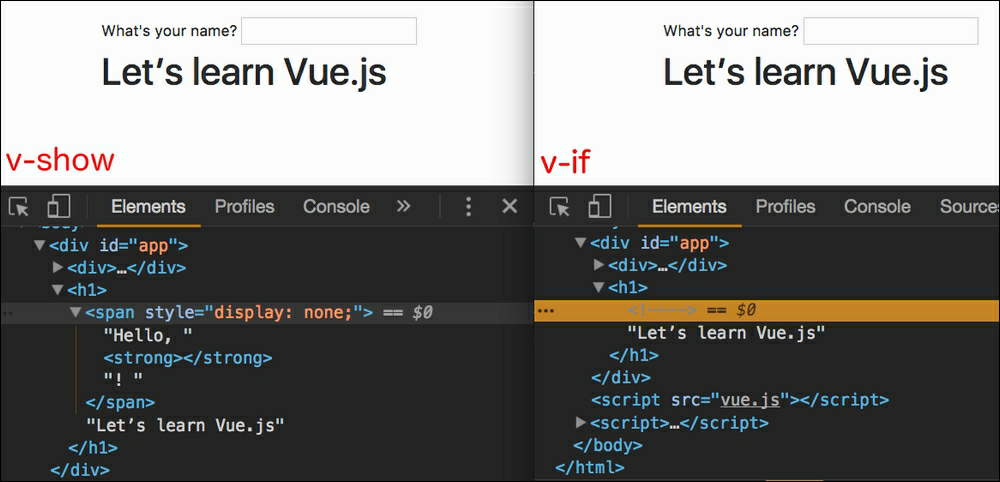
The “v-show” directive is used to conditionally display an element. Although “v-show” always generates the HTML element it is on (the element is visible in the inspector), it will only display it on the user interface if the state of the v-show="true" directive is true, otherwise the element will not be displayed because it has the display:none property. You would get the same final result on the user interface using the “v-if” directive, however in the background these two directives are crucially different, in the case of v-if="false", the element is not only hidden but completely disappears from the DOM.
When to use “v-show”
If we have a lot of elements that should be visible depending on some dynamic data, it is advised to use the v-show imp attribute, because adding or removing elements in the DOM is quite an expensive operation, so many such operations can affect the performance of the application. On the other hand, if the elements need to be conditionally executed only once, say when the application starts, then use the v-if attribute.
v-cloak
“v-cloak” is an attribute that, after being added to an element, disappears when the Vue instance is generated. Therefore, it is used to target the element until the instance is generated. It is most commonly used to target an element in CSS, after which the display: none property is assigned to that element, as this prevents the element from being displayed until the instance is created.
Example
Since this directive will remain on the element until the Vue instance is generated, we will use it to target the element during that time, in order to hide the content:
|
1 2 3 4 5 6 7 8 9 |
// HTML: <div id="app" v-cloak> {{ message }} </div> // CSS: #app[v-cloak] { display: none; } |
Example
To hide children:
|
1 |
[v-cloak] > * { display:none } |
Example
To insert the loader:
|
1 |
[v-cloak]::before { content: "loading…" |
NOTE:
The “v-cloak” directive does not work when loading remote data, but only when starting the application. Also, don’t try to load large content that would take longer to load (eg images), because the generation time of the Vue instance is short, so it won’t be enough to download the entire content.
v-once
Although the rendering of a simple HTML element is very fast, sometimes if we have a component that contains a lot of static content, we need to optimize it. The optimization is based on the use of the v-once directive which ensures only one rendering of the content, while every other time the cached content is returned.
|
1 2 3 4 5 |
<div class=”v-once”> ... ... static content that does not change ... </div> |
Although it looks very useful, it is recommended to use this directive rarely, because of the problem when the application is taken over by another developer, who overlooks the existence of the “v-once” directive and spends hours hacking why his content won’t be updated :).