


Definition
Cross Domain Data Request is a specific request for data, because the data is not on the domain (protocol or port) from which the request originates.
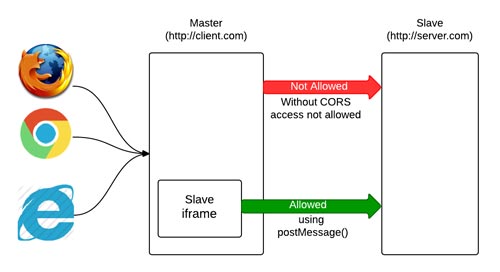
The default behavior of servers is to not allow access to data from other servers, and the main reason for this prohibition is the ability to perform advanced requests (POST, PUT and DELETE etc.) which can lead to various security issues. Therefore, AJAX requests are prohibited by default, and this restriction is known as “the same origin policy“ (Serb. polisa common origin).
However, some types of resources are not subject to this ban, because browsers allow access to them by default. Resources that are not located on the domain from which the request originates are allowed to be called only through “src” or “href” attributes of the following HTML elements: <script>, <img>, <video>, <iframe>.
There are also solutions for requests where the ban “the same origin policy” applies, but this implies the use of specific mechanisms. This article is about those mechanisms.
Overcoming the prohibition of “the same origin policy”
a) Cross-Origin Resource Sharing (CORS)
One way to overcome the “the same origin policy” ban is for the server to which the request was sent to allow Cross Domain DATA Request. In the following part, the communication between the servers is described, and therefore the procedure for obtaining permission to access the data.
The entire communication starts with the browser which generates and sends the request. In the request header, there is a section called “Origin”. This property defines the url address of the domain from which the request arrives:
|
1 |
Origin: https://webprogramiranje.org |
This information is important because based on it, the server has information about where the call is coming from and whether it has access to the server. Practically all communication between servers is based on the exchange of specific request headers. Permission to access data from another server arrives in the response header through a section called “Access-Control-Allow-Origin”. This property can contain two permission types:
- Access permission only for specific source (domain).
1Access-Control-Allow-Origin: https://webprogramiranje.org - Access permission for all sources using wildcard *.
This permission is used for public resources that can be accessed by everyone, e.g. fonts, libraries…).
1Access-Control-Allow-Origin: *
NOTE
If the values in Access-Control-Allow-Origin do not match the values of Origin or the server does not respond with this header, the browser aborts the call and returns an error.
Example
Here is a piece of server code that allows all sources to access data using the wildcard *
|
1 2 3 |
<?php header('Content-type: text/html'); header('Access-Control-Allow-Origin: *'); |
NOTE:
If during development you have problems accessing remote servers, you can install a chrome plugin called “Moesif Origin & CORS Changer”. This plugin allows you to send “cross-domainrequests” directly from the browser without “Cross Origin Errors”.
b) JSONP
JSONP is another way to get data from a server that is not the same as the server from which the request originated. This mechanism is based on the fact that access to the external server is allowed through the “src” attribute of the <script> tag. Explaining the JSONP concept is easiest through code examples, so we’ll start with a simple code consisting of two script tags. In the first part there is a dataHandler() function that prints what is passed to it through a parameter, while in the second part we call the dataHandler() function and pass it some JSON object that should be printed.
|
1 2 3 4 5 6 7 8 9 10 11 |
// Callback A function that accepts some JSON as a parameter and prints it <script type="text/javascript"> function dataHandler (data){ console.log(data); } </script> // Calling a callback function with a JSON object as a parameter <script type="text/javascript"> dataHandler({"title":"Webprogramiranje skripte","description":"Strava sajt o web programiranju :)}); </script> |
There is always the possibility to extract the part with the function call into a separate file, e.g. datahandler.js and later insert it through the link.
|
1 |
dataHandler({"title":"Webprogramiranje skripte","description":"Strava sajt o web programiranju :)}); |
To make this file available, we need to insert a link to that file in the src attribute. Since it is allowed to call a file from another server through the “src” attribute, that link practically becomes a REST endpoint.
|
1 2 3 4 5 6 7 8 9 |
// Callback A function that accepts some JSON as a parameter and prints it <script type="text/javascript"> function dataHandler (data){ console.log(data); } </script> // Calling a callback function with a JSON object as a parameter <script src="linkdoFajlaKojiPozivaDataHandlerFunkciju" type="text/javascript"></script> |
If the entire script tag that calls the function with the JSON parameter is generated dynamically, then the code would look like this:
|
1 2 3 4 5 6 7 8 9 |
<script type="text/javascript"> function dataHandler (data){ console.log(data); } </script> var script = document.createElement('script'); script.src = 'https://linkdoFajlaKojiPozivaDataHandlerFunkciju'; document.body.appendChild(script); |
Then in the src attribute we can define which callback function is responsible for this file, by passing ?callback=”dataHandler”:
|
1 2 3 4 5 6 7 8 9 |
<script type="text/javascript"> function dataHandler (data){ console.log(data); } </script> var script = document.createElement('script'); script.src = 'https://linkdoFajlaKojiPozivaDataHandlerFunkciju?callback="dataHandler'; document.body.appendChild(script); |
From the above, we conclude that it is necessary to put the JSON object as a parameter of a callback function. For this purpose, we can use the online service https://json2jsonp.com which transfers a JSON object to a function whose parameter is that JSON object.
Example
In this example, we want to “get” a JSON object from a url address whose domain is not the same as the domain from which we send the AJAX request. For the purposes of this example, the JSON object was generated using the online resource myjson.com. The REST API endpoint that we get through this online service is: “https://api.myjson.com/bins/amz5t”. However, this address is not on the same domain from which we will send the request. Therefore, we need to use the JSONP mechanism.
This implies that we present this JSON object as a parameter of a callback function. To transfer a JSON object to a function parameter, we use the following online service: “https://json2jsonp.com”. After processing our JSON object, this service generates a URL address: “https://json2jsonp.com/?url=https://api.myjson.com/bins/amz5t&callback=dataHandler”. Now that we have all the necessary information, the part related to the JSONP mechanism would look like this:
|
1 2 3 4 |
/* Generating a script tag whose source is JSON in the form of a function attribute*/ var script = document.createElement('script'); script.src = 'https://json2jsonp.com/?url=https://api.myjson.com/bins/amz5t&callback=dataHandler'; document.body.appendChild(script); |
And you can see the entire example code here:
See the Pen JSONP by Web programming (@chos) on CodePen.