


Introduction
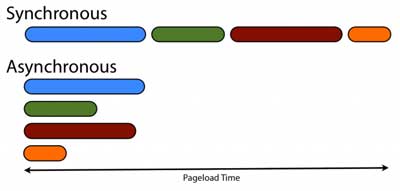
In synchronous execution of operations, the current operation must be completed before the next operation can begin. While in asynchronous execution, operations do not wait for each other to be executed, but are executed simultaneously. In general, in most cases, synchronous processes are not a problem because computers are very fast, so all operations are executed almost instantly. However, with the web, the problem is queries to the server. If these processes were synchronous, the entire interface of the web application would be “frozen” until the server’s response arrived. The same is true for data I/O operations. The result is that overall asynchronous operations are executed faster, even though each one individually is no faster than synchronous operations. (Look at the picture)
JavaScript and asynchronous programming
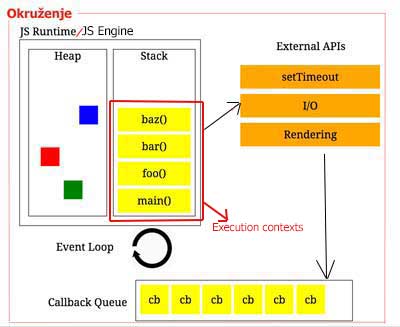
JavaScript is a “single thread” programming language and itself cannot perform multiple simultaneous parallel actions. JavaScript is also a scripting language, therefore it is necessary to “place” it in some container that would enable it to work, that container is called JS Runtime Environment (Serbian environment). It is precisely this environment that is responsible for the execution of several parallel actions at the same time (so-called asynchronous execution). The key parts responsible for the asynchronous operation of JS are “External API”, and “Event loop”. Therefore, in order to understand how JavaScript handles asynchronous operations, it is necessary to first know the basic elements of the Runtime Environment.
There are two types of environments: browser (for working on the client) and node.js (for working on the server). Runtime Environment consists of :
- JS Engine/Runtime
- Heap
- Stack
- External API
- Queue
- Event loop
Read more about the JS Runtime Environment in the article “JavaScript and its environment”
What processes are asynchronous in JavaScript?
a) Executing the setTimeout() method
Asynchronous programming with a suitable external API is easiest to explain through examples. The following example is executed in the browser, and the code contains two methods for printing text in the console and one special method setTimeout() which is part of the Window object (WebAPI).
Example
JS executes the code line by line, first puts on the stack the first console.log() method and then executes it. After which the JS engine reaches the line where setTimeout() is called, so it puts this method on top of the stack and executes it.
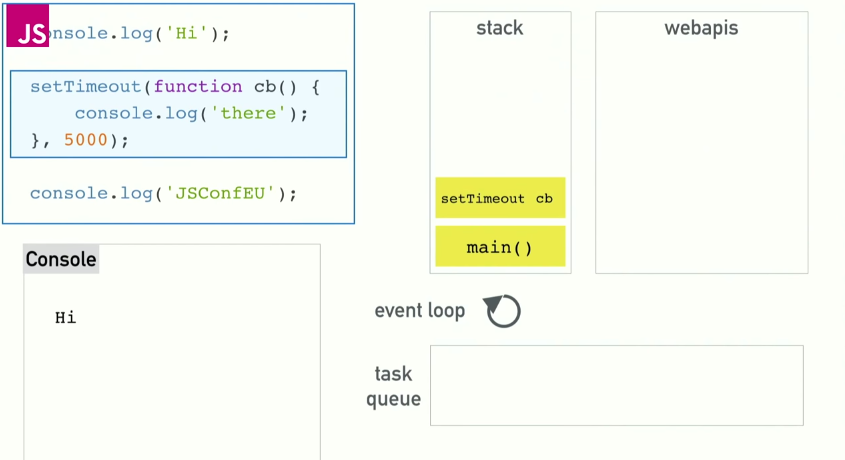
This is where the interesting part begins because after the setTimeout() method is executed, it is removed from the stack, and its callback function is moved to the webAPI section and includes a timer. After that, the JS engine continues processing the next line of code where it encounters another console.log() method that it puts on the stack and executes.
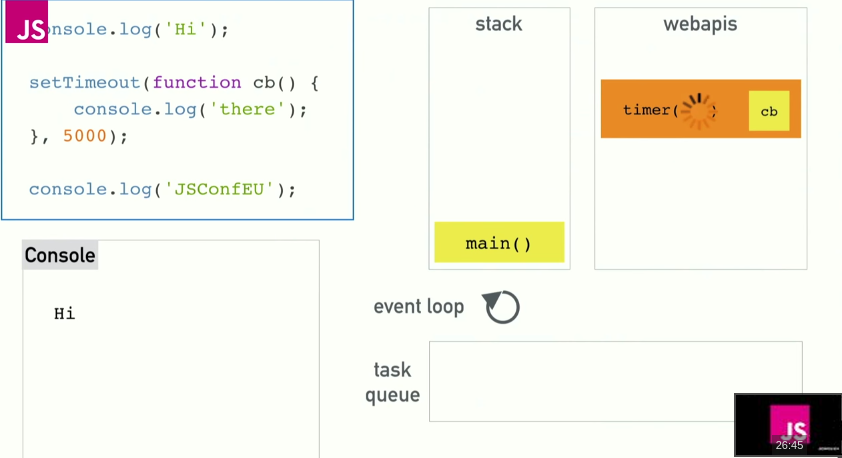
While the rest of the program is being executed, and after the time specified in the timer, the callback function is switched to the task queue and there it waits for the stack to be emptied so that it can be executed.
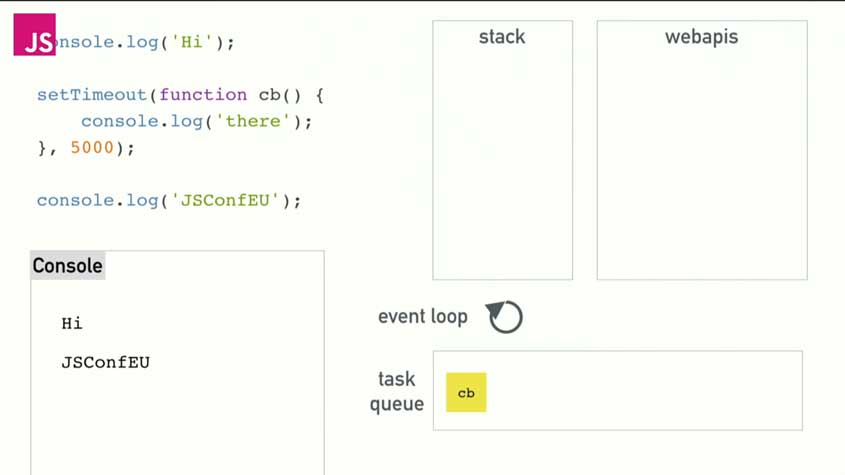
The event loop will transfer the task (callback function) from the task queue only if the stack is empty.
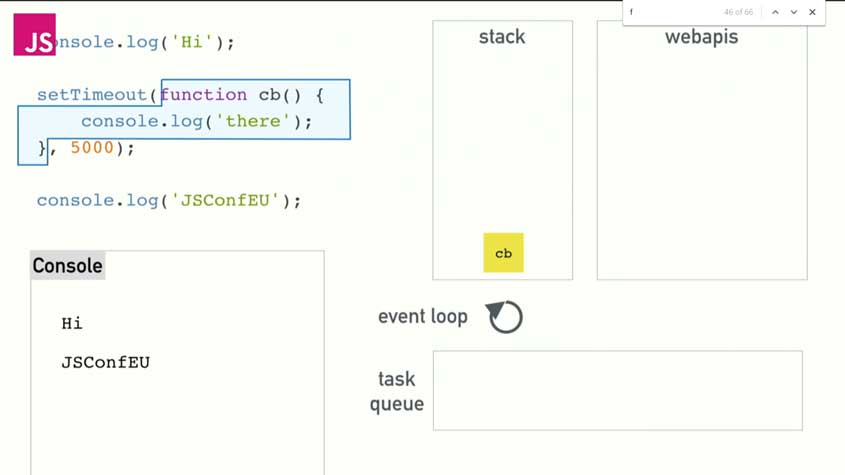
When the callback function is found on the stack, it is executed and then removed from the stack. The result of executing this code is to print text to the console in this order:
- The first console.log() method prints: “Hi”
- The third console.log() method prints: “JSconfEU“
- The second console.log() method within the setTimout() method prints: “there“
NOTE:
Delaying a callback function for zero seconds does not mean that it will be executed immediately. The callback function must follow the same path as in the previous example (stack -> web API -> task queue -> stack), with the result that zero seconds will be kept in the web API section. However, it will have to wait in the task queue until the stack is empty. This “fora” is used when we want the synchronous process to become asynchronous, by wrapping the callback function with the setTimout() method, and setting 0ms as a parameter.
See the animation of this example here (Tip: Click the two crossed hammers icon in the top left corner of the app to change the code execution speed).
b) Data request from the server
In addition to timers that enable asynchronous programming, a call to the server using the XMLHttpRequest object is also asynchronous. In the following example, we will explain how JavaScript works asynchronously when calling the server:
Example
|
1 2 3 4 5 |
console.log("Hi"); $.get("url", function cb (data) { console.log(data); }) console.log("SJS"); |
First, the first line of code is executed, causing it to be pushed onto the stack
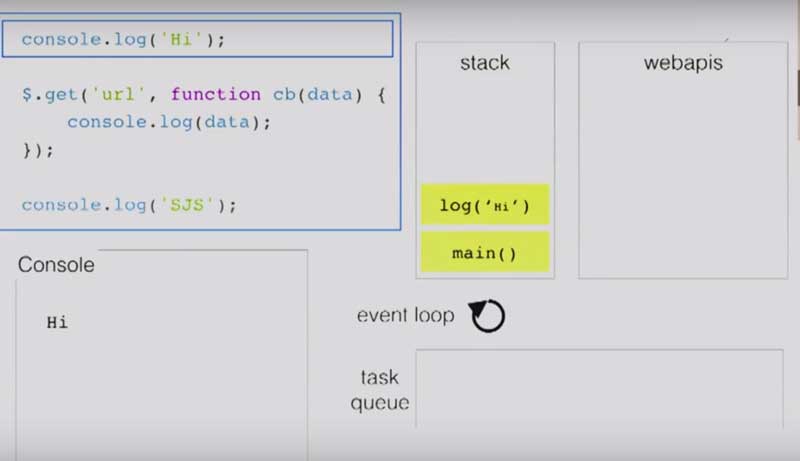
When the first command is executed, it is removed from the stack and the next one is executed, which is the get() method, which should asynchronously “fetch” data from the server using “HTTP GET request“.
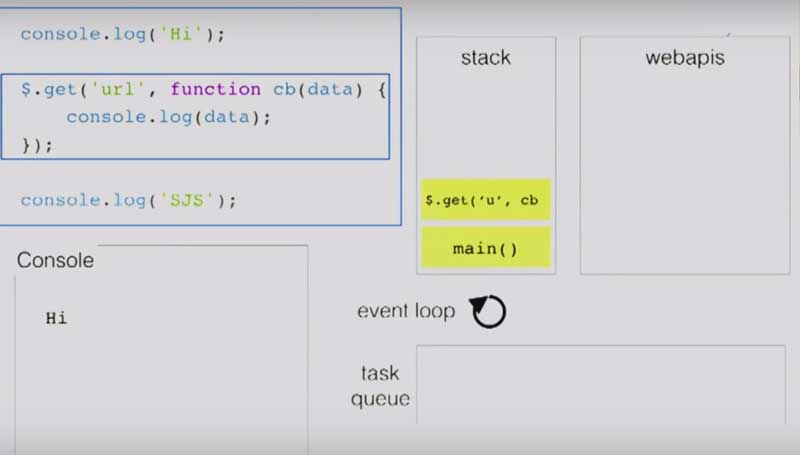
When the get() method is executed, it is removed from the stack, while the “callback” function sits on the side and thus does not block further JavaScript code execution while waiting for data.
While the callback function is waiting for data, the last line of code that prints some text to the console is executed in parallel.
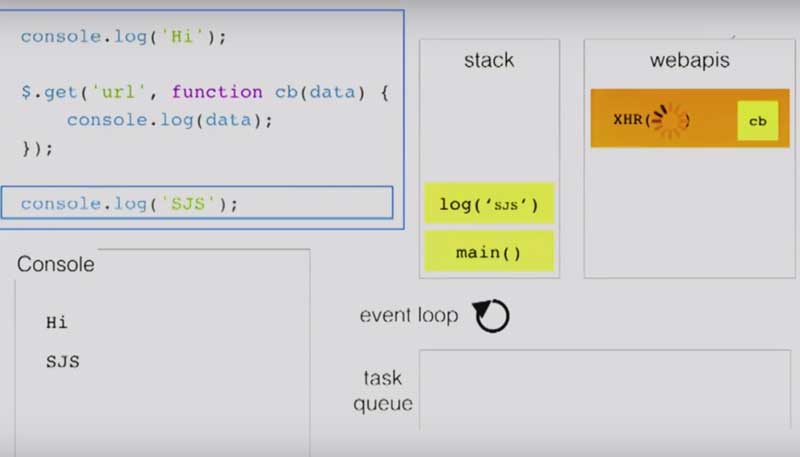
When the text is printed and the last command is executed, it is removed from the stack, which remains empty. During this time, the callback function has received data and placed itself in the “queue”.
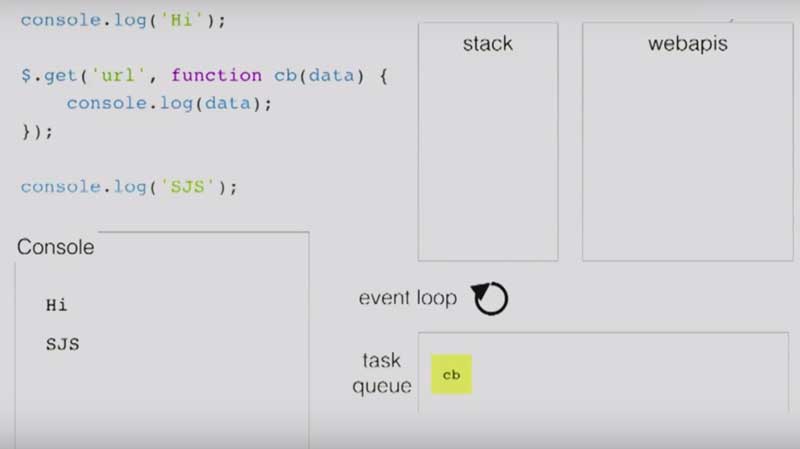
As soon as the stack is freed, the event loop moves the callback function onto the stack and executes it.
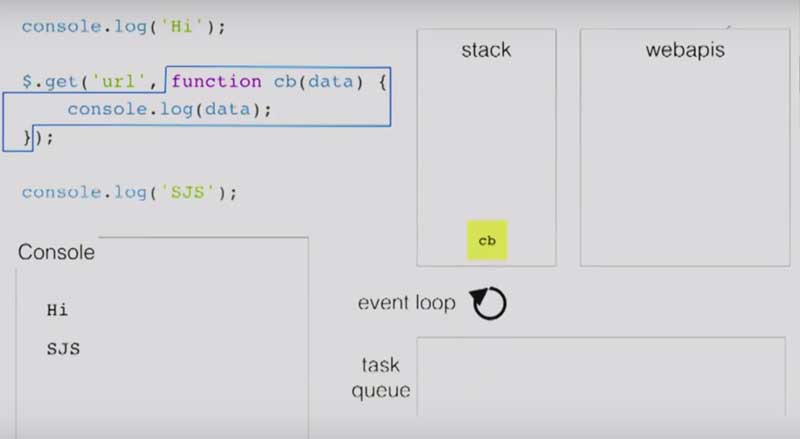
The result of executing this code is to print text to the console in this order:
- The first console.log() method prints: “Hi”
- The third console.log() method prints: “SJS“
- The second console.log() method within the setTimout() method prints the data from the server
c) Events are executed asynchronously
All events in JavaScript are executed asynchronously, because when compiling the code, the JS engine puts callback functions related to events on the side and thus does not block the execution of other code.
Example
In this example, with each mouse click, three events are “triggered” and three callback functions are activated, which do not block the execution of the Javascript code, but are forwarded to the “queue” where they wait for the stack to be emptied.

See the animation of this example here (Tip: Click the two crossed hammers icon in the top left corner of the app to change the code execution speed).
NOTE:
Do not block the event loop!!! The whole principle of the asynchronous operation of JavaScript and the Runtime Environment is based on the fact that parts of the code are passed from the “queue” to the stack with an Event Loop, however, if the stack is constantly occupied (e.g. some large while loop, or some required rendering…), then we are not able to perform an asynchronous action waiting in the “queue”.