



Standard loops
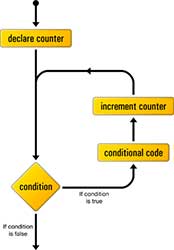
There is often a need to execute some lines of code multiple times within a program. This mode of execution is achieved by means of appropriate management structures. Loops and iterations are the basic building block of any program. Standard loops occur in more or less the same form in almost all programming languages. The most used is “for loop”. Special attention should be paid to while loops because there is a possibility that the loop may become infinite due to a bad choice of conditions.
“while” loop
The while statement is executed as long as the condition is TRUE, and if it is not then the loop is exited. This type of loop is most often used when the exact number of elevations of the loop is not known. In case the condition is not met at the very beginning, the loop is not executed once. Before entering the loop, variables are initialized that will be used either in the condition or in the body of the loop. The body of the loop contains the code that forms the condition for remaining in the loop.
|
1 2 3 |
while ([condition]) { expression for execution if condition is TRUE } |
This type is called a “pre-test loop” because the condition is executed before the expression block.
|
1 2 3 4 5 6 7 |
var n = 0; var x = 0; while (n < 3) { n++; x += n; } alert ("Ukupan zbir niza je " + x) |
The expression “n++” is called “updater”. Most often, the initial values for the condition are defined before the loop. Pay attention to the possibility of creating an “infinite loop” if there is no updater.
|
1 2 3 |
while (true) { console.log('Hello, world!'); } |
do..while loop
The statement in the do…while loop is executed until the condition is FALSE. The difference between “do…while” and “while” loops is that here the expression is executed at least once, while with “while” there is a possibility that the expression is never executed if the condition at the start is FALSE.
|
1 2 3 |
do { expression for execution } while ([condition]); |
This type of loop is most often used when an expression in the body of the loop generates a value to be used in a condition.
|
1 2 3 4 5 |
var i = 0; do { i += 1; console.log(i); } while (i < 5); |
“for” loop
This is the most commonly used loop. Unlike “while” and “do…while” loops where the key loop points [initial value], [condition] and [increment expression] are in different places, here a structure called “iteration statement” keeps them together, on one line, separated by semicolons.
|
1 2 3 |
for ([initial value]; [condition]; [expression for increase]){ expression for execution } |
This type of loop is used if at the beginning the exact number of loop executions is known.
|
1 2 3 4 5 |
var sum = 0; for (var i = 1; i <= 50; i++) { sum = sum + i; } alert("Sum = " + sum); |
Additional commands
break
The break statement is used to break out of the body of the loop. It is located somewhere in the body of the loop, usually after some additional condition. Can be used with any loop type mentioned.
BREAK in FOR loop
|
1 2 3 4 5 6 7 |
var text = ""; var i; for (i = 0; i < 10; i++) { if (i === 3) { break; } text += "Broj manji od 3 je " + i + "n"; } console.log(text); |
The result is:
|
1 2 3 |
Broj manji od 3 je 0 Broj manji od 3 je 1 Broj manji od 3 je 2 |
continue
With the continue command, the execution of iterations is not interrupted, but the current iteration is skipped.
continue in FOR loop
|
1 2 3 4 5 6 7 |
var text = ""; for (var i = 0; i < 5; i++) { // If the number is 3 then don't print it if (i === 3) { continue; } text += "broj " + i + 'n'; } console.log(text); |
The result is:
|
1 2 3 4 5 |
broj 0 broj 1 broj 2 broj 4 broj 5 |
continue in WHILE loop
|
1 2 3 4 5 6 7 8 9 |
var x = 0; var text = ""; while (x < 5) { x = x + 1; // If the number is 3 then don't print it if (x == 3){ continue; } text += "broj " + x + 'n'; } console.log( text ) |
Result:
|
1 2 3 4 |
broj 1 broj 2 broj 4 broj 5 |
Loop labels
Loop labels is a syntax that enables the labeling of loops. A label (loop name) is placed before each loop along with a colon.
|
1 2 3 4 5 6 7 |
spoljnaPetlja: for( ) { // ... unutrasnjaPetlja: for( ) { // ... } } |
Marking loops gives us the possibility that when using the break or continue commands, we can select the loop to which we want to apply the commands.
|
1 2 3 4 5 6 7 8 9 10 |
petlja_1: for (var i in set1) { petlja_2: for (var j in set2) { petlja_3: for (var k in set3) { break petlja_2; // exit from loops: loop_3 and loop_2 } } } |
Iteration through arrays forEach()
This method executes a specific function (callback) using each element of the passed array. This function is less flexible than the standard “for loop” because it has no conditional statements and there is no way to terminate a “loop” once started other than throwing an exception. The method passes three parameters to the callback function:
- string member value
- index of array member
- an array (on which the method is executed)
|
1 2 3 |
someArray.forEach(function (currentValue, index, array) { // some calculation }, [thisArg]); |
In addition to the callback function, the argument thisArg can (optionally) be passed, which defines what the reserved word this will point to within the callback function. The function itself does not automatically return anything, so it is not “chainable” (the next method cannot be chained to it). Even after explicitly using the return statement, it will not return anything after the iteration.
Example
|
1 2 3 4 5 |
var someArray = ['a', 'b', 'c']; someArray.forEach(function(element) { console.log(element); }); // Returns: "a" "b" "c" |
The same result can be obtained using other attributes
|
1 2 3 4 5 |
var someArray = ['a', 'b', 'c']; someArray.forEach(function(element, index, prosledjen_niz) { console.log(prosledjen_niz[index]); }); // Returns: "a" "b" "c" |
Example
Callback function cannot use “empty array members” (array member with an index that has no associated value) in the calculation. Therefore, in the following example, this method will not take into account an empty element, so the array member with index 2 will be skipped:
|
1 2 3 4 5 |
function callbackFunkcija(element, index, array) { console.log('a[' + index + '] = ' + element); } [2, 5, , 9].forEach(callbackFunkcija); // Returns: a[0] = 2 a[1] = 5 a[3] = 9 |
Iteration through the object for..in
This is a specific “for” loop that passes through all the properties of an object where the property descriptor is enumerable, set to TRUE. This method can also be applied to arrays, but it has limitations and a lot of unwanted side effects, so it is recommended to use some other method to iterate through arrays (eg “for…of” loop).
NOTE:
It should be emphasized that with this method of iteration, the order of the members of the iteration is not guaranteed.
|
1 2 3 4 5 6 7 |
var person = {fname:"John", lname:"Doe", age:25}; var text = ""; var key; for (key in person) { text += person[key] + " " + "n"; } console.log( text ); |
The result is:
|
1 2 3 |
John Doe 25 |
NOTE: The
for…in loop “passes through” even properties that are inherited through the parent’s prototype object.
|
1 2 3 4 5 6 7 8 9 10 11 12 |
var Programer = function(firstName, specijalnost) { this.firstName = firstName; this.specijalnost = specijalnost; } Programer.prototype.profesija = "programer"; var dragoljub = new Programer("Dragoljub", "javascript"); var text = ""; for (var item in dragoljub) { text += dragoljub[item] + " " + "n"; } console.log (text); |
This loop will return the properties of the dragoljub object (Dragoljub, javascript) but also the inherited property from the parent (programmer). If we still want to return only the “personal” properties of the object, we have to filter using the hasOwnProperty method, as in the following example:
|
1 2 3 4 5 6 7 8 9 10 11 12 13 14 |
var Programer = function(name, specijalnost) { this.name = name; this.specijalnost = specijalnost; } Programer.prototype.profesija = "programer"; var dragoljub = new Programer("Dragoljub", "javascript"); var text = ""; for (var item in dragoljub) { if (dragoljub.hasOwnProperty(item)) { text += dragoljub[item] + " " + "n"; } } console.log (text); |
This code returns only the personal properties of the “dragoljub” object: Dragoljub and javascript.
NOTE:
“for..in” loop goes through all properties of the object, and even through those that inherit through the chain of inheritance, so if we are interested only in the “personal” properties of the object, there is a possibility of transforming the object into a string. One of the following methods is used for this: Object.values(obj), Object.keys(obj) or Object.entries(obj). Read more about these methods in the article “Object() & Object.prototype”
Iteration through iterable for..of
This is a new way of iteration that came bundled with the ES6 standard. Iterating with “for…of” goes through the values of the iterable collection. It is used for all iterable collections (Array, Map, Set, String…), but it is not planned to iterate through object properties.
|
1 2 3 |
for (variable of collection) { expression for execution } |
where is:
- Member value – represents a new value assigned at each iteration
- collection – the name of the collection whose properties are iterated through
Unlike for…in where the constant order of iteration is not guaranteed, with this method iterations are performed according to the order.
|
1 2 3 4 5 6 7 |
let someArray = []; someArray[3] = 'd'; someArray[0] = 'a'; someArray.foo = 'f'; for (let vrednostClana of someArray) { console.log(vrednostClana); } |
Result:
|
1 2 3 4 |
"a" // a[0] undefined // a[1] undefined // a[2] "d" // a[3] |
Iteration through the “array”
|
1 2 3 4 5 6 7 8 9 |
let nizBrojeva = [10, 20, 30]; for (let clanNiza of nizBrojeva) { var duplo = clanNiza *2 ; console.log(duplo); } // 20 // 40 // 60 |
Iterations through “string”
|
1 2 3 4 |
const str = 'dragoljub'; for ( const chr of str ){ console.log(chr); // 'd', 'r', 'a', 'g', 'o', 'lj', 'u', 'b' } |
Iterations through the DOM
|
1 2 3 4 5 |
const articleParagraphs = document.querySelectorAll("article > p"); for ( const paragraph of articleParagraphs ) { paragraph.classList.add("read"); } |
Iterations through MAP
|
1 2 3 4 5 |
const m = new Map([['foo', 'hello'], ['bar', 'world']]); for ( const [name, value] of m ) { console.log(name + "->" + value); //"foo->hello", "bar->world" } |
Iteration through Set
|
1 2 3 4 5 |
const s = new Set(['foo', true, 42]); for ( const value of s ) { console.log(value); // 'foo', true, 42 } |
Iteration through generators
|
1 2 3 4 5 6 7 8 9 10 |
function *foo() { yield 'foo'; yield false; yield 42; yield 'bar'; } for (const v of foo() ) { console.log( v ); // 'foo', false, 42, 'bar' } |
Iteration through the object
Although this iteration method is not intended for object iteration, there is a workaround to apply it to objects as well using Object.keys():
|
1 2 3 4 5 |
const obj = { foo : 'hello', bar : 'world' }; for ( const key of Object.keys(obj) ) { console.log(key + "->" + obj[key]); // 'foo->hello', 'bar->world' } |