


Introduction
Object() is a function that can be considered the “mother” of all objects. All objects in JavaScript are derived from this function. Creating objects is possible in several ways, but the following way best explains the connection between the constructor function and the object:
|
1 |
var someObject = new Object(); |
A constructor function has a number of methods and two properties: “Object.length” (a very strange property that always returns 1) and “Object.prototype”
EXPLANATION:
Functions in javascript are “First class citizen”, therefore they support all operations available to other types. Among other types of functions, they also support the characteristics of objects, so functions and objects have their own properties and methods. One of the most important features of the constructor function is the Object.prototype property, through which the constructor function passes basic properties and methods to all objects in JavaScript.
“Object.prototype” property of constructor f
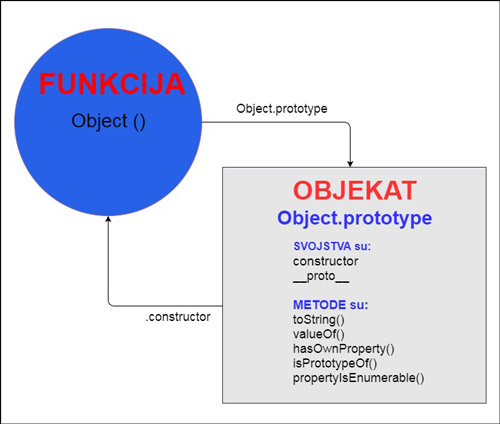
“Object.prototype” does not have a “smart” name, but a generic one, created on the basis of belonging to a function (property of the constructor function Object()). This property of the constructor function (of type “object”) is in charge of passing methods and properties to all newly generated objects. This object delegates all its properties and methods to the newly created objects, so they are available to them from the very start. Object.prototype is at the end of the inheritance chain and all the properties and methods it possesses are available to any javascript object.
- PROPERTIES:
- .constructor
- __proto__
- METHODS:
- hasOwnProperty()
- isPrototypeOf()
- propertyIsEnumerable()
- toString()
- valueOf()
The properties of this object are specific because their property descriptors have negative values (writable=no; enumerable=no; configurable=no), and since the properties are not enumerable, this means they are not accessible through a “for…in” loop. The characteristics of the properties of this object are as follows:
| Property attributes of Object.prototype | |
|---|---|
| Writable | but |
| Enumerable | but |
| Configurable | but |
These properties and methods of “Object.prototypealso delegates objects that are created by inheritance, i.e. to all objects along the inheritance chain. Object.prototype is always at the end of the prototype inheritance chain.
Properties of the “Object.prototype” object
Object.prototype.constructor
This property points to the constructor function from which the original object was created, and if the object does not have its own “personal” constructor function (eg object literal {}, created using the keyword new…), then the javascript engine searches for the .constructor property along the inheritance chain until it is found.
|
1 2 3 4 5 6 7 8 |
var o = {}; o.constructor === Object; // true var a = []; a.constructor === Array; // true var n = new Number(3); n.constructor === Number; // true |
Object.prototype.__proto__
This property (called “dunder proto”, short for “double underscore proto”) points to the parent object from which our object inherits properties and methods. With this property we can even predefine the object from which we want to inherit, although in general we should avoid using this property, because it is very slow, and besides, it is not according to the ES standard, although it is accepted in all browsers (except IE<11). If we really want to use such a property, it is better to use the getPrototypeOf() property, which is accepted by the ES2015 standard, and has the same characteristics as __proto__.
|
1 |
someObject.__proto__ == Object.getPrototypeOf(someObject) // Returns the parent prototype object |
This property can also be used chained, so it can reach any prototype object along the entire inheritance chain:
|
1 |
someObject.__proto__.__proto__ // Returnsprototype object two levels deep |
Using this non-standard property we can make another object our prototype object by simply assigning it another object.
Example
|
1 2 3 4 5 6 7 |
var objekat1 = { a: 1, b: 2 }; var someObject = {}; someObject.__proto__ = objekat1; console.log(someObject.a); // Returns: "1" |
Methods of the Object.prototype object
Object.prototype.isPrototypeOf()
This method checks if the object exists in one’s inheritance chain.
|
1 2 3 4 5 6 7 8 9 10 11 12 13 |
function Foo() {} function Bar() {} function Baz() {} Bar.prototype = Object.create(Foo.prototype); Baz.prototype = Object.create(Bar.prototype); var baz = new Baz(); console.log(Baz.prototype.isPrototypeOf(baz)); // true console.log(Bar.prototype.isPrototypeOf(baz)); // true console.log(Foo.prototype.isPrototypeOf(baz)); // true console.log(Object.prototype.isPrototypeOf(baz)); // true |
Object.prototype.hasOwnProperty()
Method “hasOwnPropery()” checks whether a certain object (without objects in the protoytpe chain) has any property, returns a boolean value. This property will check even the non-enumerable private properties of the object.
|
1 2 |
var someObject = {a:2}; someObject.hasOwnProperty("a"); // Returnstrue |
NOTE:
In addition to the previous method, the following approaches to this problem can often be seen:
a) Operator “in”
The in operator is used to test all objects in the prototype chain. With this operator, it is checked whether the object itself has any property, but all objects that delegate properties in the prototype chain are also checked.
|
1 2 3 |
if ("svojstvo" in nekiObjekt){ // some code } |
b) operator !==
|
1 2 3 4 5 |
if (obj.svojstvo !== undefined) { return true; } else { return false; } |
This method returns the same result as the operator “in” (all properties in the prototype chain), however this approach is not recommended because it is the slowest.
Object.prototype.propertyIsEnumerable()
Using the “propertyIsEnumerable()” method, it checks whether the property descriptor enumerable is set to the value true, i.e. whether the property is iterable and visible through property iterations.
|
1 |
someObject.propertyIsEnumerable(svojstvo); |
Example
|
1 2 3 4 |
var o = {}; Object.defineProperty(o, "foo", { enumerable: false }); console.log(o.hasOwnProperty('foo')); // "true" console.log(o.propertyIsEnumerable('foo')); // "false" |
Object.prototype.toString()
This method returns a string representation of the object.
|
1 2 3 4 5 6 7 8 9 |
function Dog(name, breed, color, sex) { this.name = name; this.breed = breed; this.color = color; this.sex = sex; } theDog = new Dog('Gabby', 'Lab', 'chocolate', 'female'); theDog.toString(); // Returns: [object Object] |
Since they are also native objects (String, Array, Number…).objects, then the mechanism of delegated inheritance can be applied to them as well, and even adding new properties to the initial prototype object:
|
1 2 3 |
String.prototype.trim = function() { return this.replace(/^s+|s+$/g, ‘’); }; |
We can now use the trim() method on all strings:
|
1 |
" foo bar ".trim(); // Returns the cleared string "foo bar" |
The disadvantage of this approach is that newer versions of JavaScript may have new functionality called “trim” so our method would override the standardized method. This problem could be solved as follows:
|
1 2 3 4 5 |
if(!String.prototype.trim) { String.prototype.trim = function() { return this.replace(/^s+|s+$/g, ‘’); }; } |
Methods of a constructor function
Object.create()
With the Object.create() method, an object is generated, which is defined immediately upon creation, from which object the methods are delegated via the “prototype chain” (properties are not copied!). The syntax for creating an object is:
|
1 |
Object.create(proto[, propertiesObject]) |
The Object.create() method performs the following tasks in the background:
- New object is being created
- The new object is linked to the object from which it was created and thus inserted into the inheritance chain, after which it can have access to its delegated methods
- Optionally, it can also define new object properties.
Read more about this in the article “1001 ways to create objects”.
Object.assign()
This property copies all properties of one or more objects where the enumerable property descriptor is set to true and then returns the object.
Cloning objects
|
1 2 3 |
var obj = { a: 1 }; var copy = Object.assign({}, obj); console.log(copy); // { a: 1 } |
NOTE:
This property only copies “personal object properties”, not properties along the prototype inheritance chain.
Merging multiple objects into one
This property can be used with multiple objects, so it should be noted that duplicate properties are not displayed as two but as one property.
|
1 2 3 4 5 6 |
var o1 = { a: 1, b: 1, c: 1 }; var o2 = { b: 2, c: 2 }; var o3 = { c: 3 }; var velikiObjekat = Object.assign({}, o1, o2, o3); console.log(velikiObjekat); // { a: 1, b: 2, c: 3 } |
Object.getPrototypeOf()
With this method we get the prototype object of a certain object.
|
1 2 3 |
var proto = {}; var obj = Object.create(proto); Object.getPrototypeOf(obj) === proto; // true |
This method did not work best during the ES5 standard, but it has been improved with the ES2015 standard.
Example
|
1 2 3 4 |
Object.getPrototypeOf('foo'); // (ES5 code) Returns TypeError: "foo" is not an object Object.getPrototypeOf('foo'); // (ES2015) Returns the correct value - String.prototype |
Object.setPrototypeOf()
Extending the constructor function is done using the Object.create() method, which defines a prototype object of one object with another (read a little more about this in the article 1001 ways to create objects in JS.
|
1 |
Constructor2.prototype = Object.create(Constructor1.prototype); |
However, the object literal does not have its own constructor function, so it is necessary to use the Object.setPrototypeOf() method, which assigns a prototype object to another object.
|
1 |
Object.setPrototypeOf(obj, prototype); |
NOTE:
This method is a replacement for the non-standard method
Object.prototype.__proto__ (read more about it in the article “Prototype inheritance”), which was not recommended for use because it is very slow, the same goes for the method Object.setPrototypeOf(), so avoid it!
Example
|
1 2 3 4 5 6 7 8 9 10 11 12 13 |
var proto = { y: 2 }; var obj = { x: 10 }; Object.setPrototypeOf(obj, proto); proto.y = 20; proto.z = 40; if (console && console.log) { console.log(obj.x === 10); // Returns true console.log(obj.y === 20); // Returns true console.log(obj.z === 40); // Returns true } |
Object.defineProperty()
The Object.defineProperty() method defines or modifies the properties of an object.
Example
This property can be used to create private properties using special methods called “get-era” and “set-era”.
|
1 2 3 4 5 6 7 8 9 10 11 12 13 14 15 16 17 18 19 |
var programer = {}; Object.defineProperty(programer, 'ime', { writable: true }) Object.defineProperty(programer, 'prezime', { writable: true }) function get_punoIme() { return this.ime + ' ' + this.prezime } function set_punoIme(novoIme) { var unesenoIme; unesenoIme = novoIme.trim().split(/s+/); this.ime = unesenoIme['0'] || ''; this.prezime = unesenoIme['1'] || ''; } Object.defineProperty(programer, 'punoIme', { get: get_punoIme , set: set_punoIme , configurable: true , enumerable: true }); programer.punoIme="Pera Peric"; console.log(programer.punoIme); // Returns: "Pera Peric" |
With this mechanism, every time we want to interact with the “fullName property we do so with either the “get_fullName()” or the “set_fullName()” method.
Object.is()
JS is a “loosely typed” language, which in certain situations implicitly converts types. Converting when comparison with the “==” operator often gives unwanted results.
|
1 2 3 |
0 == ' ' //true null == undefined //true [1] == true //true |
Therefore “===” is often used, although comparison with this operator can also give an illogical result:
Example
|
1 |
NaN === NaN //false |
All these problems are solved by the Object.is() method, which checks whether two objects are equal, and it does so without fail.
Example
|
1 |
console.log(Object.is(NAN, NAN)); // ReturnsTRUE |
Example
It also resolves lesser-known JavaScript inconsistencies and returns the appropriate response, such as:
|
1 2 3 |
Object.is(0, -0); // Returns: false Object.is(-0, -0); // Returns: true Object.is(NaN, 0/0); // Returns: true |
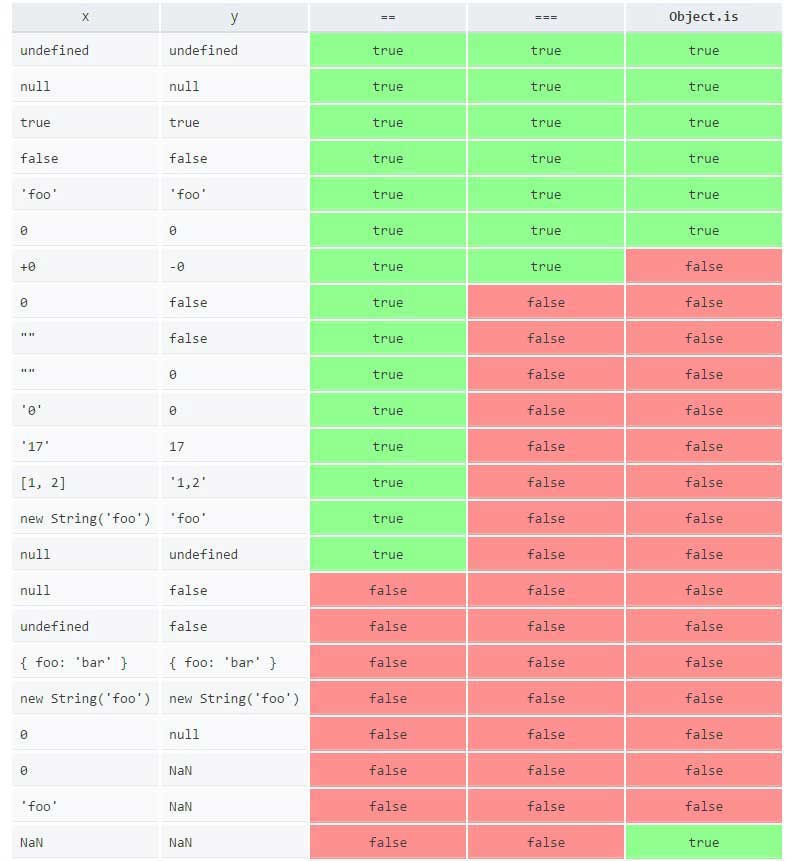
See a table of comparison results using the ==, === operators and the Object.is() method:
Object.values
Creates an array of all the values of the object’s “enumerable” properties (no properties along the inheritance chain).
|
1 |
Object.values(obj) |
Example
|
1 2 |
var someObject = { a: 'pera', b: 'mika', c: 'zika' }; console.log(Object.values(someObject)); // ['mika', 'zika', 'pera'] |
NOTE:
The order of the members is random, just like in the for..in loop!
Object.keys
Creates an array of all keys of the object’s “enumerable” properties (no properties along the inheritance chain).
|
1 |
Object.keys(obj) |
Example
|
1 2 |
var someObject = { a: 'pera', b: 'mika', c: 'zika' }; console.log(Object.keys(someObject)); // ['b', 'c', 'a'] |
NOTE:
The order of the members is random, just like in the for..in loop!
Object.entries
Creates an array of all [key, value] pairs of the object’s “enumerable” properties (no properties along the inheritance chain).
|
1 |
Object.entries(obj) |
Example
|
1 2 |
var someObject = { a: 'pera', b: 'mika', c: 'zika' }; console.log(Object.entries(someObject)); // [['b','mika'], ['c','zika'], ['a','pera']] |
NOTE:
The order of the members is random, just like in the for..in loop!
Object.getOwnPropertyNames()
This method returns an array of all object keys and even those properties where the descriptor is enumerable: false
|
1 2 |
var obj = { 0: 'a', 1: 'b', 2: 'c' }; console.log(Object.getOwnPropertyNames(obj).sort()); // Returns["0", "1", "2"] |
The “for..in” loop can also be used to view the object’s properties, which goes through all the properties (which have enumerable: true set) of the object and the entire prototype chain.
|
1 2 3 4 5 6 7 8 9 10 11 |
var obj = {a:1, b:2, c:3}; for (var prop in obj) { console.log("obj." + prop + " = " + obj[prop]); } // Output: ------------------- // "obj.a = 1" // "obj.b = 2" // "obj.c = 3" |
Object.getOwnPropertyDescriptor()
Property descriptors of an object are obtained using the method “Object.getOwnPropertyDescriptor()”:
Example
|
1 2 3 4 5 6 7 8 9 10 |
var someObject = {a:2}; Object.getOwnPropertyDescriptor(someObject, "a"); // Returns object with property attributes "a": { configurable : true enumerable : true value : 2 writable : true } |
Object.getOwnPropertyDescriptors()
With this method we get all “personal” (not inherited)properties and their property descriptors:
|
1 2 3 4 5 6 7 8 9 10 11 12 13 14 15 16 17 |
const obj = { [Symbol('foo')]: 123, get bar() { return 'abc' }, }; console.log(Object.getOwnPropertyDescriptors(obj)); // Output: // { [Symbol('foo')]: // { value: 123, // writable: true, // enumerable: true, // configurable: true }, // bar: // { get: [Function: bar], // set: undefined, // enumerable: true, // configurable: true } } |
Used to clone objects
|
1 |
const clone = Object.create(Object.getPrototypeOf(obj), Object.getOwnPropertyDescriptors(obj)); |
Object.PreventExtension()
If we want to prevent adding new properties to an object, use the “Object.PreventExtension()” method
|
1 |
Object.preventExtension(someObject) |
Object.seal()
The “Object.seal()” method takes an object and calls the previous preventExtension() method for it, and also sets the configurable descriptor to false (=> configurable: false + prevented adding new properties). The result of this method is that no new properties can be added to the object, no existing properties can be deleted, and no descriptors other than the “value”
descriptor can be changed.
Object.freeze()
The “Object.freeze()” method takes over an existing object, and calls the “Object.seal()” method for it, and changes the value of the “writable” descriptor to false (=> writable: false, configurable: false + preventing the addition of new properties) for all properties of the object. This method provides the highest level of object immutability.