


Package manager
Introduction
Today’s web development is based on a set of different technologies that are used simultaneously on one project, such as: Typescript (language), Sass (CSS extension), JSCS (code style linter and formater), JSHint or TSLint (a tool for detecting errors and potential problems), BrowserSync (a tool for synchronizing changes in the code and in the browser – Live reload)… One project requires the installation of each of the mentioned programs but also of all programs (dependencies) on which they depend and which precede their installation.
Package manager eliminates the need to manually install software with all necessary supporting software (dependencies) and to update all those components. Package manager is a set of tools responsible for automating the process of installing, configuring and removing programs. Package managers work with packages ie. with software or data contained in archive files. Packages contain meta-data that describe the given software such as the name of the software, the version and a list of all dependencies (other software necessary for the given software to work). The most famous package managers are:
- npm
- bower
- JSPM (JavaScript Package Manager)
- Yarn
Dependency Organization
The type of dependency organization, the so-called “dependencies tree type” is one of the features of package managers that makes the difference between them. The main two types are:
- Nested dependency tree implies that for each package its dependencies are installed, so that the same dependencies (eg Jquery) can be loaded multiple times but for different programs. This type of organization requires more space but allows applications to use different versions of the same software in one project.
- Flat dependency tree loads one program (dependencies) only once in the root folder, so it takes up little space and loads quickly in the browser. However, in the case that different dependecies require different versions of the software flat dependency tree has no solution.
Example (Nested dependency tree):
|
1 2 3 4 5 6 7 8 9 10 11 12 13 |
project root [node_modules] // the main (root) directory for dependencies -> dependency A -> dependency B [node_modules] // direkteorijum za dependences aplikacije B -> dependency A -> dependency C [node_modules] -> dependency B [node_modules] -> dependency A -> dependency D |
Example (flat dependency tree):
|
1 2 3 4 5 6 |
project root [bower_components] glavni (root) direktorijum za dependencies -> dependency A -> dependency B // ima zavisnost od A aplikacije -> dependency C // ima zavisnost od B i D aplikacije -> dependency D |
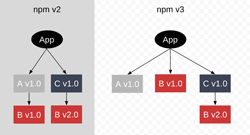
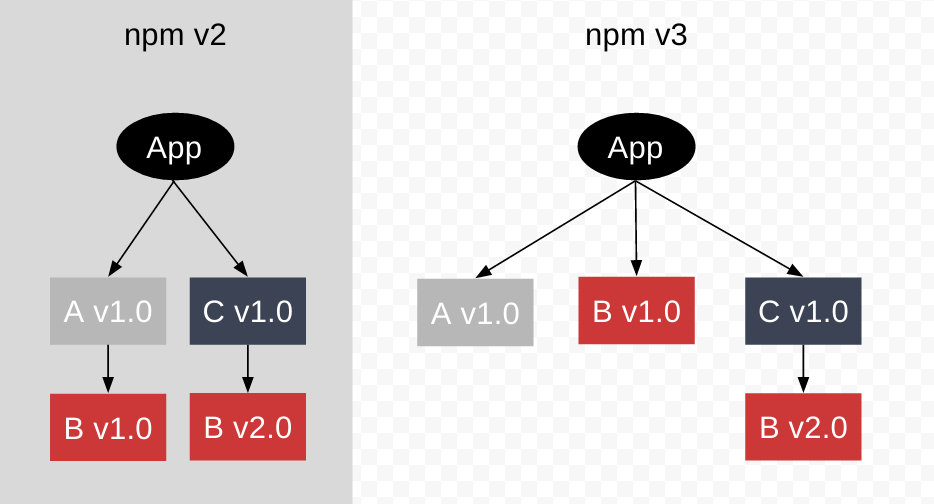
Bower and JSPM use a flat dependency tree, while npm uses a nested dependency tree. It should be noted that the latest version of npm (npm3) tries to prevent “dependencies hell” and its style is more and more like the “flat way”. See more about dependencies tree in npm3 at their
Conclusion

The biggest package manager is npm, but we must note that it is primarily made for the node.js (server) environment, so in order for it to work in a browser, it is necessary to use a module load-er (browserify or webpack). JSPM comes in a pair with SystemJS module loader and does not have its own package but allows to install packages hosted on npm or github. Bower is considered to be “outdated”, but is often bundled with other so-called technologies. “workflow wrappers for front-end” like Yeoman which give it its popularity. It should be noted that Bower can coexist with both “npm” and “JSPM” in the same project thanks to the fact that they store data about modules in different files. JSPM and npm store data in package.json while bower stores module data in bower.json file. Since the other day, “the new kid is in town”, Yarn package manager, Facebook’s child, they say it is better and faster than npm, but only time will tell.
Task runner

After all the frontend applications are installed using one of the mentioned package managers, it is necessary to configure each one and then run them every time necessary (mostly every time you save changes). Task runners are used to automate all these processes (eg compile sass to css, transpile Typescript to JavaScript, optimize images, minify files…). The most famous task runners are:
- Grunt
- Gulp
The functions performed by Grunt are added by installing a certain plugin (plugin), and all processes in Grunt are “written” within one file (Gruntfile), which is located in the root of the project. Gulp has a more flexible configuration than Grunt with less code but a smaller community. Gulp works similarly to Grunt because it has a Gulpfile and functions are also added with plugins.
Module loaders and bundlers
If we decide for a modular way of programming the application, we will face the problem of organizing the loading of modules and the modules on which they depend, the so-called. dependencies. Module loaders and bundlers are indispensable support for programmers for simpler and more efficient work with modules.
Module loaders
“Module loaders” enable dynamic loading of modules by paying attention to the loading schedule. The most famous module loaders are:
- RequireJS – implements the AMD modular system.
- SystemJS – is a universal loader and can load modules in any popular format (CommonJS, UMD, AMD, ES6). It is most often used together with jsmp.io which is more than just a package manager, it can transpile ES6 as well as TypeScript or CoffeeScript.
What are CommonJS, AMD and UMD?
- Asynchronous Module Definition (AMD) as its name suggests, supports asynchronous module loading which is suitable forwork with modules in the browser.
- CommonJS loads modules synchronously and is therefore most commonly used to work with server-side modules in a node.js environment. Although it is not planned to work in the browser, with the help of the “module bundler” it is possible to adapt CommonJS to work in the browser.
- Universal module definition (UMD) is compatible with both AMD and CommonJS definitions and is used mainly if there is a need to load the same module on the server and in the browser.
See more about this in the article Modular Programming – External Syntax (AMD & CommonJS)
Module bundlers
“Module bundlers” solve the problem by compiling all modules into one file according to a certain order, making sure that any module that is a dependency of another is loaded on time. The most famous bundler-i module:
- Browserify – implements CommonJS in the browser environment as well. It can be upgraded with various plugins and with the help of a task runner (Gulp or Grunt) it can complete various jobs.
- Webpack – can load modules in any popular format (CommonJS, UMD, AMD, ES6). In addition to the basic purpose of loading modules, webpack can also perform task runner tasks such as transpiling ES6 (Typescript) into ES5, transpiling SASS into CSS… Based on the graph google trends concludes that there is a huge interest in Webpack as a representative module bundler. You can read more about webpack in the article “Webpack basics”
Conclusion
Choosing the type of support for working with modules mostly depends on the application itself. Therefore, if the application consists of a smaller number of larger modules, the “module loader” is considered to be a better choice, while the “module bundler” is considered to be more suitable if the application consists of a larger number of smaller modules. In any case, it is safest to try both types and see which one gives better results.
TIP:
there are applications that combine several mentioned applications into one. One of these is Yeoman which, with the help of an application called Yo, combines the work of a package manager (npm or bower) and a task manager (grunt or gulp) within one application. After installing Yeoman, I can install and then run a large number of generators that are intended for various types of projects. You can view a list of all Yeoman generators here.