


Domain lease
Renting a domain is one of the first steps necessary for web presentation. Purchases are made through authorized sellers (registries). Domain registrars are companies that sell domains. They must have a certificate approved by ICANN, the Internet Corporation for Assigned Names and Numbers. List of authorized registries in Serbia can be viewed here, while I will mention foreign registries namecheep.com and name.com. When you buy a domain, you don’t really own it, but you buy the right to use that domain for a certain period.
Domain transfer
If you want to change the company with which you registered the domain, the procedure is called “domain transfer”, for which the following procedure applies:
- The end user of the domain confirms that the data from the “whois” record is correct (verifies the correctness of the e-mail address…) and retrieves the authentication code from the old registry.
- The user contacts his new registrar with a domain transfer request and in doing so forwards the authentication code he received from the old registrar.
- The new registry contacts the old domain registry.
- The old registry contacts the end user with a request to confirm the authenticity of the request.
- After confirmation, the old registry will transfer the domain to the new registry.
- The new registry will notify the end user of the completion of the domain transfer.
Due to such a complicated procedure that is often charged, as well as other hidden problems, it is recommended not to lease a domain and hosting from the same company.
Web hosting
Hosting is a service provided by a hosting provider and is based on renting resources on servers (computers connected to the network non-stop).
Basic hosting features
- Hard disk space
This is the leased space on the hard disk, which is necessary for storing data related to the website. It should be noted that the space should be large enough to accommodate all the files that make up your web presentation, as well as continuous backup of the website (monthly, weekly…) - Allowed monthly data traffic (Bandwidth or Data Transfer)
Data transfer includes images, text, audio files, video files and everything else that the server transfers to the user’s web browser. The rule is that pages with a lot of images or video content have a higher monthly data traffic than pages with only text. It is also true that sites that have a lot of visitors (i.e. page accesses) consume larger amounts of the allowed monthly transfer. An approximate throughput can be calculated by multiplying the monthly number of accesses and the average page size of your site (a “normal” site with 40,000 page accesses has a throughput of about 1GB). - Number of allowed domains and subdomains (ie number of allowed databases)
- Host stability (eng. uptime)
This term indicates how much time the server is “up” ie. available. The uptime guarantee provided by hosting is a reflection of their quality and stability. 99% availability is the absolute minimum that hosting should guarantee. - Availability of technical support
This feature includes the working hours of technical support as well as the time at which technical support responds to a request (ticket). If you do not understand the business of hosting package administration, you need to find hostingproviders with good support recommendations. - Server speed
The speed of the server depends on the software and hardware configuration (amount of memory, processor power, type of hard disk…), so servers with better processors and a larger amount of memory, as well as servers with SSD drives, have good performance.
Types of hosting
Based on the previous characteristics, there are different types of hosting, I will list the types from worse to better:
- Shared hosting
The cheapest way to host your website. On shared hosting, the files of your website are placed on a server (computer) on which a number of hosted websites are located. Server sharing means sharing two of the most important hosting resources: space and bandwidth (although the processor and memory of the server should not be neglected). Although web hosting providers often offer similar options (similar servers), the difference can be big because in addition to the fact that the quality of shared hosting depends on the quality of the server itself, it also depends on the number of sites per server. It is obvious that the same server will work much better if there are 20 sites on it than if there are 1000. The main feature of shared hosting is the existence of central server administration by technical persons, which is convenient for those users who do not want to deal with IT settings. On the other hand, this is also an obstacle for advanced users who want to develop and test new functionalities due to a lower degree of control. - VPS (Virtual Private Server)
VPS hosting is one step above shared web hosting. This hosting still shares a server with other VPS users, but each server runs its own operating system and can be reset, customized, reinstalled, etc. independently of the others. VPS hosting provides the flexibility to add and change operating system components, network settings, and software installations as desired. - Cloud hosting
Cloud hosting is a technology for hosting Internet presentations on virtual servers that draw their resources from the networks of a large number of hardware servers. It represents the next evolutionary step and was created as an alternative to hosting sites on one physical server.
The biggest advantage of cloud technology is its flexibility and the ability to scale resources very easily. Another advantage of this kind of hosting is that, apart from the resources, you can also choose the operating system. With standard hosting, the problem can arise due to the failure of the server as well as other parts of the infrastructure, while with cloud hosting, the servers are connected in one cloud (components can be physically in completely different locations), so the failure of a component is quickly resolved, and a copy of your cloud server becomes active within a few minutes, instead of a few hours. - Dedicated Hosting
Hosting where the user rents the entire server that is not shared with other users. Servers are owned by web hosting companies but are rented to one user only. The user has full control over the entire server including the choice of operating system, server applications, hardware. There are several subtypes of this kind of hosting, which differ from each other in terms of the amount of involvement of the hosting provider in server maintenance:- Fully managed
Includes monitoring, software updates, reboots, security patches, and system upgrades. Users do not need to have advanced IT knowledge or administration or hire third parties for these jobs. - Managed (management)
It represents an intermediate level of support, but part of the administration is delegated to the user - Self managed (management byuser)
It implies a basic level of support from the hosting provider - Unmanaged (no support)
Requires full user administration
- Fully managed
DNS hosting
DNS (domain name system) is a huge system of servers whose purpose is to keep a catalog database that contains information related to each domain: its IP address, registration information as well as its relationship to other domains and hosts. Software that translates a human-understandable domain name (e.g. webprogramiranje.org) into its IP address (e.g. 194.63.248.47.) is called DNS software. A server that has “DNS software” installed is called a nameserver, such servers make up the DNS system. Usually, hosting companies have their nameservers, so in addition to web hosting, they also provide DNS hosting to their clients.
Nameserver setup
If the domain lease and hosting are not taken from the same company, it is necessary to inform the provider through whom we leased the domain, which nameservers are used by the web presentation (related to that domain). Information about these nameservers is provided by the company that provides you with the DNS hosting service (usually the same company as for web hosting).
Example of nameserver change at namecheap.com
First, the domain for which we want to change nameservers is selected. Then find where “NAMESERVERS” are defined and select the custom option. In the provided form, enter the names of the nameservers given to you by your hosting company. The number of nameservers varies depending on the choice of hosting company.
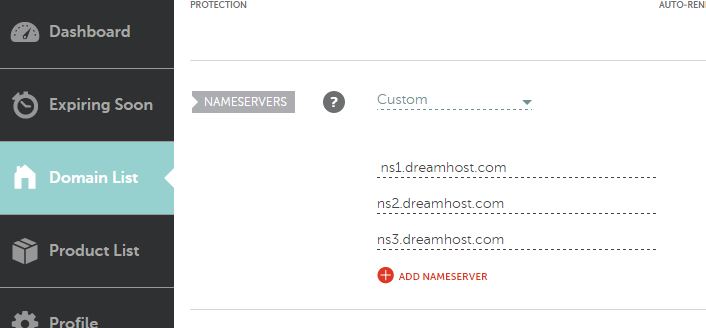
After changing the information about nameservers, it takes time for all points of the DNS system to update the changes about new nameservers, this operation can take up to 48 hours.
TIP:
If you are a Windows user, you can “force” your browser to go to a specific IP address for a specific domain name. You need to find the host file, whose path is: c:windowsSystem32driversetchosts and add a line of code inside it that connects the IP address of the new hosting and the domain name as in the following example:
188.93.124.246 www.webprogramiranje.com
Note: after making changes in the hosts file, you need to delete the browser cache and restart the browser. In this way, we can immediately access the new hosting from our computer.
Defining A record (A record)
After we have indicated where the servers with DNS software (nameserver) are located that will convert the domain name into an IP address, it is necessary to define the data for the conversion. A record (address record) defines the connection between the corresponding domain name and the IP address. A record is for IPv4 while AAAA record is for IPv6 protocol.
Procedure
It is necessary to log in to the account with the DNS provider and locate the page where A records is defined. These pages are usually named: DNS Management, Name Server Management, or Advanced Settings. It is necessary to define the domain name, IP address and TTL (time to live) time. Time TTL is the duration of information on the server without the possibility of change, so-called caching. Usually this value is 3600s (1h).

Defining a CNAME alias
CNAME (English canonical name) is the main domain name. Defining an alias (substitute name) for the so-called CNAME. setting the CNAME record gives us the possibility to call the domain by another name in addition to the default name. Such an alias gets everyonefeatures of the original, including IP addresses and subdomains. The most common application is that we can call our domain www.webprogramiranje.org only from webprogramiranje.org.

Mail hosting (Mail Exchange)
Mail hosting is the rental of an email server and its services. Most web hosting companies include the mail hosting service as part of their web hosting offer. Mail hosting usually means a mail service based on the POP3 protocol and a webmail service based on one of the open source applications (Horde, RoundCube or SquirrelMail)
MX record
The MX record (eng. mail exchange record) defines which e-mail services are responsible for accepting mail messages for a certain domain. The basic functionality of this mechanism is to provide the possibility to have multiple e-mail services for one domain and to define the exact order according to which they contact. This enables the routing of mail (English mail routing) via the SMTP protocol (Simple Mail Transfer Protocol) in a simple way, as well as the possibility of distributing the load between several services. The MX record is used if you want your email to be linked to a subdomain (for example mail.mydomain.rs).
First we need to define the connection between our subdomain mail.webprogramiranje.org and the IP address of our servers, so we will define A record
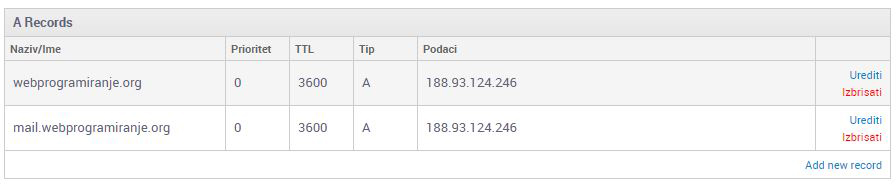
Then let’s define the MZ record:

After defining the MX records, it takes up to 48 hours for the DNS servers to be updated.
You can check the control of your domain’s MX settings on the following links: