


Introduction
WordPress widget is created by instantiating a class that has a rather large code, so when creating a new widget, a prepared template is used that can be easily adapted to needs. The Custom class inherits WordPress’s widget class WP_Widget(). You can see more about the WP_Widget() class on the official page https://developer.wordpress.org/reference/classes/wp_widget/.
The basic skeleton of the widget class
The skeleton of the new class consists of four functions and looks like this:
|
1 2 3 4 5 6 7 8 9 10 11 12 13 14 15 16 17 18 19 20 21 22 23 |
class Novi_Widget extends WP_Widget { /* Inicijalizuje widget */ public function __construct() { // parameters passed to the parent class // attaching scripts and styles and other auxiliary functions to hooks } /* Stampa widget formu kada se prevuce u widget oblast u okviru Admin stranice (back-end) */ public function form( $instance ) { // forma u okviru Admin stranice (back-end) } /* It is activated every time we press "save". The entered information is saved and printed in the form even after "save"*/ public function update( $new_instance, $old_instance ) { //cuvanje unetih podataka i validacija... } /* Prints the content of the widget on the page*/ public function widget( $args, $instance ) { // widget content } } |
Hanging a widget on a hook:
|
1 2 3 4 5 6 |
// Registration of the function night function Novi_Widget_registrovanje(){ register_widget("Novi_Widget"); } //Kacenje na udicu "widget_init" add_action( 'widgets_init', 'Novi_Widget_registrovanje'); |
or another way but with the same result:
|
1 |
add_action( 'widgets_init', create_function( '', 'register_widget("Novi_Widget");' ) ); |
Clarification of functions within the class
Function “__construct”
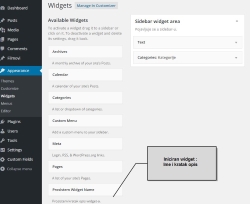
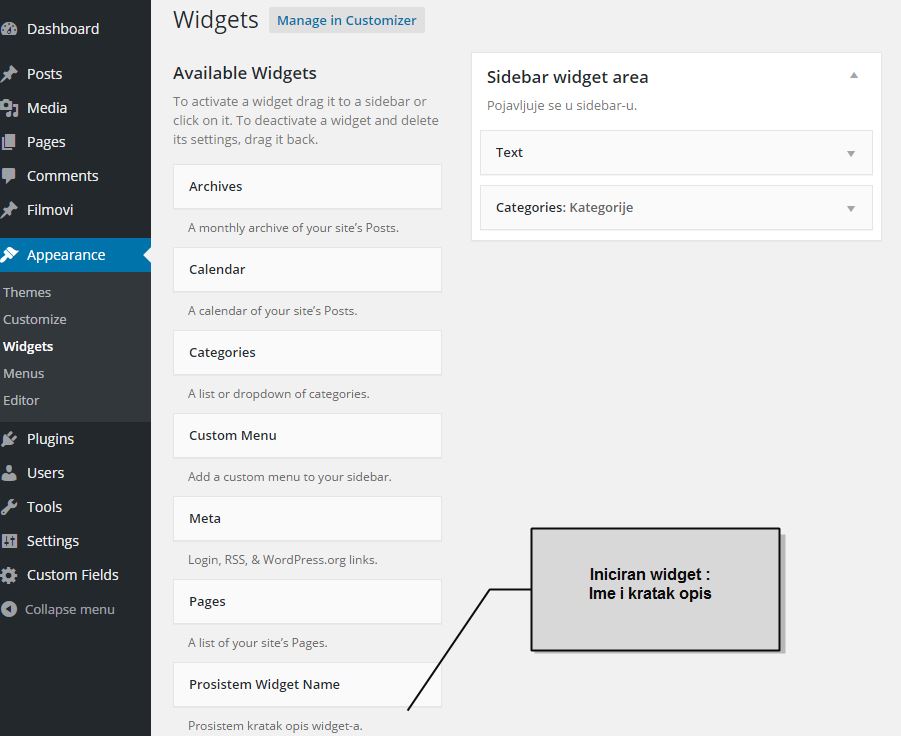
The “__construct()” function is responsible for the appearance of our widget in the “Available Widgets” section, along with other standard widgets. In addition to activating the function, it specifies a name, a short description and an identification string. Hooks for other functions can also be registered and activated within this function. The __construct() function extends the constructor inside the WP_Widget superclass.
The parameters of the constructor function within the WP-Widget class are:
|
1 2 3 4 5 6 |
WP_Widget::__construct ( string $id_base, string $name, array $widget_options = array(), array $control_options = array() ) |
We define these parameters from our custom widget class via parent::__construct():
|
1 2 3 4 5 6 7 8 |
parent::__construct( 'name_for_widget_id', // $id_base - iz superklase 'ime_widget-a', // $name - iz superklase array( // $widget_options - iz superklase 'classname' => 'css_class_name', // CSS class name 'description' => __( 'Kratak opis widget-a koji se pojavljuje na admin stranici kada je zajedno sa ostalim widget-ima') ) ); |
Example
For greater template automation, we can define the values of the $widget_slug variable and provide easy calling of the variable within our class using the get_widget_slug() function.
|
1 2 3 4 5 6 7 8 9 10 11 12 13 14 15 16 |
// Defining the name of the slug protected $widget_slug = 'prosistem_widget'; // A function that returns the widget_slug we previously defined public function get_widget_slug() { return $this->widget_slug; } // Calling the parent constructor parent::__construct( $this->get_widget_slug(), // $id_base - iz superklase __( 'Prosistem Widget Name', $this->get_widget_slug() ), // $name - iz superklase array( // $widget_options - iz superklase 'classname' => $this->get_widget_slug().'-class', // CSS class name 'description' => __( 'Prosistem kratak opis widget-a.', $this->get_widget_slug() ) //Opis widgeta ) ); |
Function “form”
This function is responsible for printing the content of the widget form on the admin page (when it is dragged to the widget area). Properties of the instantiated widget are stored in the $instance array. We can add default values to this string, while all other values are obtained through form field input. In order for the variable $instance to be an array, we use the expression “(array) $instance” so called. casting (eng.casting).
Form field values are members of the $instance array and can be accessed using the key array e.g. $instance[‘title’]
-
Default values in the form of a string $defaults
Default values are defined in the form of a key/value string (e.g. $defaults):
1234$defaults = array('title_input_polja' => 'defaultno input polje','default_sadrzaj_inputa' => 'Default entry',); -
Joining two strings
After that, let’s concatenate the two strings using the wordpress function “wp_parse_args($instance, $defaults)”. This function will concatenate the arrays ($instance and $defaults) so that the values of the array $defaults are overwritten if they exist in the array $args.
-
Widget form
-
Dynamic form elements
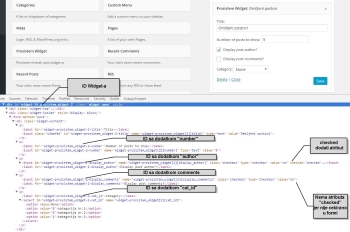
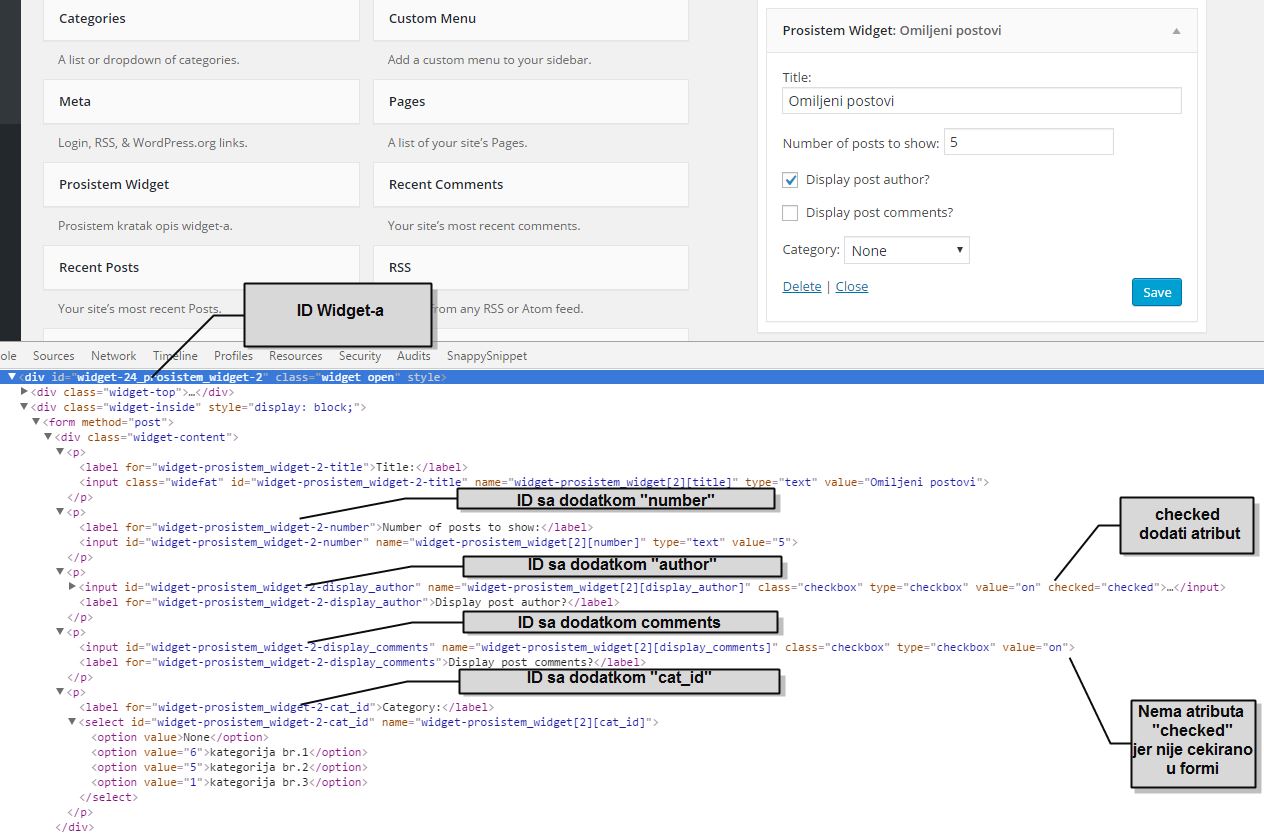
Within the form, it is necessary that some parameter (eg field ID) has dynamic values that will be different for each new instance of the widget. This is achieved with a methodand the WP_Widget class:
- get_field_id().
- get_field_name()
-
Radio button and Check box
If a check box or radio button is used in the form, then the command checked($checked, $current) is used, which compares two values: the last saved value and the current value of the field. If both are checked, the checked-“checked” attribute is added. See more about this function at codex.wordpress.org/Function_Reference/checked
-
Dropdown menu
When using the dropdown menu, selected( $selected, $current) is used, which compares two values: the last saved value and the current value of the field. If both are checked, the selected=”selected” attribute is added. More about this function at codex.wordpress.org/Function_Reference/selected
-
Preventing XSS attacks (eng.escaping)
When writing the code of the form, pay attention to escaping entries
-
Example
|
1 2 3 4 5 6 7 8 9 10 11 12 13 14 15 16 17 18 19 20 21 22 23 24 25 26 27 28 29 30 31 32 33 34 35 36 37 38 39 40 41 42 43 44 45 46 47 48 |
public function form( $instance ) { // default values (the ones the widget should have when it is first used) $defaults = array( "title" => "Omiljeni postovi", "number" => 5, "display_author" => "on", "display_comments"=> "", "cat_id" => "", ); // Cast $instance to an array and merge with the $defaults array $instance = wp_parse_args( (array) $instance, $defaults ); // Kategorije za "select" dropdown $cats = get_categories( array("hide_empty"=>false) ); ?> // FORMA: <p> <label for="<?php echo esc_attr($this->get_field_id( "title" )); ?>"><?php _e( "Title:","wpp" ); ?></label> <input class="widefat" id="<?php echo esc_attr($this->get_field_id( "title" )); ?>" name="<?php echo esc_attr($this->get_field_name( "title" )); ?>" type="text" value="<?php echo esc_attr( $instance["title"] ); ?>" /> </p> <p> <label for="<?php echo esc_attr($this->get_field_id( "number" )); ?>"><?php _e( "Number of posts to show:","wpp" ); ?></label> <input id="<?php echo esc_attr($this->get_field_id( "number" )); ?>" name="<?php echo esc_attr($this->get_field_name( "number" )); ?>" type="text" value="<?php echo esc_attr( $instance["number"] ); ?>" /> </p> <p> <input id="<?php echo esc_attr($this->get_field_id( "display_author" )); ?>" name="<?php echo esc_attr($this->get_field_name( "display_author" )); ?>" class="checkbox" type="checkbox" value="on" <?php checked($instance["display_author"], "on") ?> /> <label for="<?php echo esc_attr($this->get_field_id( "display_author" )); ?>"><?php _e( "Display post author?","wpp" ); ?></label> </p> <p> <input id="<?php echo esc_attr($this->get_field_id( "display_comments" )); ?>" name="<?php echo esc_attr($this->get_field_name( "display_comments" )); ?>" class="checkbox" type="checkbox" value="on" <?php checked($instance["display_comments"], "on") ?> /> <label for="<?php echo esc_attr($this->get_field_id( "display_comments" )); ?>"><?php _e( "Display post comments?","wpp" ); ?></label> </p> <p> <label for="<?php echo esc_attr($this->get_field_id( "cat_id" )); ?>"><?php _e( "Category:","wpp" ); ?></label> <select id="<?php echo esc_attr($this->get_field_id( "cat_id" )); ?>" name="<?php echo esc_attr($this->get_field_name( "cat_id" )); ?>"> <option value="" ><?php _e("None", "wpp"); ?></option> <?php foreach( $cats as $cat ) : ?> <option value="<?php echo esc_attr($cat->term_id); ?>" <?php selected($instance["cat_id"], $cat->term_id) ?>><?php echo esc_html($cat->name) ?></option> <?php endforeach; ?> </select> </p> <?php } // end Function "form" |
Function “update”
This function is activated every time we press save. It saves some data in the field if it is entered and prints it in the form. Two parameters of the parent class WP_Widget():
are used
- string $new_instance – New settings for this instance as input by the user via WP_Widget::form()
- string $old_instance – Old settings for this instance
Within this function, in addition to saving the entered data, validation (eng.validation) and cleaning (eng.sanitize) of the entries from the form are done in parallel.
Example
|
1 2 3 4 5 6 7 8 9 10 11 12 13 |
public function update( $new_instance, $old_instance ) { // We store the entered values and validate the entered data via the form $instance = $old_instance; $instance["title"] = strip_tags( $new_instance["title"] ); $instance["number"] = (int)strip_tags( $new_instance["number"] ); $instance["display_author"] = isset($new_instance["display_author"]) ? "on" : ""; $instance["display_comments"] = isset($new_instance["display_comments"]) ? "on" : ""; $instance["cat_id"] = isset($new_instance["cat_id"]) ? $new_instance["cat_id"] : ""; return $instance; } // end Function widget |
Function “widget”
This function is responsible for printing widgets on the user’s public page. Within the WP_Widget superclass, the $args parameter is an array (key/value) whose members are:
- ‘before_title’=> ‘ ‘
- ‘after_title’=> ‘ ‘
- ‘before_widget’=> ‘ ‘
- ‘after_widget’=> ‘ ‘
The members of this array are transferred to variables with the function extract():
|
1 |
extract( $args, EXTR_SKIP ); |
After which we can use variables:
- $before_title
- $after_title
- $before_widget
- $after_widget
Everything that needs to be printed is stored in the variable $widget_string”. We can use the functions “ob_start() and ob_get-clean()” or simple string concatenation.
Template class for creating widgets
This custom widget class template was created by modifying the code of the original template “Widget Boilerplate” by Tom McFariln. The entire code of the template can be copied into functions.php, but a better solution is to separate it into a separate file and call it in functions.php with the command:
|
1 |
include_once locate_template('/include/widget.php'); |
After copying the template code, we should adapt the code to our needs, change the names in the places where the word “prosystem” appears, and add part of the code in the places “add_code”.
|
1 2 3 4 5 6 7 8 9 10 11 12 13 14 15 16 17 18 19 20 21 22 23 24 25 26 27 28 29 30 31 32 33 34 35 36 37 38 39 40 41 42 43 44 45 46 47 48 49 50 51 52 53 54 55 56 57 58 59 60 61 62 63 64 65 66 67 68 69 70 71 72 73 74 75 76 77 78 79 80 81 82 83 84 85 86 87 88 89 90 91 92 93 94 95 96 97 98 99 100 101 102 103 104 105 106 107 108 109 110 111 112 113 114 115 116 117 118 119 120 121 122 123 124 125 126 127 128 129 130 131 132 133 134 135 136 137 138 139 140 141 142 143 144 145 146 147 148 149 150 151 152 153 154 155 156 157 158 159 160 161 162 163 164 165 166 167 168 169 170 171 172 |
<?php /** * Osnovni Widget Boilerplate "ProSistem Studio" * (napravljen na osnovu Tom McFarlin boilerplate) * * INSTRUCTIONS FOR USE: * ----------------------- * Change where it says "prosystem" and add logic where it says "add_code" * * Class content: * ---------------------- * 1. The name of the widget slug is defined * 2. Function "get_widget_slug()" - returns the defined widget slug for use within our custom class * 3. Function "__construct" * 3.1 - Hook the "widget_textdomain" function that loads the textdomain * 3.2 - "parent::__construct" * Inicira pojavljivanje widget-a u admin stranici zajedno sa standardnim widget-ima. * Real: widget ID, widget name, widget description (while waiting to be dragged), CSS class name * 3.3 - Add "flush_widget_cache()" function to different hooks * 4. The "form" function - prints the widget form when it is dragged to the widget area within the Admin page * 5. The "update" function - is activated every time we press the "save" widget in the back-end. The entered data is saved and printed in the form even after "save". * Within this function, both "validation" and "sanitize" of entered data are done in parallel. * 6. Function "widget()" - prints the content of the widget on the public side of the site * 6.1 Part related to Caching - Check if there is a cached output * 6.2 Creates variables from a series of input data (form elements) via the $args function parameter * 6.3 Printing widgets * 7. Function "wp_cache_delete()" to delete cache * 8. "widget_textdomain" function - loads Widget's text domain for localization and translation from the "lang" folder */ // Prevent direct file access if ( ! defined( 'ABSPATH' ) ) { exit; } class Prosistem_Widget extends WP_Widget { /** * 1. The name of the widget slug is defined */ protected $widget_slug = 'prosistem_widget'; /** * 2. Returns the defined widget slave for use within our custom class * * @return string - the name of the widget slug that we previously defined */ public function get_widget_slug() { return $this->widget_slug; } /** 3. Constructor function*/ public function __construct() { /** 3.1. Hook the "widget_textdomain" function that loads the textdomain*/ add_action( 'init', array( $this, 'widget_textdomain' ) ); /** 3.2 Attaches the values we want to the variables of the Superclass "WP_Widget"*/ parent::__construct( $this->get_widget_slug(), // $id_base - iz superklase __( 'Prosistem Widget', $this->get_widget_slug() ), // $name - iz superklase array( // $widget_options - iz superklase 'classname' => $this->get_widget_slug() . '-class', // CSS class name 'description' => __( 'Prosistem kratak opis widget-a.', $this->get_widget_slug() ) //Opis widget-a ) ); /** 3.3 Attach the "flush_widget_cache()" function to different hooks*/ add_action( 'save_post', array( $this, 'flush_widget_cache' ) ); add_action( 'deleted_post', array( $this, 'flush_widget_cache' ) ); add_action( 'switch_theme', array( $this, 'flush_widget_cache' ) ); } // end 1. Constructor /** * 4. The "form" function - within the Admin page, prints the appearance of the widget form when the widget is dragged into the widget area * * @param array $instance The array of keys and values for the widget. */ public function form( $instance ) { // TODO: add_code that defines the "$defaults" array with the default widget values $defaults = array( 'nesto prosistem' => 'defaultno nesto prosistem', ); // Cast $instance to an array and merge with the $defaults array $instance = wp_parse_args( (array) $instance, $defaults ); // TODO: add_code that builds the form } // end Function form /** * 5. The "intrude" function is activated every time we press the "save" widget in the back-end. * Leaves the value of a field visible if it is entered even after "save" * Sadrzi procese koji prethode cuvanju widget-a kao sto je validacija... * * @param array $new_instance - new instance value generated via the update. * @param array $old_instance - previous instance value before update. * * @return array $instance - updated and validated instance */ public function update( $new_instance, $old_instance ) { $instance = $old_instance; // TODO: add_code that usually validates the values entered via the form ($new_instance) return $instance; } // end Function widget /** * 6. The "widget" function prints the content of the widget on the user's page * * @param array $args - niz elemenata forme * @param array $instance - current widget instance * * @return int */ public function widget( $args, $instance ) { // 6.1 Part related to Caching - Check if there is a cached output $cache = wp_cache_get( $this->get_widget_slug(), 'widget' ); if ( !is_array( $cache ) ) $cache = array(); if ( ! isset ( $args['widget_id'] ) ) if ( isset ( $cache[ $args['widget_id'] ] ) ) return print $cache[ $args['widget_id'] ]; /** 6.2 Creates variables from a series of input data (form elements) via the $args function parameter * (Pravi $before_widget, $after_widget, $before_title, $after_title (defined by themes). */ extract( $args, EXTR_SKIP ); /** * 6.3 printing widget layout */ $widget_string = $before_widget; ob_start(); // TODO: add_code - the part related to printing the widget on the public user page // Note: a simple string concatenation can be done here instead of the "ob_start() and ob_get-clean()" functions. $widget_string .= ob_get_clean(); $widget_string .= $after_widget; print $widget_string; // drugi deo dela vezanog za kesiranje $cache[ $args['widget_id'] ] = $widget_string; wp_cache_set( $this->get_widget_slug(), $cache, 'widget' ); } // end Function "widget" // 7. function to clear cache public function flush_widget_cache() { wp_cache_delete( $this->get_widget_slug(), 'widget' ); } //end Function "flush_widget_cashe" /** * 8. "widget_textdomain" function - loads Widget's text domain for translation from the "lang" folder */ public function widget_textdomain() { // TODO be sure to change 'widget-name' to the name of *your* plugin load_plugin_textdomain( $this->get_widget_slug(), false, plugin_dir_path( __FILE__ ) . 'lang/' ); } // end Function "widget_textdomain" } // end class add_action( 'widgets_init', create_function( '', 'register_widget("Prosistem_Widget");' ) ); |
Widget inside the plugin
Plugin structure
If we make a widget as part of a plugin, the template is supplemented with additional elements related to the plugin. So the plugin folder structure looks like this:
- css
- admin.css
- widget.css
- sass
- admin.scss
- widget.scss
- js
- admin.js
- widget.js
- lang
- plugin.po
- views
- admin.php
- widget.php
- Prosistem-Widget-Boilerplate.php
Css files style the appearance of the plugin, on the admin page admin.css while widget.php styles the final appearance of the widget on the public page of the site. Similarly for javascript files, admin.js contains scripts used for display on the admin page while widget.js contains scripts for display on the public user page of the site. The folder “lang” stores files related to plugin translation.
The folder “view” contains files containing selected parts of the php code. In the file admin.php there is a separate part from the function “form” which is responsible for printing the content inside the widget form when it is dragged to the widget area within the admin page. While in the widget.php file, the part from the “widget” function is separated.
Widget class template for plugin
This template contains all the code previously explained, but has an additional part that will register and load scripts, css files and files related to plugin translation.
|
1 2 3 4 5 6 7 8 9 10 11 12 13 14 15 16 17 18 19 20 21 22 23 24 25 26 27 28 29 30 31 32 33 34 35 36 37 38 39 40 41 42 43 44 45 46 47 48 49 50 51 52 53 54 55 56 57 58 59 60 61 62 63 64 65 66 67 68 69 70 71 72 73 74 75 76 77 78 79 80 81 82 83 84 85 86 87 88 89 90 91 92 93 94 95 96 97 98 99 100 101 102 103 104 105 106 107 108 109 110 111 112 113 114 115 116 117 118 119 120 121 122 123 124 125 126 127 128 129 130 131 132 133 134 135 136 137 138 139 140 141 142 143 144 145 146 147 148 149 150 151 152 153 154 155 156 157 158 159 160 161 162 163 164 165 166 167 168 169 170 171 172 173 174 175 176 177 178 179 180 181 182 183 184 185 186 187 188 189 190 191 192 193 194 195 196 197 198 199 200 201 202 203 204 205 206 207 208 209 210 211 212 213 214 215 216 217 218 219 220 221 222 223 224 225 226 227 228 229 230 231 232 233 234 235 236 237 238 239 240 241 242 243 244 245 246 247 248 249 250 251 252 253 254 255 256 257 258 259 260 261 262 263 264 265 266 267 268 269 270 271 272 273 274 275 276 |
<?php /** * WordPress Widget Boilerplate uz Plugin by ProSistem Studio * @url https://github.com/tommcfarlin/WordPress-Widget-Boilerplate * * Plugin Name: @TODO * Plugin URI: @TODO * Description: @TODO * Version: 1.0.0 * Author: @TODO * Author URI: @TODO * Text Domain: widget-name * License: GPL-2.0+ * License URI: http://www.gnu.org/licenses/gpl-2.0.txt * Domain Path: /lang * GitHub Plugin URI: https://github.com/... * * * UPUTSTVO: * ------------------------------------------------------------------------- * Change where it says "prosystem" and add code where it says "add_code" */ /** * Class content: * ---------------------- * 1. Osnovna setovanja * 1.1 The name of the widget slug is defined * 1.2. Function "get_widget_slug()" - returns the defined widget slug for use within our custom class * 1.3 __construct * 1.3.1 Hook the "widget_textdomain" function from the "Helper functions" section * 1.3.2 Registers hooks for the functions: "activate()" and "deactivate()" from the "Helper Functions" section * 1.3.3 "parent::__construct" function * Inicira pojavljivanje widget-a u admin stranici zajedno sa standardnim widget-ima. * Real: widget ID, widget name, widget description (while waiting to be dragged), CSS class name * 1.3.4 Hook the functions: "register_admin_styles()" and "register_admin_scripts()" from part 3. Public function * 1.3.5 Hook the functions: "register_widget_styles" and "register_widget_scripts" from part 3. Public function * 1.3.6 Hooks to different hooks 2.2 function "flush_widget_cache()" * * 2. API functions (Print widget content) * 2.1 Function "widget()" - prints the contents of the widget * 2.1.1 Part related to caching * 2.1.2 Creates variables from a series of input data (form elements) via the $args function parameter * 2.1.3 Printing widget layout * 2.2 "flush_widget_cache" function - related to clearing caching * 2.3 The "update" function - it is activated every time we press the "save" widget in the back-end. The entered data is saved and printed in the form even after "save". * Within this function, both "validation" and "sanitize" of entered data are done in parallel. * 2.4 Function "form" - prints the widget form when it is dragged into the widget area within the Admin page * * 3. Auxiliary functions * 3.1 "widget_textdomain" function - loads Widget's text domain for localization and translation. * 3.2 "activate" function - activates the logic of the widget when the widget is active * 3.3 "deactive" function - deactivates the logic of the widget when the widget is turned off * 3.4 Function "register_admin_styles" - inserts CSS located in css/admin.css folder * 3.5 Function "register_admin_scripts" - inserts JS located in js/admin.js folder * 3.6 Function "register_widget_styles" - inserts CSS located in css/widget.css folder * 3.7 Function "register_widget_scripts" - inserts JS located in js/widget.js folder */ // Prevent direct file access if ( ! defined ( 'ABSPATH' ) ) { exit; } /* * TODO: Define widget name */ class Prosistem_Widget extends WP_Widget { /*--------------------------------------------------*/ /* 1. Osnovna setovanja /*--------------------------------------------------*/ // 1.1 The name of the widget slug is defined protected $widget_slug = 'prosistem_widget'; // 1.2. Return the widget slug. /** * @return string - the name of the widget slug that we previously defined */ public function get_widget_slug() { return $this->widget_slug; } public function __construct() { // 1.3.1 Hook the function under number 3.1 from the section "Auxiliary functions" add_action( 'init', array( $this, 'widget_textdomain' ) ); // 1.3.2 Registers hooks for the functions: "activate()" and "deactivate()" from the "Helper Functions" section register_activation_hook( __FILE__, array( $this, 'activate' ) ); register_deactivation_hook( __FILE__, array( $this, 'deactivate' ) ); // 1.3.3 Assigns values to parent class method variables parent::__construct( $this->get_widget_slug(), // $id_base - iz superklase __( 'Prosistem Widget', $this->get_widget_slug() ), // $name - iz superklase array( // $widget_options - iz superklase 'classname' => $this->get_widget_slug().'-class', // CSS class name 'description' => __( 'Prosistem kratak opis widget-a.', $this->get_widget_slug() ) //Opis widget-a ) ); // 1.3.4 Hook the functions: "register_admin_styles()" and "register_admin_scripts()" from part 3. Public function add_action( 'admin_print_styles', array( $this, 'register_admin_styles' ) ); add_action( 'admin_enqueue_scripts', array( $this, 'register_admin_scripts' ) ); // 1.3.5 Hook the functions: "register_widget_styles" and "register_widget_scripts" from part 3. Public function add_action( 'wp_enqueue_scripts', array( $this, 'register_widget_styles' ) ); add_action( 'wp_enqueue_scripts', array( $this, 'register_widget_scripts' ) ); // 1.3.6 Attach the "flush_widget_cache()" function from part 3. Helper functions to different hooks add_action( 'save_post', array( $this, 'flush_widget_cache' ) ); add_action( 'deleted_post', array( $this, 'flush_widget_cache' ) ); add_action( 'switch_theme', array( $this, 'flush_widget_cache' ) ); } // end 1. Constructor /*--------------------------------------------------*/ /* 2. Widget API /*--------------------------------------------------*/ /** * 2.1 The "widget" function prints the content of the widget * * @param array $args - niz elemenata forme * @param array $instance - current widget instance * * @return int */ public function widget( $args, $instance ) { // 2.1.1 Part related to Caching - Check if there is a cached output $cache = wp_cache_get( $this->get_widget_slug(), 'widget' ); if ( !is_array( $cache ) ) $cache = array(); if ( ! isset ( $args['widget_id'] ) ) if ( isset ( $cache[ $args['widget_id'] ] ) ) return print $cache[ $args['widget_id'] ]; // 2.1.2 Create variables from a series of input data (form elements) via the $args function parameter (Create $before_widget, $after_widget) extract( $args, EXTR_SKIP ); // 2.1.3 Printing the widget layout. In this part is the logic that manipulates the values obtained through the input fields of the form $widget_string = $before_widget; ob_start(); // TODO: add_code - here goes the part related to typing, the functions "ob_start() and ob_get-clean()" can be used as start or delete and then simple string concatenation $widget_string .= ob_get_clean(); $widget_string .= $after_widget; // drugi deo dela vezanog za kesiranje $cache[ $args['widget_id'] ] = $widget_string; wp_cache_set( $this->get_widget_slug(), $cache, 'widget' ); print $widget_string; } // end function "widget" // 2.2 cache clearing function public function flush_widget_cache() { wp_cache_delete( $this->get_widget_slug(), 'widget' ); } /** * 2.3 The "drop in" function is activated every time we press the "save" widget in the back-end. * Within this function, both "validation" and "sanitize" of entered data are done in parallel. * * @param array $new_instance - new instance value generated via the update. * @param array $old_instance The previous value of the instance before the update. * * @return array $instance - updated and validated instance */ public function update( $new_instance, $old_instance ) { $instance = $old_instance; // TODO: add code that usually validates values entered via the form ($new_instance) return $instance; } // end Function "update" /** * 2.4 Back-end widget forma. * * @param array $instance The array of keys and values for the widget. */ public function form( $instance ) { // TODO: add_code that defines the "$defaults" array with the default widget values // Parses $instances into an array and appends the default values defined in the $defaults array $instance = wp_parse_args( (array) $instance, $defaults ); // TODO: Store the values of the widget in their own variable // Display the admin form include( plugin_dir_path(__FILE__) . 'views/admin.php' ); } // end Function "form" /*---------------------------------------------------------------------------------------------*/ /* 3. Auxiliary functions /*---------------------------------------------------------------------------------------------*/ /** * 3.1 "widget_textdomain" function - loads Widget's text domain for localization and translation from the "lang" folder */ public function widget_textdomain() { // TODO be sure to change 'widget-name' to the name of *your* plugin load_plugin_textdomain( $this->get_widget_slug(), false, plugin_dir_path( __FILE__ ) . 'lang/' ); } // end widget_textdomain /** * 3.2 "activate" function - activates the logic of the widget when the widget is active * * @param boolean $network_wide True if WPMU superadmin uses "Network Activate" action, false if WPMU is disabled or plugin is activated on an individual blog. */ public function activate( $network_wide ) { // TODO define activation functionality here } // end activate /** * 3.3 "deactive" function - deactivates the logic of the widget when the widget is turned off * * @param boolean $network_wide True if WPMU superadmin uses "Network Activate" action, false if WPMU is disabled or plugin is activated on an individual blog */ public function deactivate( $network_wide ) { // TODO define deactivation functionality here } // end deactivate /** * 3.4 Function "register_admin_styles" - inserts CSS located in css/admin.css folder */ public function register_admin_styles() { wp_enqueue_style( $this->get_widget_slug().'-admin-styles', plugins_url( 'css/admin.css', __FILE__ ) ); } // end register_admin_styles /** * 3.5 Function "register_admin_scripts" - inserts JS located in js/admin.js folder */ public function register_admin_scripts() { wp_enqueue_script( $this->get_widget_slug().'-admin-script', plugins_url( 'js/admin.js', __FILE__ ), array('jquery') ); } // end register_admin_scripts /** * 3.6 Function "register_widget_styles" - inserts CSS located in css/widget.css folder */ public function register_widget_styles() { wp_enqueue_style( $this->get_widget_slug().'-widget-styles', plugins_url( 'css/widget.css', __FILE__ ) ); } // end register_widget_styles /** * 3.7 Function "register_widget_scripts" - inserts JS located in js/widget.js folder */ public function register_widget_scripts() { wp_enqueue_script( $this->get_widget_slug().'-script', plugins_url( 'js/widget.js', __FILE__ ), array('jquery') ); } // end register_widget_scripts } // end class add_action( 'widgets_init', create_function( '', 'register_widget("Prosistem_Widget");' ) ); |
You can view the original code by Tom McFarlin on his github account github.com/tommcfarlin/WordPress-Widget-Boilerplate/tree/master/widget-boilerplate