


Introduction
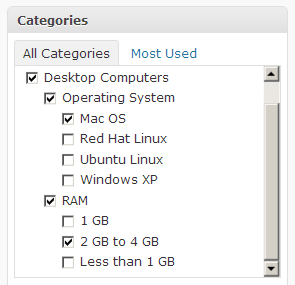
Taxonomy is a term that refers to classification and organization. In WordPress, classification ie. taxonomy is reduced to categories and tags. Their sole purpose is to sort content to improve its usefulness. That the user of the site can simply browse the content by topic, rather than searching in the chronological way that blogs were originally organized.
The term wordpress custom taxonomy (Serb. special taxonomy) is most often related to Custom post type because it is important that when using custom post types taxonomies that are used for standard posts and vice versa do not appear.
Categories
Categories are intended for general grouping of your posts. Think of them as a general theme or an overview of your site’s content. Categories are there to help identify the topic of your blog and help readers find the right type of content. Categories are hierarchical, so you can have sub-categories. Each post must be categorized, if the user does not insert a post into a category, then wordpress itself adds the category uncategorized.
Tags
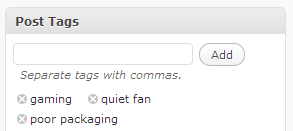
Tags are intended to describe specific details about posts. We can describe them as a word index of the site, they are micro data for categorizing content on a micro level. Tags are not hierarchical. Unlike categories where categorization of posts is mandatory, you are not required to add tags.
Function register_taxonomy()
This function is used to register new taxonomies and update the text in the interface related to the new taxonomy.
|
1 |
register_taxonomy( $taxonomy, $object_type, $args ) |
$taxonomy
is the name used by wordpress so called machine name, must not contain capital letters or spaces
$object_type is the name of the object for which a new taxonomy is being created, i.e. custom post type name
$args is an array of arguments that define the new taxonomy.
Some frequently used arguments are:
- label is the name (plural) that appears on the admin page ready for translation
- labels is an array of labels used in that type of custom post
- ‘name’ – general name for the taxonomy, usually plural. The same as and overridden by $tax->label. Default is _x( ‘Post Tags’, ‘taxonomy general name’ ) or _x( ‘Categories’, ‘taxonomy general name’ ). When internationalizing this string, please use a matching your post type. Example: _x(‘Writers’, ‘taxonomy general name’);
- ‘singular_name’ – name for one object of this taxonomy. Default is _x( ‘Post Tag’, ‘taxonomy singular name’ ) or _x( ‘Category’, ‘taxonomy singular name’ ). When internationalizing this string, please use a matching your post type. Example: _x(‘Writer’, ‘taxonomy singular name’);
- ‘menu_name’ – the menu name text. This string is the name to give menu items. If not set, defaults to value of name label.
- ‘all_items’ – the all items text. Default is __( ‘All Tags’ ) or __( ‘All Categories’)
- ‘edit_item’ – the edit item text. Default is __( ‘Edit Tag’ ) or __( ‘Edit Category’ )
- ‘view_item’ – the view item text, Default is __( ‘View Tag’ ) or __( ‘View Category’ )
- ‘update_item’ – the update item text. Default is __( ‘Update Tag’ ) or __( ‘Update Category’ )
- ‘add_new_item’ – the add new item text. Default is __( ‘Add New Tag’ ) or __( ‘Add New Category’ )
- ‘new_item_name’ – the new item name text. Default is __( ‘New Tag Name’ ) or __( ‘New Category Name’ )
- ‘parent_item’ – the parent item text. This string is not used on non-hierarchical taxonomies such as post tags. Default is null or __( ‘Parent Category’ )
- ‘parent_item_colon’ – The same as parent_item, but with colon : in the end null, __( ‘Parent Category:’ )
- ‘search_items’ – the search items text. Default is __( ‘Search Tags’ ) or __( ‘Search Categories’ )
- ‘popular_items’ – the popular items text. This string is not used on hierarchical taxonomies. Default is __( ‘Popular Tags’ ) or null
- ‘separate_items_with_commas’ – the separate item with commas text used in the taxonomy meta box. This string is not used on hierarchical taxonomies. Default is __( ‘Separate tags with commas’ ), or null
- ‘add_or_remove_items’ – the add or remove items text and used in the meta box when JavaScript is disabled. This string is not used on hierarchical taxonomies. Default is __( ‘Add or remove tags’ ) or null
- ‘choose_from_most_used’ – the choose from most used text used in the taxonomy meta box. This string is not used on hierarchical taxonomies. Default is __( ‘Choose from the most used tags’ ) or null
- ‘not_found’ (3.6+) – the text displayed via clicking ‘Choose from the most used tags’ in the taxonomy meta box when no tags are available and (4.2+) – the text used in the terms list table when there are no items for a taxonomy. Default is __( ‘No tags found.’ ) or __( ‘No categories found.’ )
- public is an option that controls visibility to site authors and readers, and is true by default.
- show_ui (boolean) (optional) Whether to generate a default UI for managing this taxonomy. Default: if not set, defaults to value of public argument. As of 3.5, setting this to false for attachment taxonomies will hide the UI.
- show_in_menu (boolean) (optional) Where to show the taxonomy in the admin menu. show_ui must be true. Default: value of show_ui argument
- show_in_nav_menus (boolean) (optional) true makes this taxonomy available for selection in navigation menus. Default: if not set, defaults to value of public argument
- show_tagcloud (boolean) (optional) Whether to allow the Tag Cloud widget to use this taxonomy. Default: if not set, defaults to value of show_ui argument
- show_in_quick_edit (boolean) (optional) Whether to show the taxonomy in the quick/bulk edit panel. (Available since 4.2) Default: if not set, defaults to value of show_ui argument
- show_admin_column (boolean) (optional) Whether to allow automatic creation of taxonomy columns on associated post-types table. (Available since 3.5) Default: false
- description (string) (optional) Include a description of the taxonomy. Default: “”
- hierarchical (boolean) (optional) Is this taxonomy hierarchical (have descendants) like categories or not hierarchical like tags. Default: false
- rewrite (boolean/array) (optional) Set to false to prevent automatic URL rewriting a.k.a. “pretty permalinks”. Pass an $args array to override default URL settings for permalinks as outlined below: Default: true
- ‘slug’ – Used as pretty permalink text (i.e. /tag/) – defaults to $taxonomy (taxonomy’s name slug)
- ‘with_front’ – allowing permalinks to be prepended with front base – defaults to true
- ‘hierarchical’ – true or false allow hierarchical urls – defaults to false
- ‘ep_mask’ – (Required for pretty permalinks) Assign an endpoint mask for this taxonomy – defaults to EP_NONE. If you do not specify the EP_MASK, pretty permalinks will not work.
- capabilities (array) (optional) An array of the capabilities for this taxonomy. Default: None
- capabilities (array) (optional) An array of the capabilities for this taxonomy. Default: None
- ‘manage_terms’ – ‘manage_categories’
- ‘edit_terms’ – ‘manage_categories’
- ‘delete_terms’ – ‘manage_categories’
- ‘assign_terms’ – ‘edit_posts’
- sort (boolean) (optional) Whether this taxonomy should remember the order in which terms are added to objects. Default: None
Examples of creating taxonomies
The following examples create a new taxonomy for custom_post_type “book”.
Example No. 1
A basic example of using this function:
|
1 2 3 4 5 6 7 8 9 10 11 12 |
function create_book_tax() { register_taxonomy( 'genre', 'book', array( 'label' => __( 'Genre' ), 'rewrite' => array( 'slug' => 'genre' ), 'hierarchical' => true, ) ); } add_action( 'init', 'create_book_tax' ); |
Example No. 2
An example of a hierarchical taxonomy.
|
1 2 3 4 5 6 7 8 9 10 11 12 13 14 15 16 17 18 19 20 21 22 23 24 25 26 27 |
function create_book_taxonomies() { $labels = array( 'name' => _x( 'Genres', 'taxonomy general name' ), 'singular_name' => _x( 'Genre', 'taxonomy singular name' ), 'search_items' => __( 'Search Genres' ), 'all_items' => __( 'All Genres' ), 'parent_item' => __( 'Parent Genre' ), 'parent_item_colon' => __( 'Parent Genre:' ), 'edit_item' => __( 'Edit Genre' ), 'update_item' => __( 'Update Genre' ), 'add_new_item' => __( 'Add New Genre' ), 'new_item_name' => __( 'New Genre Name' ), 'menu_name' => __( 'Genre' ), ); $args = array( 'hierarchical' => true, 'labels' => $labels, 'show_ui' => true, 'show_admin_column' => true, 'query_var' => true, 'rewrite' => array( 'slug' => 'genre' ), ); register_taxonomy( 'genre', array( 'book' ), $args ); } add_action( 'init', 'create_book_taxonomies', 0 ); |
Example No. 3
An example of a taxonomy that does not have a hierarchical structure:
|
1 2 3 4 5 6 7 8 9 10 11 12 13 14 15 16 17 18 19 20 21 22 23 24 25 26 27 28 29 30 31 32 33 |
function create_book_taxonomies() { $labels = array( 'name' => _x( 'Writers', 'taxonomy general name' ), 'singular_name' => _x( 'Writer', 'taxonomy singular name' ), 'search_items' => __( 'Search Writers' ), 'popular_items' => __( 'Popular Writers' ), 'all_items' => __( 'All Writers' ), 'parent_item' => null, 'parent_item_colon' => null, 'edit_item' => __( 'Edit Writer' ), 'update_item' => __( 'Update Writer' ), 'add_new_item' => __( 'Add New Writer' ), 'new_item_name' => __( 'New Writer Name' ), 'separate_items_with_commas' => __( 'Separate writers with commas' ), 'add_or_remove_items' => __( 'Add or remove writers' ), 'choose_from_most_used' => __( 'Choose from the most used writers' ), 'not_found' => __( 'No writers found.' ), 'menu_name' => __( 'Writers' ), ); $args = array( 'hierarchical' => false, 'labels' => $labels, 'show_ui' => true, 'show_admin_column' => true, 'update_count_callback' => '_update_post_term_count', 'query_var' => true, 'rewrite' => array( 'slug' => 'writer' ), ); register_taxonomy( 'writer', 'book', $args ); } add_action( 'init', 'create_book_taxonomies', 0 ); |
Mention should also be made of the online “Taxonomy generator” for some quick hacks!
Data attached to taxonomy
Each taxonomy term has a specific data set associated with it. In WordPress they are:
- Name
- Servant
- Parent
- Description
But if we want to save more than that default data like image with some taxonomy term we can use plugin “Taxonomy Metadata”
Templates for taxonomies
The hierarchy for custom taxonomies looks like this:
- taxonomy-{custom taxonomy}-{term}.php
- taxonomy-{custom taxonomy}.php
- taxonomy.php
- archive.php
- index.php
Explanation through an example
Eg.custom taxonomy is a genre that is used in the custom post type “Movies”, and the terms used are e.g. “Action”, “Horror” or “SF”.
To show movies for one term e.g. “Action” wordpress will first look for the template taxonomy-žanr-akcioni.php and only if that template does not exist then taxonomy-žanr.php.
To display all terms entered under the taxonomy “genre” wordpress will first look for the template taxonomy-genre.php.
Displaying taxonomies
List of appointments
To list taxonomy terms, we can use the function get_terms() which only gives a list (not a link) of all terms in the taxonomy with the following code:
|
1 2 3 4 5 6 7 8 9 10 11 12 13 14 15 |
<?php // Get a list of all terms in a taxonomy $terms = get_terms( "genre", array( 'hide_empty' => 0, ) ); $genres = array(); if ( count($terms) > 0 ): foreach ( $terms as $term ) $genres[] = $term->name; $genres_str = implode(', ', $genres); ?> <h2>Zanrovi</h2> <p>Ovo je spisak svih zanrova: <?php echo $genres_str; ?>.</p> <?php endif; ?> |
The output looks like this: This is a list of all genres: Action, Horror, SF.
List of term links
The template tag function wp_list_category() is used to list the list of terms (as links) used in a taxonomy. After clicking on a link, it will display the corresponding page with all members of a custom post type who have that term.
The following example shows a list of all the terms used in the custom taxonomy for the movie genre. This code should be inserted into the appropriate template where we want it to appear.
|
1 2 3 4 5 6 7 8 9 10 11 12 13 |
$genre_list = wp_list_categories( array( 'taxonomy' => 'genre', 'orderby' => 'name', 'show_count' => 0, 'pad_counts' => 0, 'hierarchical' => 1, 'echo' => 0, 'title_li' => '<h1>Zanrovi filma:</h1>' ) ); // Make sure there are terms with articles if ( $genre_list ) echo '<ul class="genre-list">' . $genre_list . '</ul>'; |
The result would be a list of links:
- Horror
- SF
- Action
List via custom loop
The following example can be used to create an archiva.php template that will list all custom post titles of type “movie” that use the taxonomy “genre” and whose term is “SF”, by replacing the standard loop with this:
|
1 2 3 4 5 6 7 8 9 10 11 12 13 14 15 16 17 18 19 20 21 22 23 |
<?php $genres_query = new WP_Query( array( 'post_type' => 'movie', 'posts_per_page' => 10, 'tax_query' => array( array( 'taxonomy' => 'genre', 'field' => 'slug', 'terms' => 'sf' ) ) ) ); // Display the custom loop if ( $genres_query->have_posts() ): ?> <h1>Lista filmova SF žanrom:</h1> <ul class="postlist"> <?php while ( $genres_query->have_posts() ) : $genres_query->the_post(); ?> <li><a href="<?php the_permalink(); ?>"><?php the_title(); ?></a></li> <?php endwhile; wp_reset_postdata(); ?> </ul><!--// end .postlist --> <?php endif; ?> |
Taxonomy cloud
|
1 2 3 4 5 6 7 8 9 10 11 12 13 |
<?php $genres_cloud = wp_tag_cloud( array( 'taxonomy' => 'genre', 'echo' => 0 ) ); // Make sure there are terms with articles if ( $genres_cloud ): ?> <h2>Filmovi po zanrovima:</h2> <div class="genres-cloud"> <?php echo $genres_cloud; ?> </div> <?php endif; ?> |
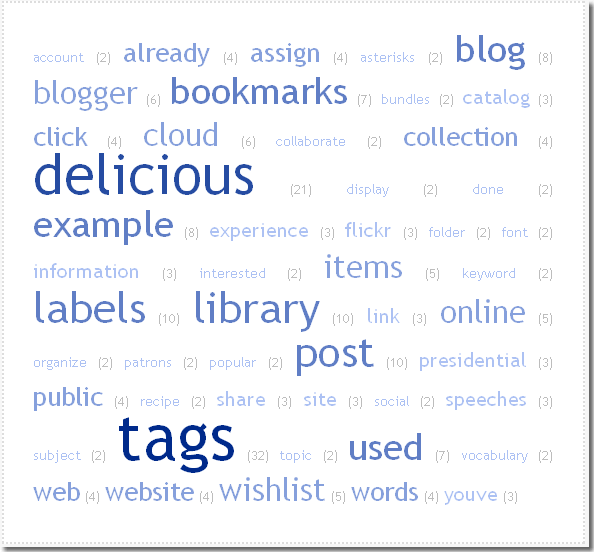
Printing taxonomy terms in a way where the print size of each tag depends on how many times that specific term has been tagged for a post is called a “tag cloud”. For that we will use the WP function wp_tag_cloud().