


Introduction
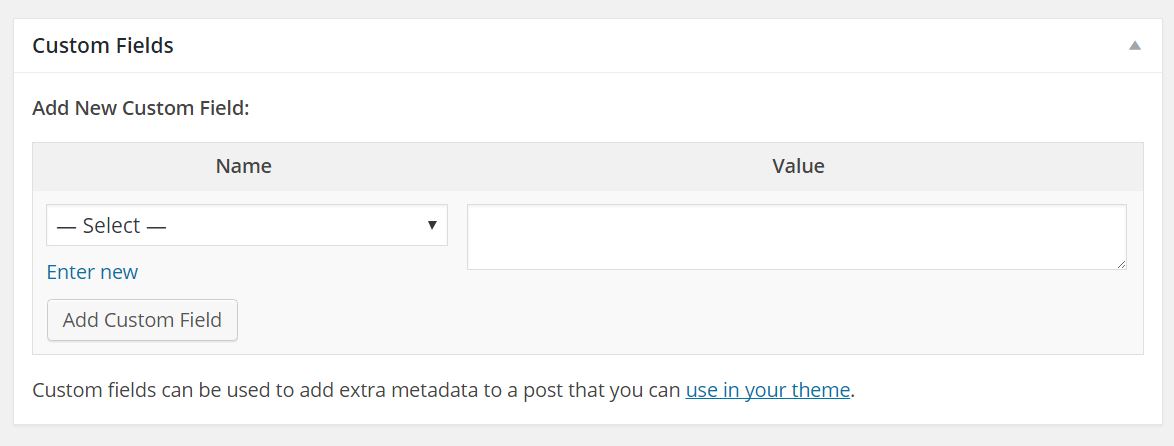
WordPress Custom fields allow the end user to enter some specific information without using the existing standard meta boxes (post title and post content). Custom Fields (Serb. special fields) are actually meta data (eng.meta data) but they are called fields because they look like fields in the wordpress admin interface.
In order for the “Custom Fields” meta-box to be available when editing a post, it is necessary to click on the Screen Options button in the upper right corner while on the post editing page and thus open the drop-down menu, where we check the Custom Fields option.
Custom Fields consists of two fields and forms a pair of so-called key/value. Key would be the data written in the “Name” field, and the value written in the “Value” field. After the “Name” and “Value” fields are filled in, click on the Add Custom Field button. It should be emphasized that it is allowed to submit several different custom fields with the same key. If the key has already been used, it will appear in the drop-down menu when we want to fill in the following custom fields. But if we don’t want the value “key” to appear in the drop-down menu for some future use, then the name should start with underscore _
Database
Post meta information is stored in the table “wp_postmeta”. That table consists of 4 fields:
- ‘meta_id’ – A unique id for each entry.
- ‘post_id’ – The ID of the post for this metadata.
- ‘meta_key’ – The name of the ‘key’.
- ‘meta_value’ – The value associated with the key.
Every time “add custom field” is clicked, the data is inserted into the database regardless of whether it will be used or not!
The cached data is a multidimensional array stored in the variable $post_meta_cache and looks similar to this code:
|
1 2 3 4 5 6 7 8 9 10 11 12 13 |
[ postid1 => [ key1 => [ val1, val2, ... ], key2 => [ val1, val2, ... ], ... ], postid2 => [ key1 => [ val1, val2, ... ], key2 => [ val1, val2, ... ], ... ], ... ] |
Add post meta()
If we are using standard custom fields without any special requirements, then we will not need the following commands, but if we are making a custom meta-box this function is necessary!
|
1 |
add_post_meta($post_id, $meta_key, $meta_value, $unique) |
Adds custom fields to a post of any post type. The parameters used are:
- $post_id – (integer) (required) The ID of the post to which a custom field should be added.
- $meta_key – (string) (required) The key of the custom field which should be added.
- $meta_value – (mixed) (required) The value of the custom field which should be added. If an array is given, it will be serialized into a string.
- $unique – (boolean) (optional) Whether or not you want the key to remain unique. When set to true, the custom field will not be added if the given key already exists among custom fields of the specified post.
example
In the following example, a new field is added if the key does not already exist or isdo update if there is:
|
1 2 3 |
<if ( ! add_post_meta( 7, 'fruit', 'banana', true ) ) { update_post_meta ( 7, 'fruit', 'banana' ); } |
Update_post_meta()
If we are using standard custom fields without any special requirements, then we will not need the following commands, but if we are making a custom meta-box this function is necessary!
|
1 |
update_post_meta($post_id, $meta_key, $meta_value, $prev_value) |
Updates the value of the Value field. The parameters used are:
- $post_id – (integer) (required) The ID of the post which contains the field you will edit.
- $meta_key -(string) (required) The key of the custom field you will edit. (this should be raw as opposed to sanitized for database queries)
- $meta_value – (mixed) (required) The new value of the custom field. A passed array will be serialized into a string. (this should be raw as opposed to sanitized for database queries)
- $prev_value – (mixed) (optional) The old value of the custom field you wish to change. This is to differentiate between several fields with the same key. If omitted, and there are multiple rows for this post and meta key, all meta values will be updated.
example no. 1
If in a post with ID=76 the key mood has the value ‘Sad’ and we want to update the value to ‘happy’.
|
1 |
update_post_meta( 76, 'raspolozenje', 'Srecan', 'Tuzan' ) |
example no. 2
In the following example, we use a custom field with the parameters key=’Price’ and value=’an integer that is the price of the product in dollars’. If we want to add a new post meta called discount for products whose price is over 400, then we will use the following custom function:
|
1 2 3 4 5 6 7 8 9 10 11 |
function add_discount_meta( $post_id ) { $price = get_post_meta($post_id, 'Price', true); if(strlen($price) > 0) { $discount = '0%'; if(intval(str_replace("$","",$price)) > 400 ) $discount = '15%'; update_post_meta( $post_id, 'Discount', $discount ); } } add_action( 'save_post', 'add_discount_meta' ); |
After we Update the page a new custom field will appear with key=’Discount’ and Value=15%.
NOTE:
The previous example does not use the add_post_meta() function. This is thanks to the feature of the update_post_meta() function, which in case there is no key with the value we passed, calls the add_post_meta() function itself.
example no. 3
In the following example, we save new fields in the custom meta box:
|
1 2 3 4 5 6 7 8 9 10 11 |
function save_meta_box_data( $post_id ) { // Make sure that it is set. if ( ! isset( $_POST['myplugin_new_field'] ) ) { return; } // Sanitize user input. $my_data = sanitize_text_field( $_POST['myplugin_new_field'] ); // Update the meta field in the database. update_post_meta( $post_id, '_my_meta_value_key', $my_data ); } add_action( 'save_post', 'save_meta_box_data' ); |
Delete_post_meta()
|
1 |
delete_post_meta($post_id, $meta_key, $meta_value) |
Deletes all Custom Fields with a specific key or value for a specific post. The parameters used are:
- $post_id – (integer) (required) The ID of the post from which you will delete a field.
- $meta_key – (string) (required) The key of the field you will delete.
- $meta_value – (mixed) (optional) The value of the field you will delete. This is used to differentiate between several fields with the same key. If left blank, all fields with the given key will be deleted.
Using database data
Using means collecting data that was entered into the database with the submission of “add custom fields”.
Across the array
Retrieving data from a wp_postmeta table is the same as retrieving data from a multidimensional array field. I will explain this procedure on the following example where it is necessary to collect all the data from some post no. 256 for the key “reading’:
|
1 |
$readinglist = $post_meta_cache[256]['reading']; |
We get an array of values corresponding to the fields [val1, val2, …]
the_meta()
This function lists and prints all meta data entered via custom fields and displays them as an unordered list:
|
1 2 3 4 5 |
<ul class='post-meta'> <li><span class='post-meta-key'>Key 1:</span> Value for Key 1</li> <li><span class='post-meta-key'>Key 2:</span> Value for Key 2</li> <li><span class='post-meta-key'>Key 3:</span> Value for Key 3</li> </ul> |
get_post_meta()
This function is much more flexible and returns a value only for a specific key.
|
1 |
get_post_meta($post_id, $key, $single); |
Where is:
- $post_id (int) – is the ID of the post in which the meta-data is entered in the custom fields.
At this point, use the following template tag get_the_ID() to get the dynamic ID within the WordPress Loop. We can also use the global variable and its parameter ID $post->ID in the loop. - $key (string) – is the text entered in the “key” field.
- $single – can be true or false.
- true (boolen) – returns a single value as a string
- false or if not defined – returns the string
The false option is used in the event that several different custom fields with the same key have been submitted, so the entire string should be listed. This is explained on the following example when several custom fields with the name songs have been entered.
1234567<?php $pesme = get_post_meta($post->ID, 'pesme', false); ?><h3>Ovaj post je pisan dok su se listened next pesme:</h3><ul><?php foreach($pesme as $song) {echo '<li>'.$song.'</li>';} ?></ul>
Examples of use:
If we want only specific custom fields to appear in the post, i.e. only with a specific key, then it is necessary to write an IF loop as in the following example:
|
1 2 3 4 5 6 7 8 9 10 |
//Provera da li postiji key pesme <?php $pesme = get_post_meta($post->ID, 'pesme', true); if ($pesme) { ?> They listened ste: <?php echo $pesme; ?> <?php } //Ako nema pesama popunjenih u custom filds-u else { ?> Niste listened to nikakvu muziku dok ste pisali post <?php } ?> |
Or to display a link only if it has Custom Fields filled with the key “link”
|
1 2 3 4 5 6 |
// Provera dali je popunjeno custom polje link <?php $link=get_post_meta($post->ID, 'facebook', true); if( $link != '' ) : ?> <a href="<?php echo $link; ?>"> link </a> <?php endif; ?> |
get_post_custom()
Returns a multidimensional array with all custom fields on that post or page.
|
1 |
get_post_custom($post_id) |
Where $post_id is the post number (integer). In the following example, it returns a post that has custom fields with the key “songs”
|
1 2 3 4 5 6 7 |
<?php $custom_fields = get_post_custom($post->ID); $my_custom_field = $custom_fields['pesme']; foreach ( $my_custom_field as $key => $value ) { echo $key . " => " . $value . "<br />"; } ?> |
get_post_custom_keys()
Returns all keys from custom fields used in one post.
get_post_custom_keys($post_id)
get_post_custom_values
Returns an array with all values of the specified key.
|
1 |
get_post_custom_values($key, $post_id) |
Where is:
$key – (string) key for the value we are looking for
post_id – optional number (integer) post ID
|
1 2 3 4 5 6 |
<?php $mykey_values = get_post_custom_values( 'pesme' ); foreach ( $mykey_values as $key => $value ) { echo "$key => $value" <br />; } ?> |
Custom fields as a condition
Custom fields can also be a condition for displaying posts in a loop. Then the custom messes up
for WP_Query can use parameters for Custom Fields:
- meta_key
- meta_value
- meta_value_num
- meta_compare
- meta_query
In the following example, only posts with the key “songs” are displayed
|
1 2 3 4 5 6 7 |
<?php $query = new WP_Query( array( 'meta_key' => 'pesme' ) ); if($query->have_posts()) : while($query->have_posts()) : $query->the_post() the_content() endwhile endif?> |